Get a Free WorkTrek Demo
Let's show you how WorkTrek can help you optimize your maintenance operation.
Try for freeThe days of tracking maintenance with spreadsheets and paper logs are finally gone.
Today, digitized systems handle the heavy lifting, helping companies across industries cut costs, minimize downtime, and extend the lifespan of their valuable assets.
However, this change presents a new challenge: selecting the right solution.
With so many options available, where do you even start?
That’s where this article comes in.
In it, we break down six top maintenance management solutions, exploring their strengths, weaknesses, and pricing, so you can confidently find the one that fits your needs.
WorkTrek
First, let’s talk about our solution, WorkTrek.
WorkTrek is a web-based maintenance management platform designed for plants, facilities, field service, and logistics teams.
It’s highly intuitive and easy to use while still offering all the features you need in such a solution:
| Work Order Management | Create, assign, track, and prioritize WOs from anywhere. Capture key details with customizable required fields |
| Work Request Management | Submit requests through multiple channels: app, email, or request portal. Automatically notify stakeholders of updates, and collect feedback once work is completed |
| Asset Management | Record and update all asset information, including physical location, performance history, warranties, maintenance logs, and costs |
| Inventory Management | Track parts using barcodes or QR codes to reduce manual entry. Receive low-stock alerts to avoid delays |
| Invoicing | Generate invoices from work orders in just a few clicks. Minimize errors by pulling accurate data directly from completed tasks |
| Analytics | Unlock insights into your business with reports, KPIs, metrics, and customizable dashboards |
Most importantly, WorkTrek automates preventive maintenance (PM) scheduling.
You can plan and set up recurring work orders, complete with SOPs, checklists, photos, and instructions.
These can be scheduled based on time (daily, monthly, etc.) or usage metrics such as mileage, hours, temperature, or pressure.
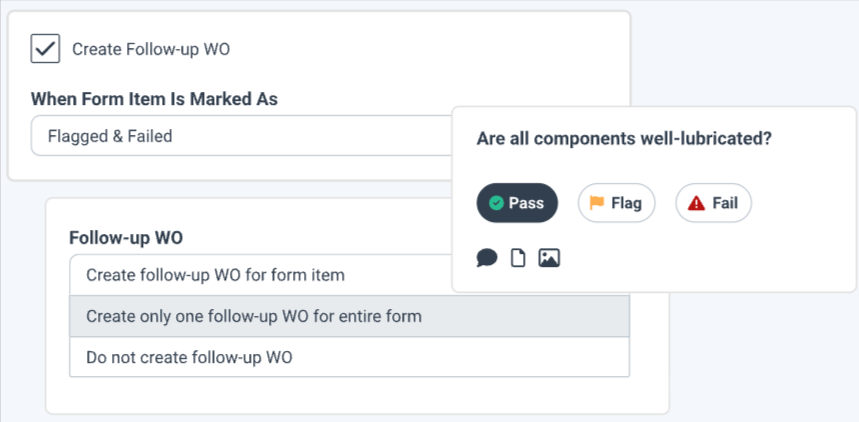
WorkTrek also automatically creates follow-up work orders after failed inspections, ensuring nothing gets overlooked and assets remain in top condition with minimal downtime.
We also provide a mobile app, available for both iOS and Android, which supports QR code scanning and includes an offline mode.
It’s ideal for teams on the move who still need to stay connected.
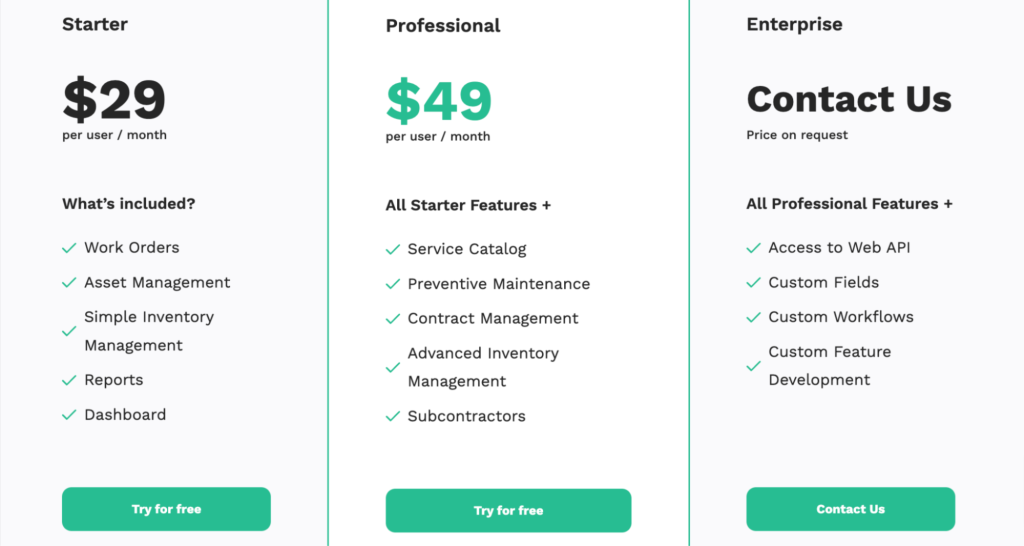
As for pricing, we offer three plans starting at just $29 per user/month.
All plans include unlimited guest requests and a mobile application.
All in all, if you’re a small to mid-sized business seeking a straightforward, powerful system with excellent customer support, WorkTrek may be the perfect fit.
To see it in action before making any decisions, visit our website to book a demo or start a free trial.
Cryotos
Cryotos is an AI-powered, cloud-based maintenance management system with a robust set of features:
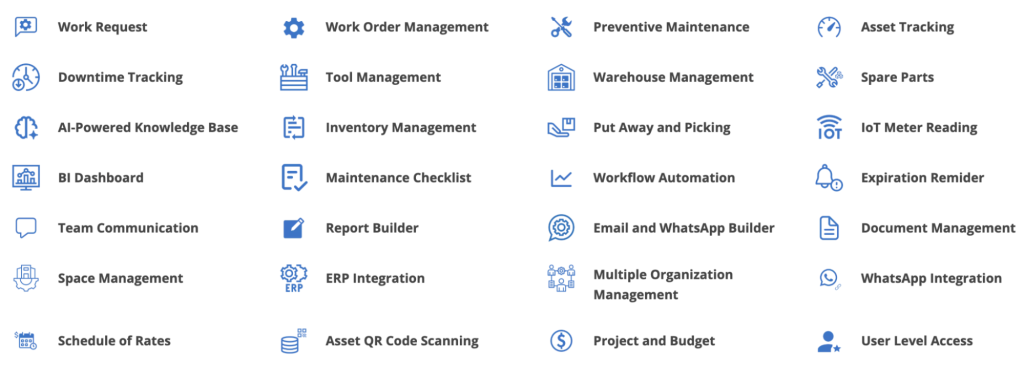
Much like WorkTrek, it includes essentials such as WO management, preventive maintenance, reporting, and inventory management, but its AI capabilities take some of these a step further.
More specifically, Cryotos offers an AI-powered knowledge base that ingests information from SOPs, manuals, safety guidelines, and more, allowing workers to ask questions at any time.
For example, within a work order, technicians can request troubleshooting guidance, safety procedures, diagrams, or even video tutorials and receive instant answers.

They could enter natural language queries like, “Show me the top five assets with the most work requests,” and immediately get charts or tables in response.
Additionally, Cryotos integrates with IoT devices and sensors to enable predictive maintenance.
However, note that they don’t sell hardware, so you’ll need to purchase sensors separately if you’re only getting started with PdM.
Cryotos also includes a mobile app with offline mode, making it convenient for teams in the field.
When it comes to pricing, they offer four plans, starting at $29 per user/month.
However, unlike WorkTrek’s entry plan, Cryotos’ basic tier doesn’t include reports, asset management, inventory management, or offline app access.
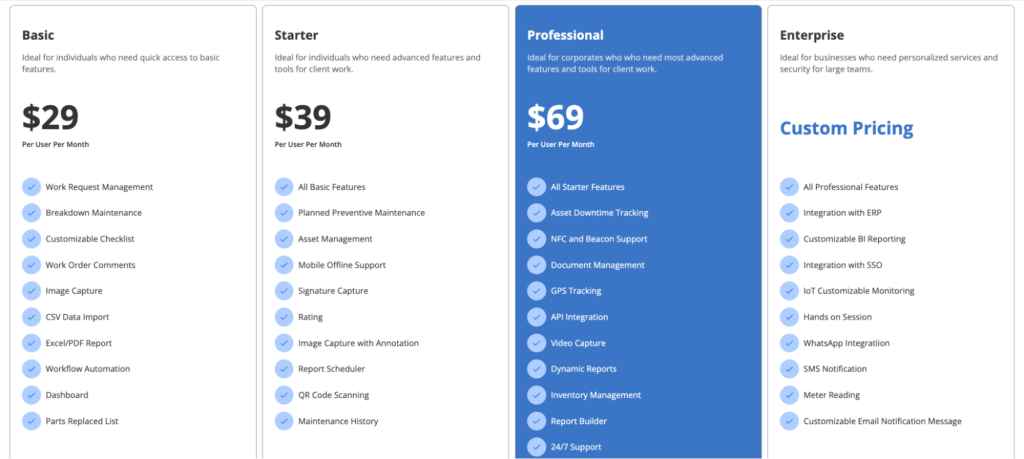
Overall, Cryotos is more feature-rich than many tools in this category, which can be a double-edged sword.
On one hand, it offers extensive capabilities that suit companies with complex maintenance needs or those that want to explore predictive maintenance.
On the other hand, the wide range of capabilities can feel overwhelming, especially for less tech-savvy users.
In fact, some online reviews mention that features like reporting and inventory management can be overly complex.
Fortunately, you don’t need to make a decision right away. Instead, you can explore Cryotos yourself with a 14-day free trial or product tour.
Fabrico
Fabrico is a web-based maintenance management software designed by technicians, for technicians.
It offers:
- Preventive maintenance
- Analytics and reporting
- Work order management
- Inventory management
- QR-code scanning support
One standout feature is their OEE (Overall Equipment Effectiveness) module, which helps manufacturers understand operations by tracking asset availability and performance in real time.
Essentially, Fabrico integrates with PLCs, data centers, or IoT devices to capture critical production signals.
This data flows directly into the platform, where it’s consolidated, analyzed, and visualized in real time, giving manufacturers instant visibility across production lines.
You can detect micro-stoppages, speed losses, and quality drifts, as well as compare OEE across lines, shifts, and plants.
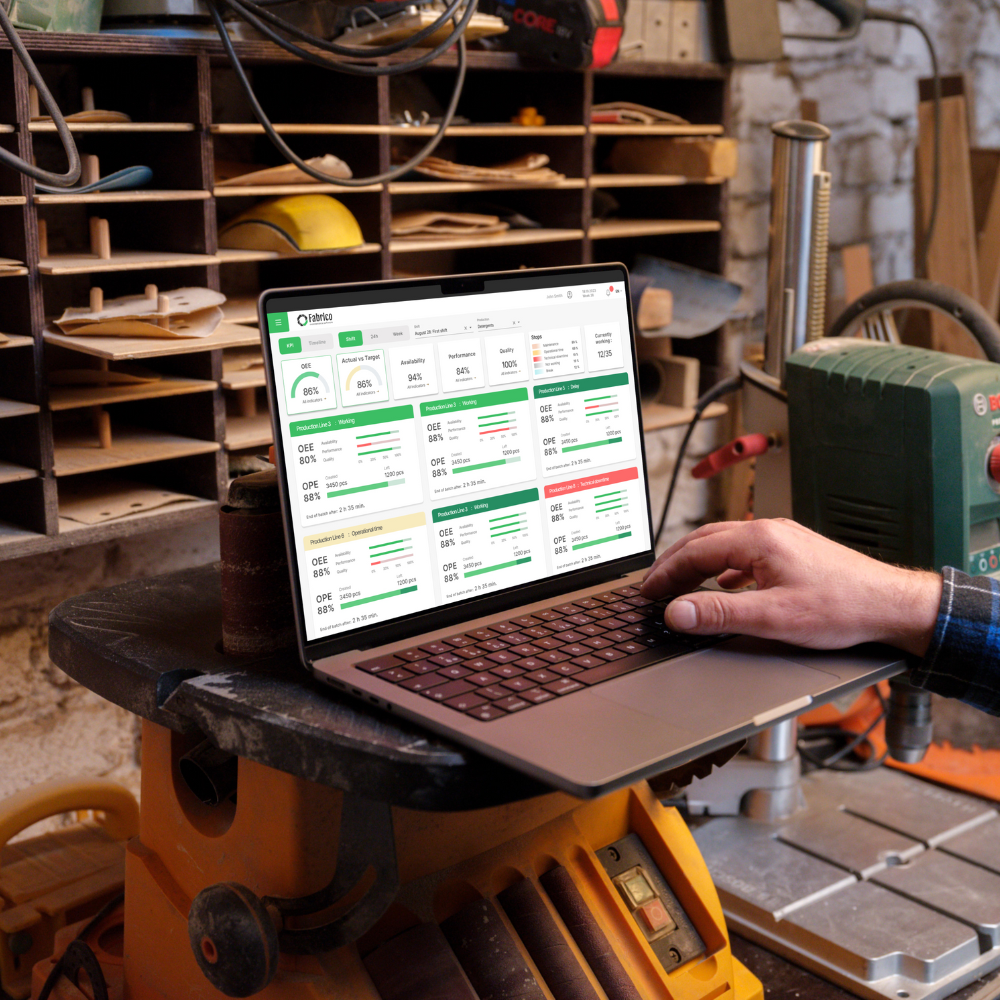
You can even see how equipment health affects availability, so you can plan proactive interventions that reduce downtime.
Fabrico also provides a mobile app, though unlike Cryotos and WorkTrek, it doesn’t appear to include offline mode.
In fact, some users have noted issues with the app when the internet connection is weak.
Now, let’s talk pricing.
Fabrico offers four plans, including one completely free tier.
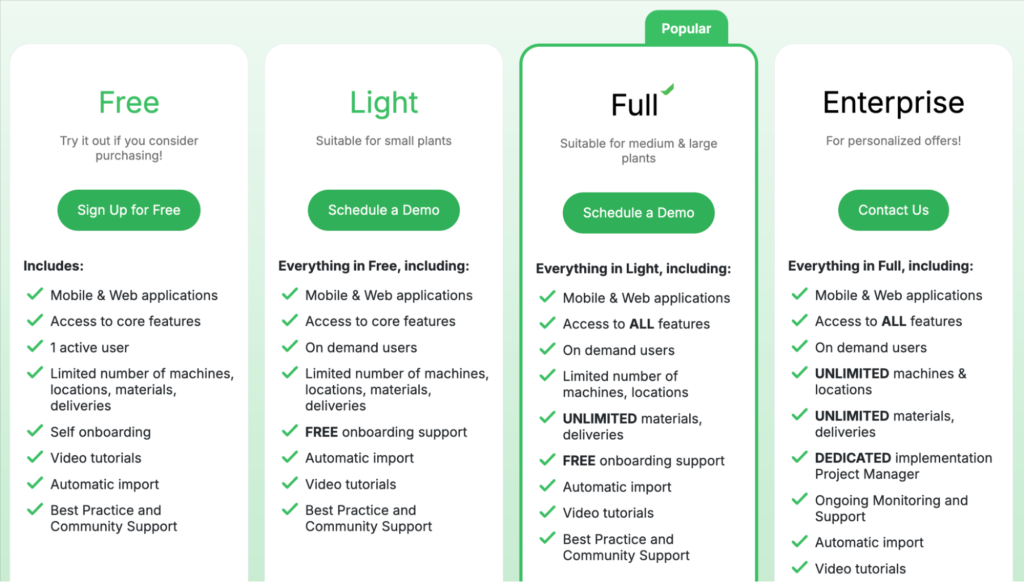
While this entry-level option is great for trying the system out, it comes with limited features.
For the paid tiers, pricing isn’t publicly listed, which means you’ll need to contact the company directly.
Ultimately, Fabrico is tailored primarily for manufacturing.
If you’re in another sector, you may want to consider different solutions from this list.
But if you’re a manufacturer looking for an efficient solution that’s not too overwhelming, Fabrico might be the right choice for you.
You can visit their website to schedule a demo and learn more about the product.
Accruent Maintenance Connection
Accruent Maintenance Connection is a cloud-based CMMS and part of the broader Accruent suite.
It includes all the core maintenance management essentials, such as:
- Work order management
- Reporting
- Asset and inventory management
- Preventive maintenance
- Labor management
Its reporting capabilities are particularly strong.
The platform offers more than 360 pre-built reports, all of which can be customized, copied, and configured to fit your company’s needs.
You can adjust style, format, and layout, as well as schedule reports in various ways to deliver the most relevant information to stakeholders.
Additionally, the solution offers Smart Elements, which enable dynamic data searches.
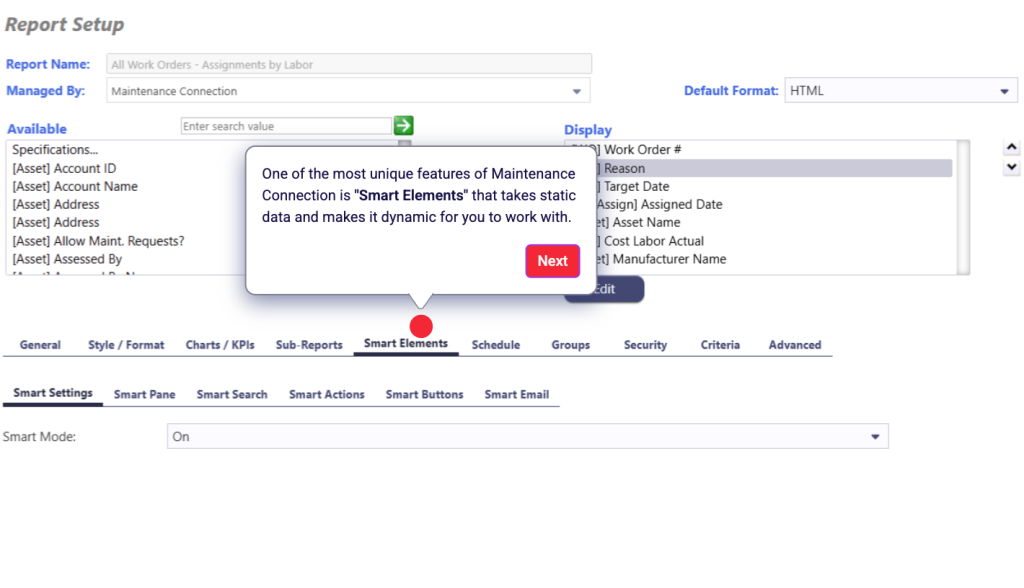
For organizations with years of records, this can save hours of frustration and put the right information at your fingertips instantly.
Maintenance Connection also includes a mobile app with offline support and barcode/QR code scanning, just like WorkTrek and Cryotos.
When it comes to pricing, this platform is on the higher end compared to some other solutions on this list.
The base cost is $110 per user/month, plus another $58 per user/month for mobile access.
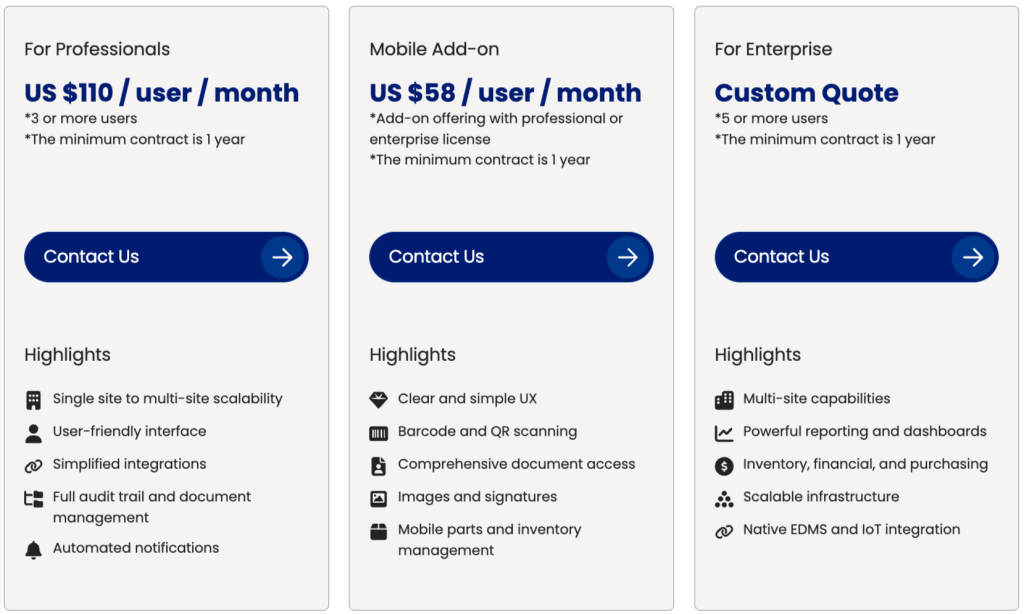
Costs rise even further if you add modules such as IoT remote monitoring or document management.
While this level of robustness allows organizations to build powerful maintenance systems, it may be excessive or too costly for teams that don’t require such depth.
In fact, some reviews note that the platform can be overwhelming without a dedicated administrator to manage it.
That said, for larger organizations that need highly detailed maintenance data and have the resources to properly train their teams, Maintenance Connection can be an excellent choice.
To see it in action, visit their website to request a free trial or a demo.
Maintenance Care
Maintenance Care is a web-based maintenance management solution primarily designed for facilities management.
It includes all the essentials you’d expect:
- Work orders
- Preventive maintenance
- Asset and inventory tracking
- Reporting
- IoT integration
The platform is also moving toward AI capabilities, similar to Cryotos, with features like AI Image-to-Requests, AI How-To Suggestions, and more coming soon.
Beyond the basics, Maintenance Care also offers some more advanced tools.
For instance, Virtual Spaces allow remote access to your facilities as if you were on-site, from any location or device.
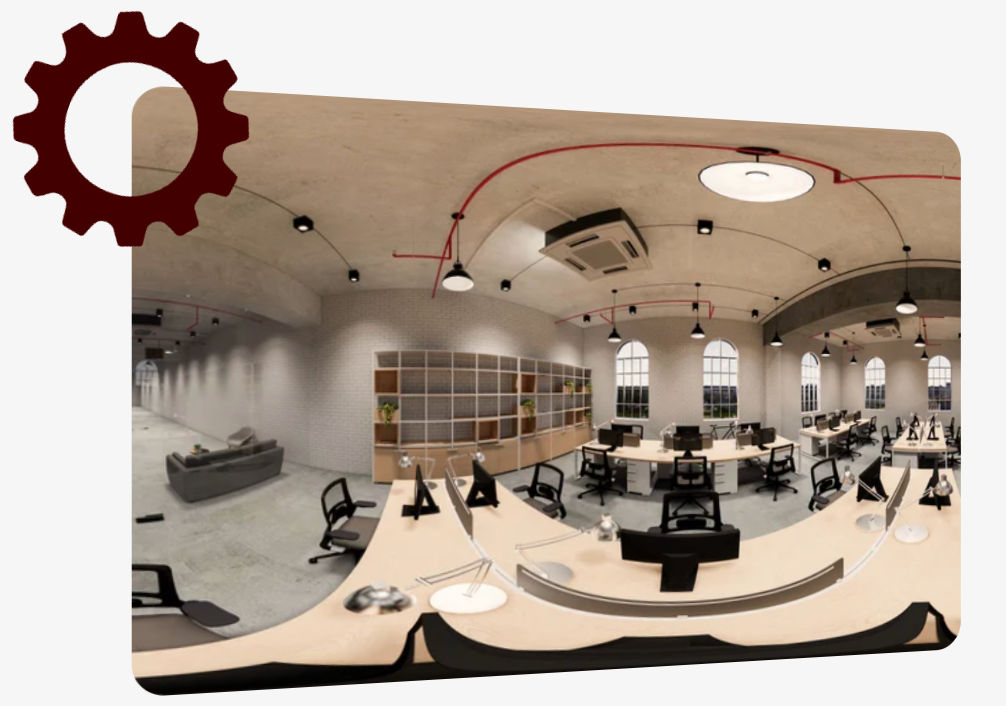
Their 3D-mapping camera gives a “behind-the-wall” view of electrical circuits, hidden plumbing, and HVAC vents.
You can even tag equipment in these virtual renderings and link them directly in the CMMS, modernizing your asset management and improving system knowledge.
Keep in mind, however, that most of these advanced features are only available to Enterprise-level users with Asset Management capabilities.
Maintenance Care also includes a mobile app, but it does not offer offline mode, which may be a limitation for teams working in remote areas or locations with unreliable internet connections.
Pricing comes in three plans, including a completely free option. The lowest-paid plan starts at $225 per month.
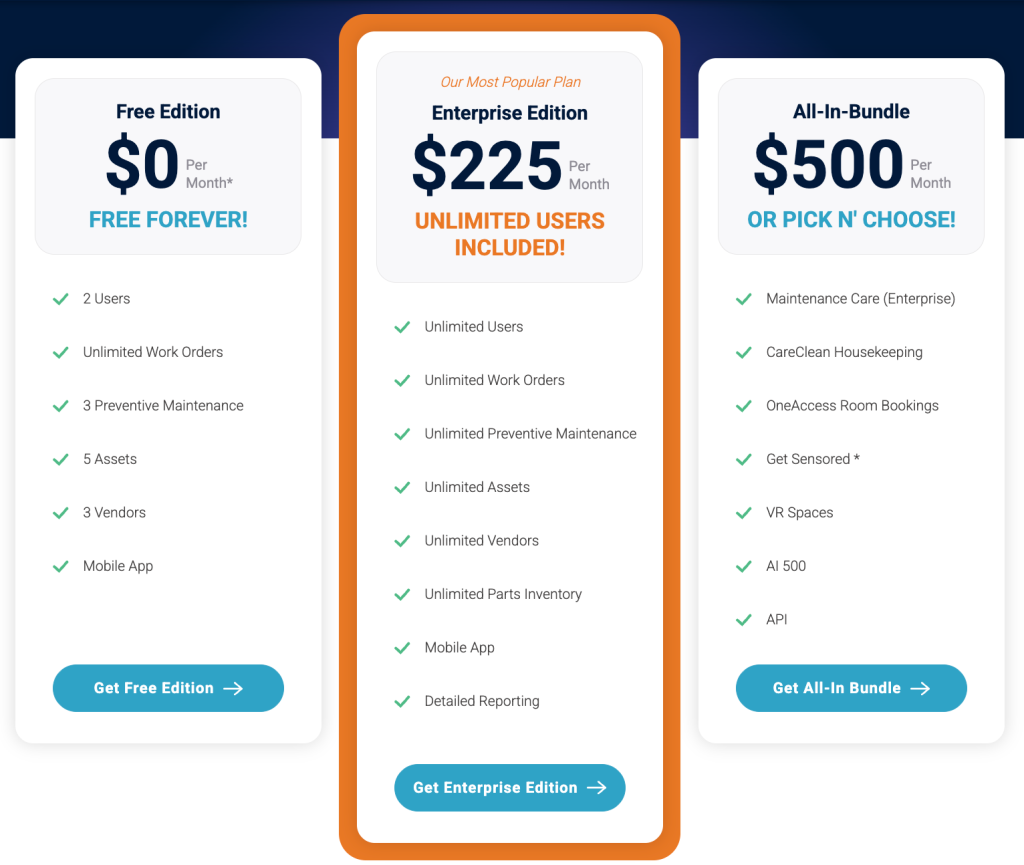
Be careful when selecting a plan, though, as some advanced features are only available in bundled packages.
Like Accruent, Maintenance Care is modular, which means you can choose a basic setup with just the essentials or expand to include advanced capabilities.
This flexibility is a plus, but costs can add up quickly.
Overall, users appreciate its user-friendly interface, though some report that certain features can feel overwhelming at first.
If Maintenance Care seems like a fit for your team, head to their website to request a free demo and explore the platform before making a decision.
Coast
Coast is a mobile-first CMMS that provides essential maintenance management tools, including:
- Work Order Management
- Asset Management
- Preventive Maintenance Scheduling
- Inventory Tracking
- Maintenance Reports
- Checklists
Where Coast really shines is in labor scheduling.
You can build schedules in minutes, and technicians are automatically notified of upcoming shifts.
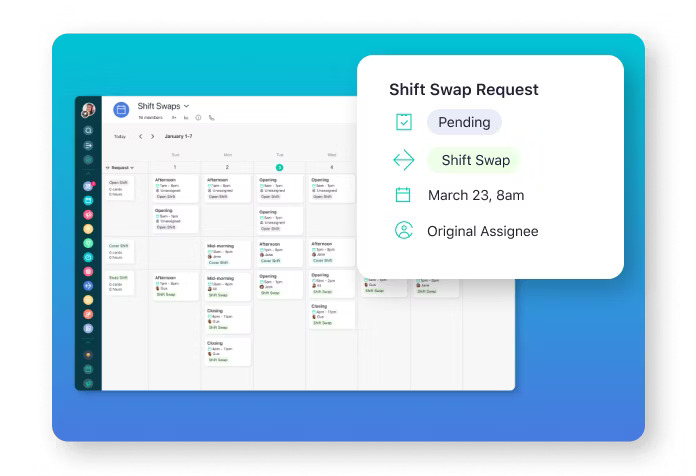
Shift swaps are handled seamlessly, too.
Employees can find replacements themselves, while managers receive approval requests, and staff are automatically updated on any changes.
Coast also includes a Time Clock, providing clear visibility into hours worked, attendance, and overtime, ultimately increasing accountability among technicians.
For instance, if an inspection is missed, it’s easier to pinpoint who’s responsible.
The mobile app supports QR code scanning, though it does not include offline mode.
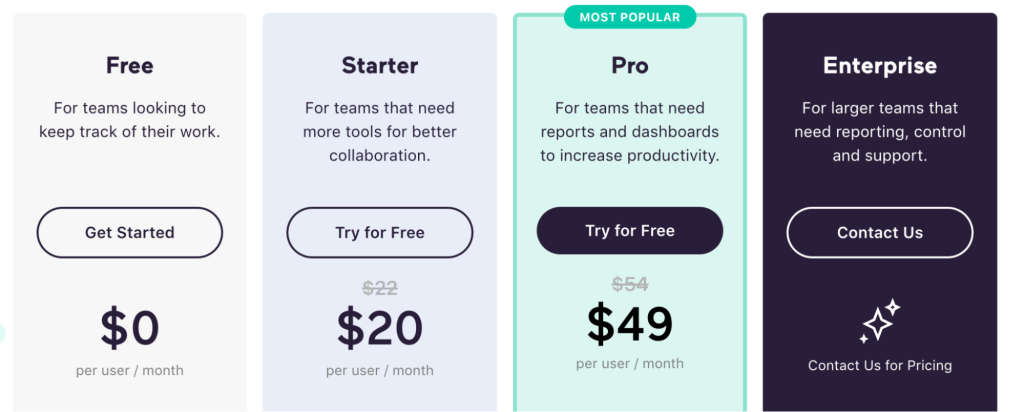
Pricing is split between two workflows, Premium and Basic, each offering three plans, including a free option.
Coast is one of the most affordable CMMS solutions on this list, though reviews suggest that this comes with trade-offs.
Users say features are somewhat limited, and customization is more restricted compared to other tools, making it less suitable for complex operations or workflows.
That said, Coast might be an option worth considering for smaller teams with tight budgets or organizations operating across multiple locations that want a solution focused on improved communication and task visibility.
You can explore the platform with a free 7-day trial or schedule a demo on their website to learn more.
Conclusion
Each software on this list has its own strengths, weaknesses, and ideal use cases.
The right choice will ultimately depend on your needs, budget, workflows, and preferred deployment method.
Make sure to compare these tools against those factors.
And don’t forget: trials and demos exist for a reason.
Take full advantage of them to see how each platform feels in action and get your team’s opinion.
That’s the surest way to discover the best match for you.