Get a Free WorkTrek Demo
Let's show you how WorkTrek can help you optimize your maintenance operation.
Try for freeKey Takeaways:
- New hires spend up to 30h a week asking for help when unique knowledge isn’t shared.
- The lack of or incomplete LOTO procedures is one of the most frequently cited OSHA violations.
- 60% of employees report difficulty accessing information at work.
Proper process documentation isn’t always the top priority in maintenance operations.
That’s understandable. There are countless other pressing concerns, from minimizing costly unplanned downtime and ensuring equipment reliability to reducing safety incidents.
What many don’t realize, however, is that effective documentation can actually support all of these goals.
If done correctly, that is.
That’s why, in this article, we’ll share six best practices for documenting maintenance processes and explain why they matter.
These strategies are straightforward and fairly easy to implement, yet can significantly improve your overall operations.
Standardize the Structure
First and foremost, it’s important for every maintenance document to follow the same repeatable layout, regardless of the task or activity.
Sections, headings, and the overall sequence of information should all be consistent so that anyone opening the document immediately knows where to find what they are looking for.
This leads to more efficient execution and, just as importantly, safer work for everyone involved.
Therefore, before documenting any processes, define a single, standardized template for all future documents.
Most maintenance SOPs typically include the following core sections, in this order:
- Scope & Purpose
- Safety Requirements
- Tools, Materials, and Parts
- Step-by-Step Procedure
- Visual References
- Troubleshooting / Notes
- Completion Checklist
- Revision History
This structure presents information in a logical, easy-to-follow way without overwhelming the reader.
That’s why so many maintenance professionals prefer it.
Take, for example, the preventive maintenance SOP used by the Water and Sewerage Company Inc. (WASCO), an African utility company.
The document follows this exact format, clearly outlining responsibilities, purpose, and scope, step-by-step instructions, and even a flowchart of the full workflow for easier understanding.
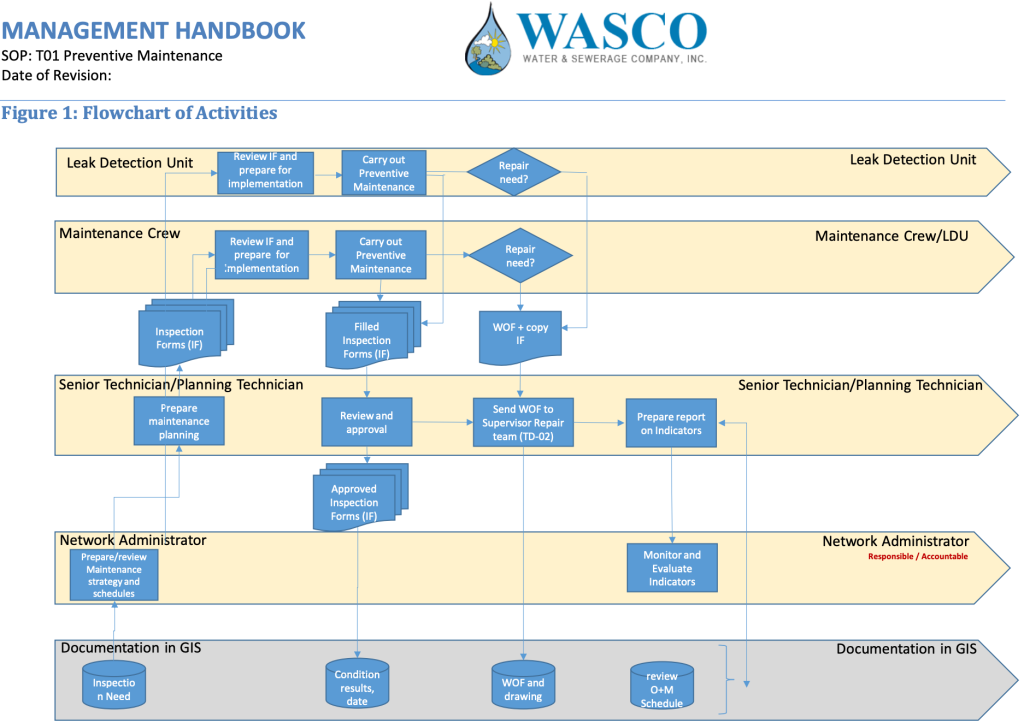
They also include a list of abbreviations used throughout the document, such as Work Order Form (WOF), Inspection Form (IF), or Leak Detection Unit (LDU).
While WASCO places this list at the end, some prefer to put it at the beginning to help readers better understand the content from the start.
Ultimately, the exact sections, their number, and their order are up to you and should reflect what makes the most sense for your team.
The bottom line is this: standardized maintenance documentation is effective documentation.
It’s easier to create, read, implement, learn from, and use for onboarding, making everyone’s job that much smoother.
Capture Tribal Knowledge
Tribal knowledge is the unwritten, experience-based know-how that lives in the heads of your most experienced technicians and operators.
This information is incredibly valuable. You won’t find it anywhere else, yet it often keeps everything running smoothly.
That’s why failing to capture it before those workers leave can be a huge missed opportunity.
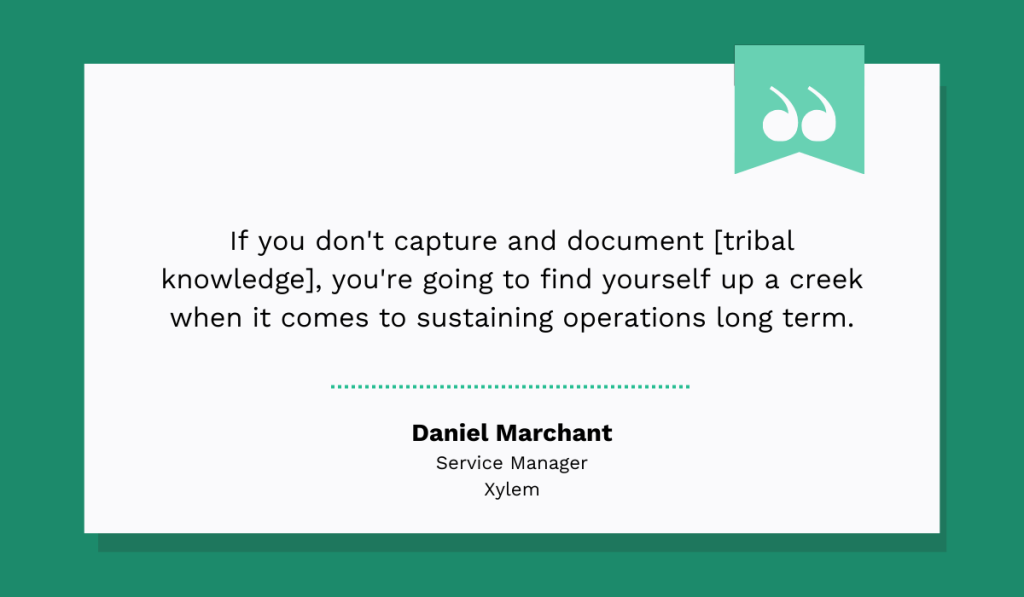
Daniel Marchant, Service Manager at Xylem, a large American water technology provider, agrees:
If you think this doesn’t apply to your company, or that capturing this knowledge isn’t worth the effort, take a look at research from Panopto, which suggests otherwise.
According to it, nearly half of employee knowledge is unique, meaning no one else in the company has it.
When that knowledge isn’t shared, the research shows, new hires waste hours upon hours every week asking for help.
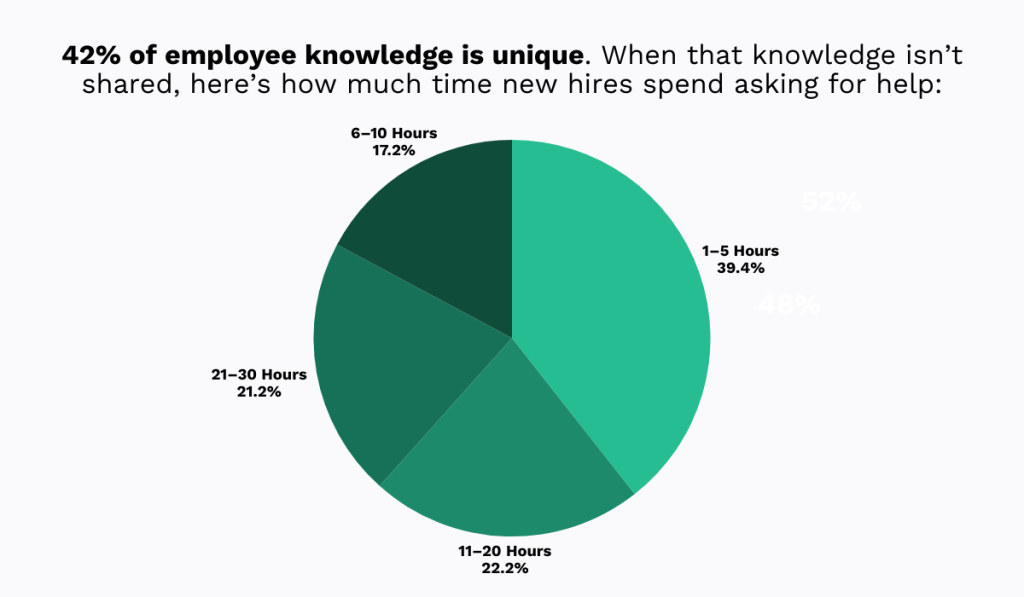
Naturally, the situation becomes even worse when experienced workers retire, leaving no one to ask for help in the first place.
So, try to intentionally capture this knowledge before it’s too late.
Start with structured, formal interviews designed to extract specific insights across all critical systems.
Create an equipment inventory organized by system, such as HVAC, electrical, plumbing, and so on.
Then, for each major system or piece of equipment, schedule focused interview sessions with experienced technicians using a consistent framework:
| Equipment overview | Ask the technician to describe the asset, its function, and its role within the operations |
| Common issues and solutions | What problems occur regularly? How are they diagnosed, and what solutions work best? |
| Equipment quirks | How does this machine behave differently than expected? What advice would you give someone working on it for the first time? |
| Maintenance tips | Which tasks are vital? Which can be skipped? What non-standard maintenance practices have been added based on experience? |
| Seasonal or operational considerations | Does this equipment require special attention during certain times of the year or under specific operating conditions? |
Most importantly, try to frame these interviews not as interrogations but as a way to honor hard-earned expertise and pass it on to the next generation.
In the end, many retiring technicians are deeply invested in their facilities and genuinely want to share what they know.
These interviews will give them the opportunity to do just that.
Put Safety Front and Center
Maintenance work can be dangerous.
That’s why safety information must be especially clear and highly visible when documenting procedures.
When these critical safety details are hard to find, technicians are unlikely to look for them, putting themselves, their colleagues, equipment, and overall operational stability at risk.
Take lockout/tagout (LOTO) procedures, for example.
They make all the difference when it comes to safety, says Paula Dixon-Roderick, Area Director at OSHA:
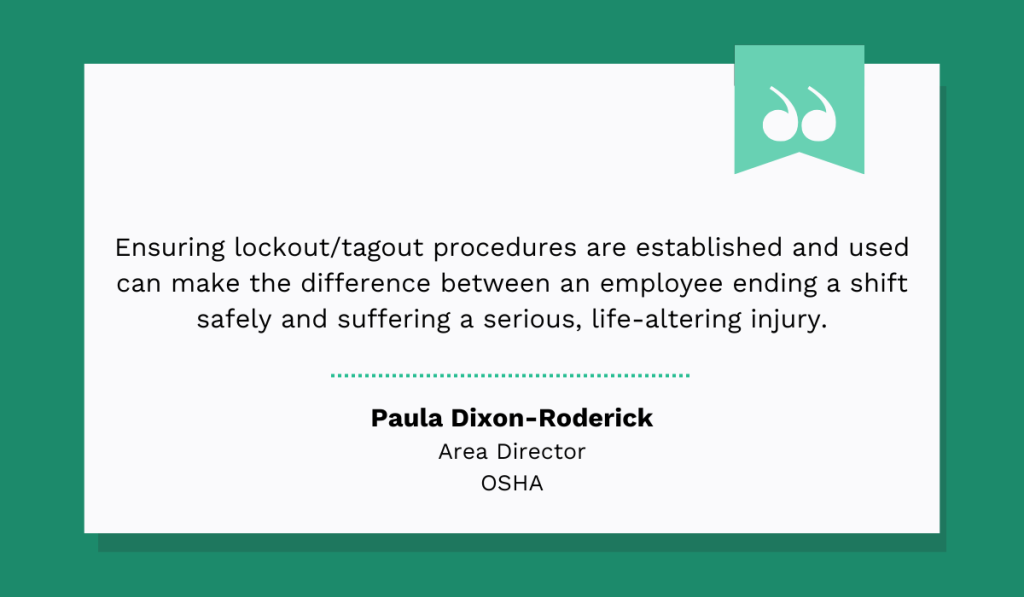
Yet, the absence of or incomplete LOTO procedures is still one of the most frequently cited OSHA violations, year after year.
So, to protect your workers and avoid hefty fines, ensure safety rules are embedded directly into your documents, clearly structured, and easy to locate.
Use visual cues such as bold text, highlights, or warning icons to draw attention to the most important steps and hazards.
You can take some inspiration from Workhorse Staffing, an award-winning specialist recruitment agency based in Australia that focuses on technical trades, engineering, and manufacturing.
Their SOPs clearly outline PPE requirements, define who is authorized to perform LOTO procedures, explain what needs to be done, and how to do it step by step.
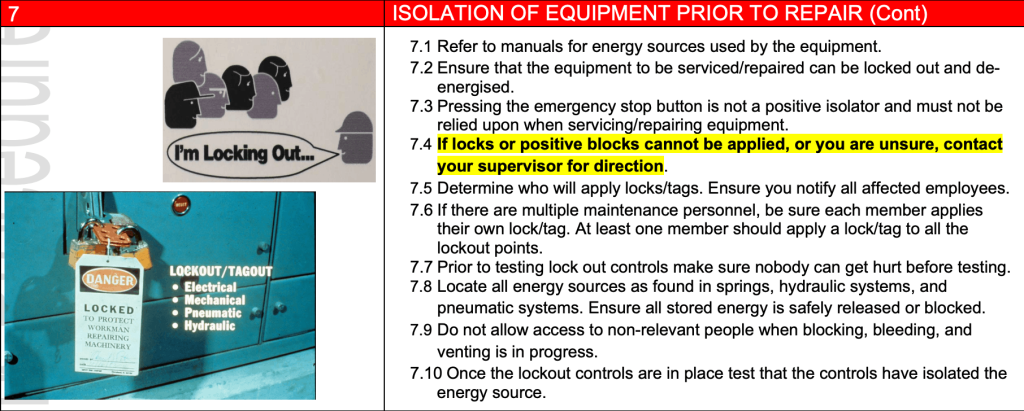
They also describe what to do if any issues arise, and visually emphasize the most critical information.
Safety is unmistakably the top priority here.
Additionally, if you’re using a CMMS solution, you can often embed safety documentation directly into work orders.
This further increases compliance, since technicians don’t need to search for safety information.
It’s already there alongside the task, listing required PPE, hazard warnings, and relevant procedures.
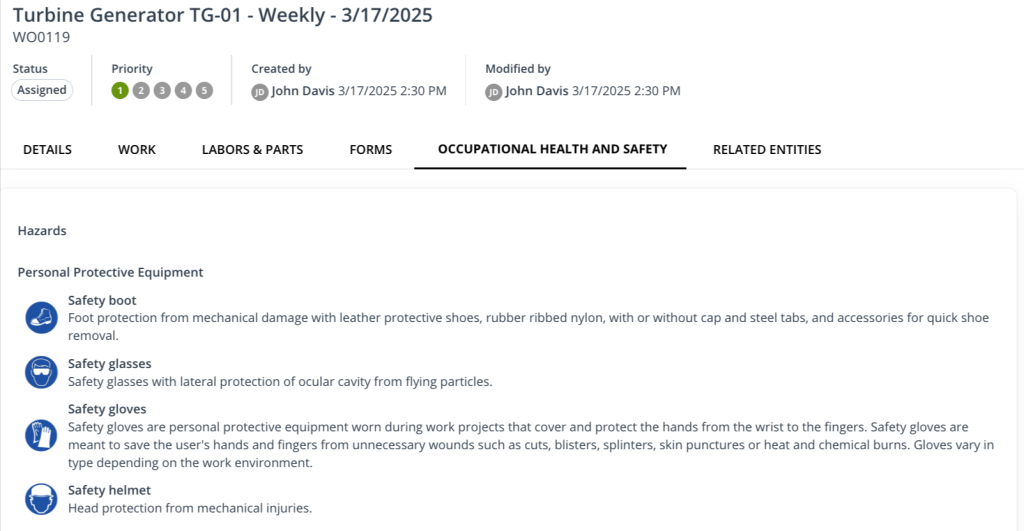
The faster and easier it is to access this information, the safer the work becomes for everyone involved.
Use Visuals Wherever Possible
Wherever possible, avoid relying on text alone to explain a process.
Maintenance work often takes place in tight spaces, poor lighting, under time pressure, and in noisy environments.
In these conditions, visuals can significantly reduce interpretation errors and help ensure safe and efficient task execution.
They also help technicians retain information more quickly overall.
University of Edinburgh professor of psychology Robert Logie explains:
“When you’re learning, you’re developing these networks and forming associations between bits of information. Images are much richer in information than language, […]. So with images, you’re actually growing more connections as you learn.”
When it comes to the types of visuals you can use, there are plenty of options.
The most valuable are usually photographs, as they depict the real equipment at your premises.
An example of this can be seen in the SOP below from Johnson Controls, a global leader in HVAC, security, and building automation systems:
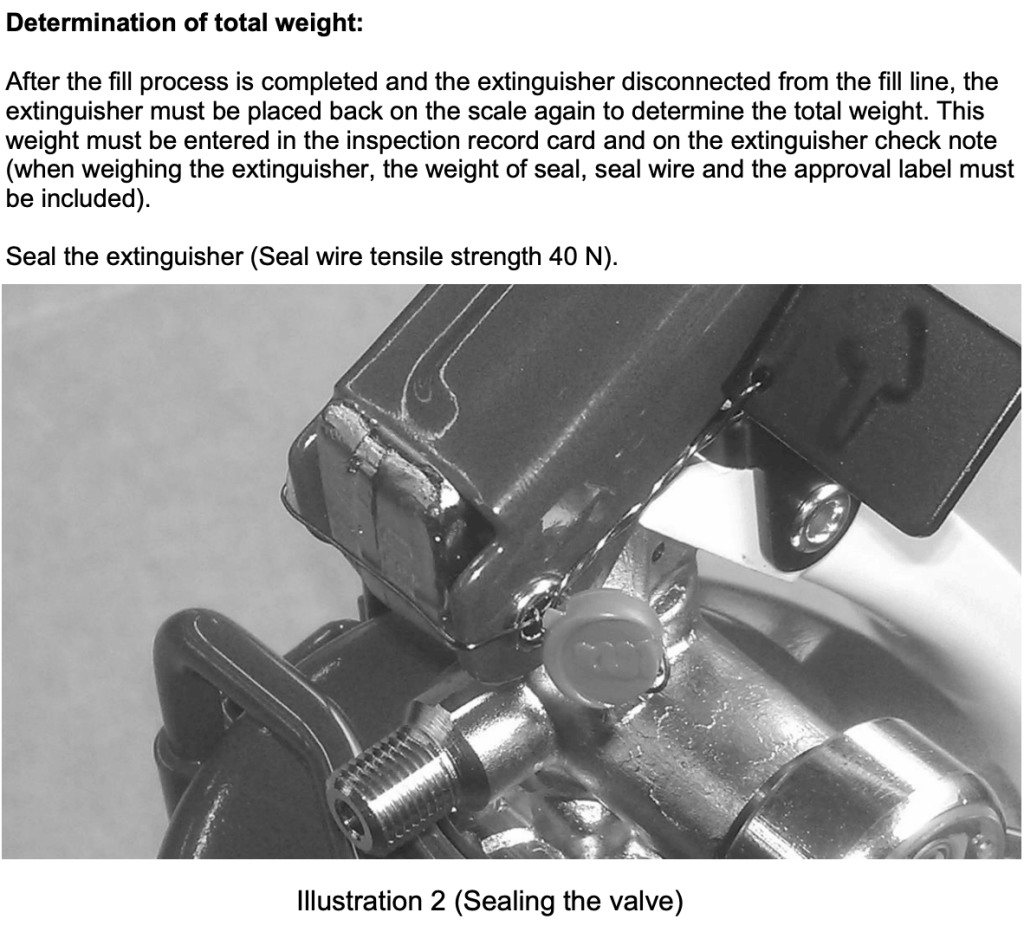
Please note that, though the photo shown is in black and white, it would ideally be in color to convey information more clearly.
Whenever possible, take photos yourself at the site.
After all, the goal here is to show the exact equipment that maintenance personnel interact with on a daily basis.
That said, you can also include images from OEM manuals or similar documentation, as shown in the example below:
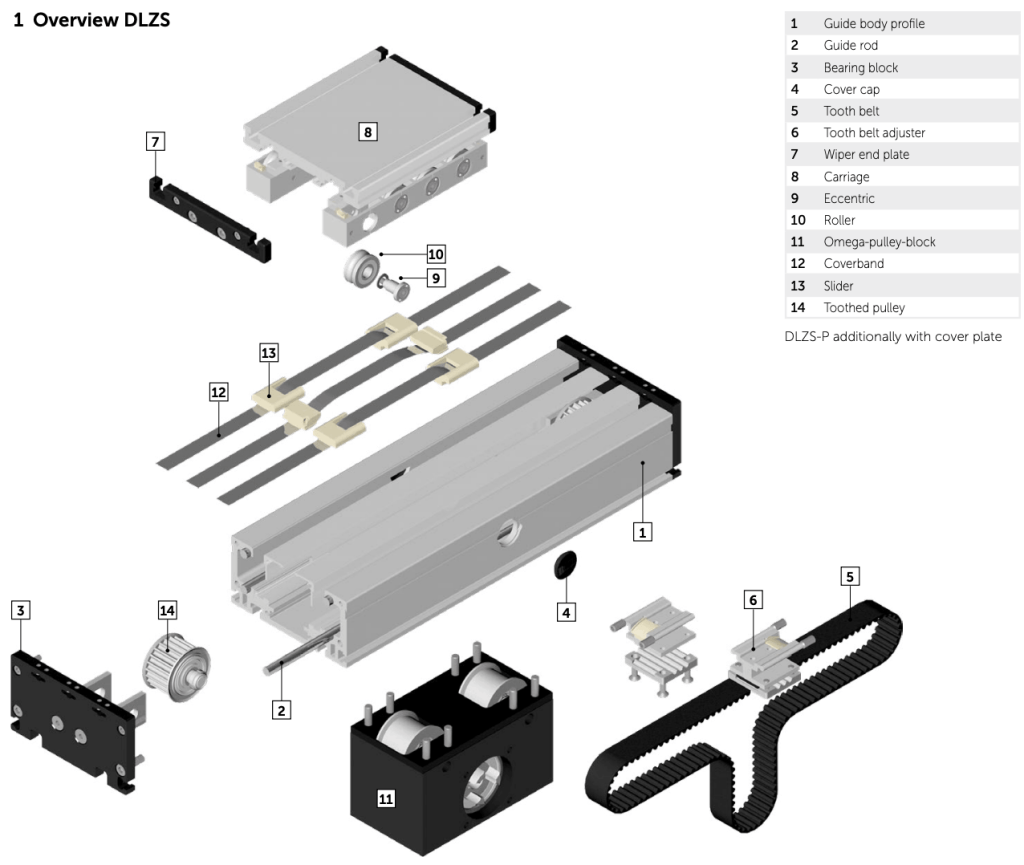
These are especially useful for explaining how specific components work, identifying parts, highlighting safety symbols, or describing procedures such as lubrication.
In addition to photos, you may also want to include step-by-step visual sequences, correct-versus-incorrect examples, and diagrams or schematics.
Diagrams and schematics, like the one shown below, are particularly effective for explaining relationships and process flow.
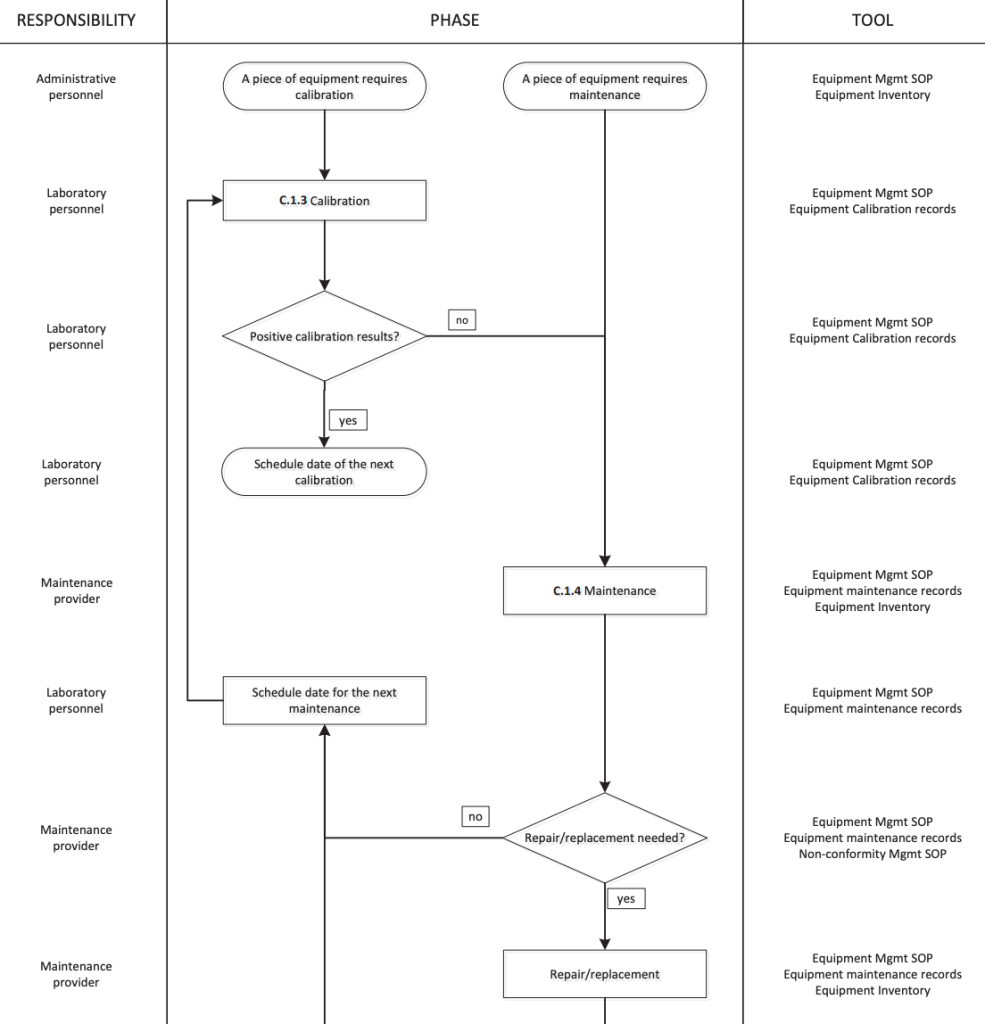
Overall, visuals play a significant role in ensuring procedures are followed correctly, information is clearly understood, and knowledge is retained.
Give them a try, and see how much of a difference they can make.
Make It Easy to Find and Use
Even the best-written documents are useless if they take too long to find.
A simple rule of thumb is this: if a technician would rather ask a coworker than search the records, there is some room for improvement.
Panopto research we referenced earlier confirms that the inability to find important information significantly harms productivity.
It reveals that more than half of employees report difficulty accessing information at work, and when that happens, they feel frustrated, overwhelmed, lost, and confused.
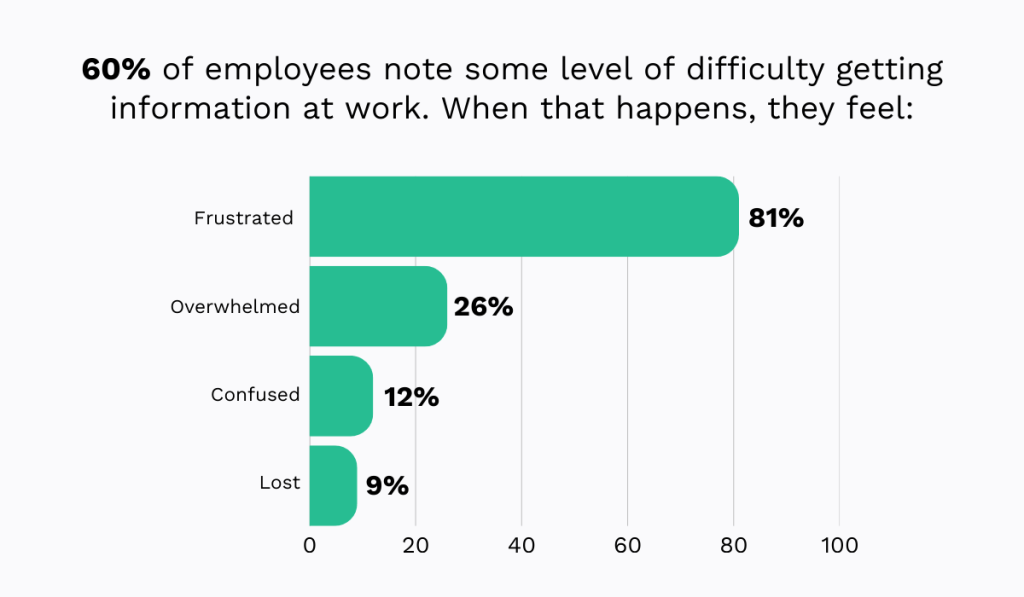
Those aren’t the emotions of someone who can perform their job effectively.
The good news is that the problem is relatively easy to fix by digitizing your documentation and storing it in a single, easily searchable location.
CMMS solutions like WorkTrek are especially effective here.
WorkTrek is specifically designed to act as a central hub for everything maintenance-related, including work orders and requests, invoices, reports, asset profiles, spare parts, and more.
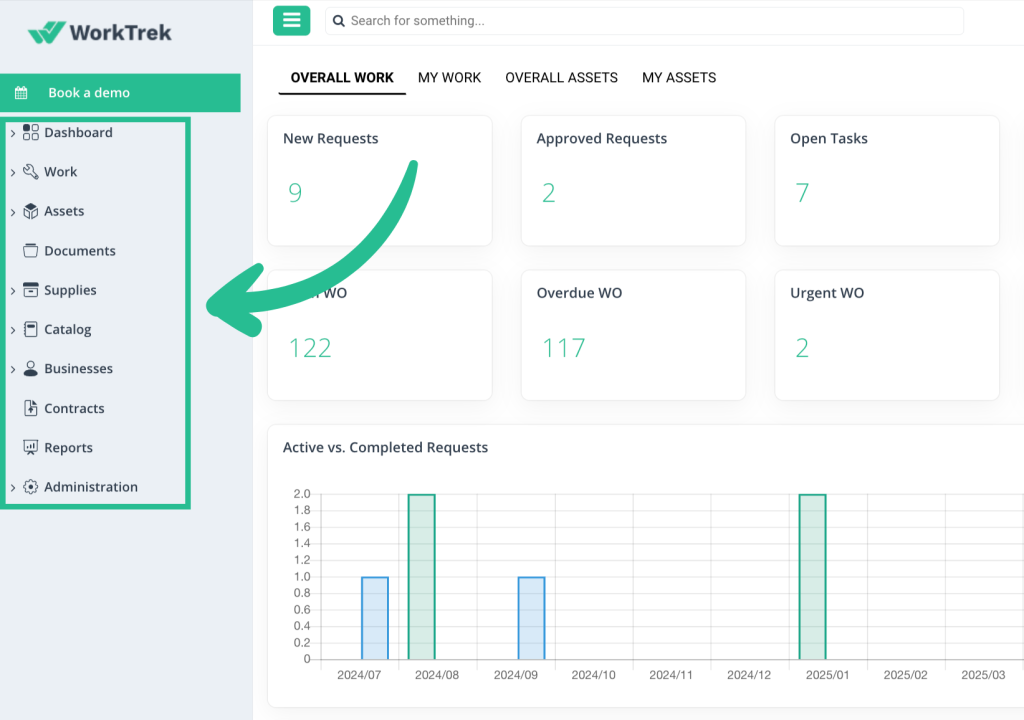
In short, all operational knowledge, including process and safety documentation, becomes available right at your fingertips.
With mobile access, WorkTrek can be used anytime and anywhere, even offline.
As such, it completely eliminates the need for unnecessary trips to the office, calling around for important information, and combing through mountains of scattered paperwork.
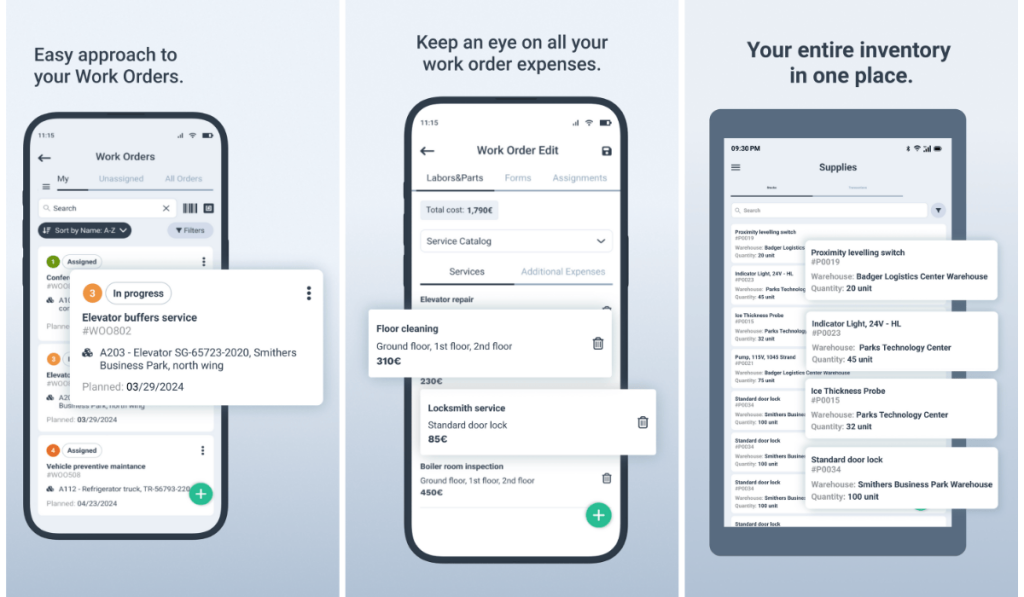
This makes it ideal for field technicians who are constantly on the move.
At the same time, supervisors and managers can track progress, update information, schedule work, receive notifications, and bill customers, all within the same system and in real time.
It doesn’t get much easier or more efficient than that.
Review Regularly
Your maintenance SOPs should be living documents that evolve with the company’s needs, goals, and priorities.
If you ignore changes in your operations, such as equipment upgrades or evolving safety risks, your process documents become obsolete.
And outdated information can be worse than no information at all, leading workers to perform tasks incorrectly and potentially lose trust in your documentation over time.
That’s why many companies often embed version control directly into their SOPs.
For example, Efteon, a South African research infrastructure monitoring terrestrial and freshwater ecosystems, includes a dedicated section for document control:
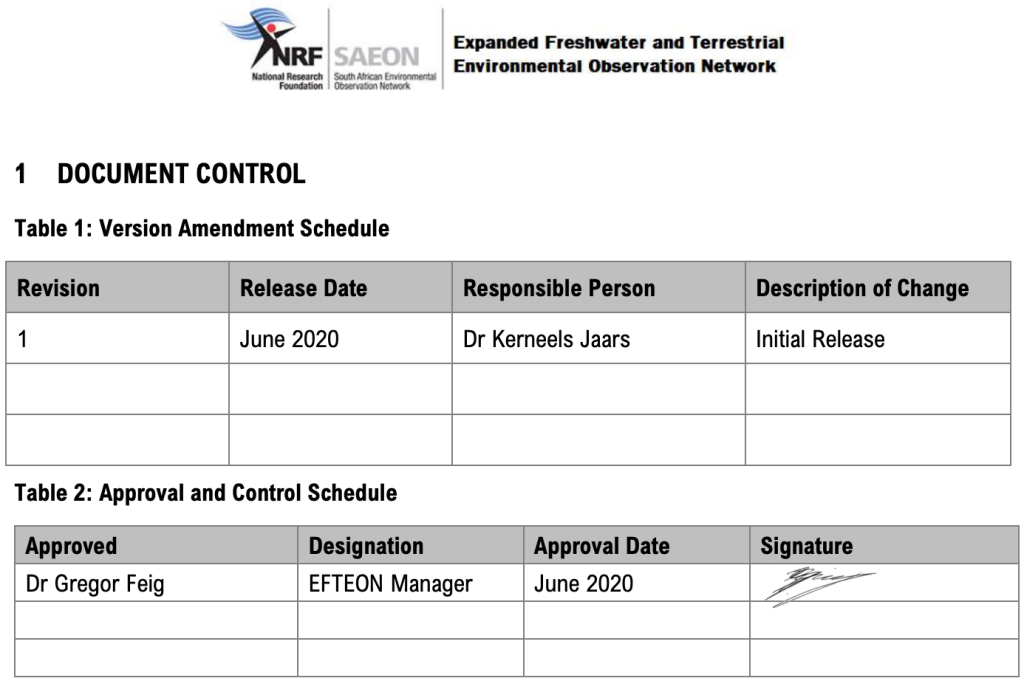
Placed at the beginning of the SOP, it lists the release date, responsible parties, approvals, change descriptions, and other information to ensure transparency.
Kottakkal Farook Arts and Science College goes a step further by specifying how often their facilities maintenance SOP must be reviewed and by whom:
“The SOP will be reviewed annually by the Management Team to ensure its effectiveness and relevance. Any changes or updates will be communicated to all relevant teams.”
Embedding version control like this signals that the documents are taken seriously and evolve with operational needs, thereby boosting accountability and trust.
Of course, this only works if you follow through with the reviews.
The frequency of updates can be based on a set schedule, as is the case at Kottakkal Farook College, but remember that this alone might not be enough.
Certain operational events may also trigger revisions, such as:
- Repeated failures or breakdowns
- Safety incidents or near-misses
- Equipment upgrades or modifications
- Introduction of new parts or tools
- Negative feedback from technicians
Essentially, whenever it becomes clear that previous practices are no longer effective, it’s worth investigating, documenting what was learned, and updating procedures accordingly.
This keeps your documentation relevant, accurate, and genuinely useful over time.
Conclusion
If there’s one overriding rule for effective maintenance documentation, it’s this: simplicity wins every single time.
When documenting maintenance processes, your first priority should always be making sure the document is easy, not just to access, but also to understand, implement, and learn from.
If you achieve that, without sacrificing any vital information, you end up with a truly effective SOP that people actually follow.
It may take some practice to strike that balance, but once you get it right, everything runs more smoothly from there.