Get a Free WorkTrek Demo
Let's show you how WorkTrek can help you optimize your maintenance operation.
Try for freeKey Takeaways:
- Meaningful feedback makes employees fully engaged and more productive.
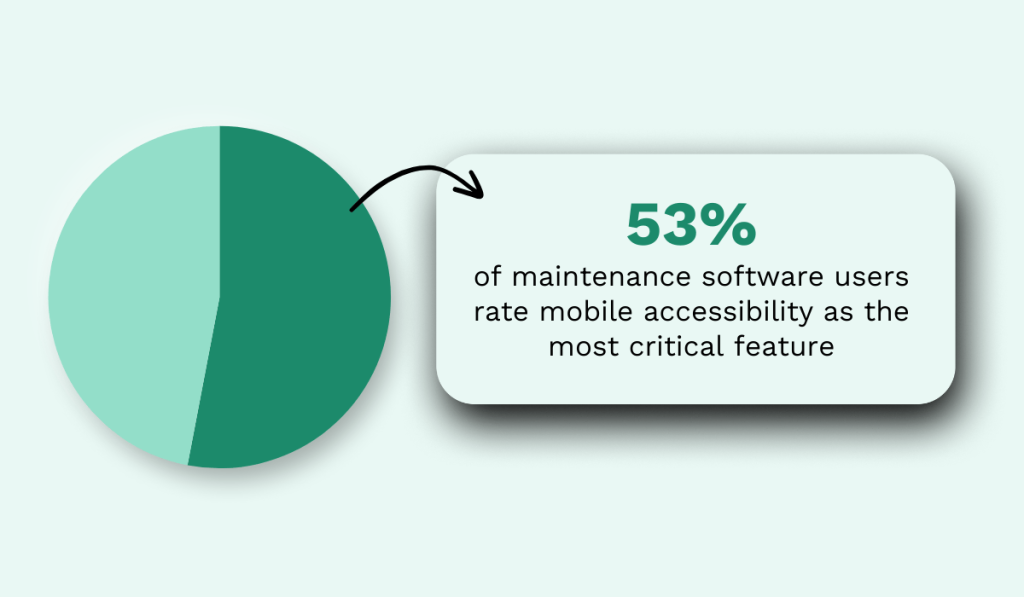
- 53% of maintenance software users rate mobile accessibility as the most critical feature.
- One-third of MRO parts in manufacturing never end up being used.
Few maintenance teams move beyond tracking their work on paper or spreadsheets.
And why would they?
These methods are cheap, easy, and familiar. They’ve worked so far, so why change?
Poor maintenance record-keeping is a surefire way to lose money, overlook critical tasks, and create operational inefficiencies without realizing it until it’s too late.
That’s why, in this article, we outline what to do instead.
Keep reading for six tips that can boost your record-keeping efficiency and help you make faster, smarter, data-driven decisions.
Establish a Standardized Record-Keeping System
There’s no efficient record-keeping without a standardized system.
When everyone uses the same format and process for documenting maintenance activities, the information becomes easier to read, compare, and analyze.
Standardization also prevents missing or incomplete records, which is one of the biggest obstacles to agile, data-driven decision-making.
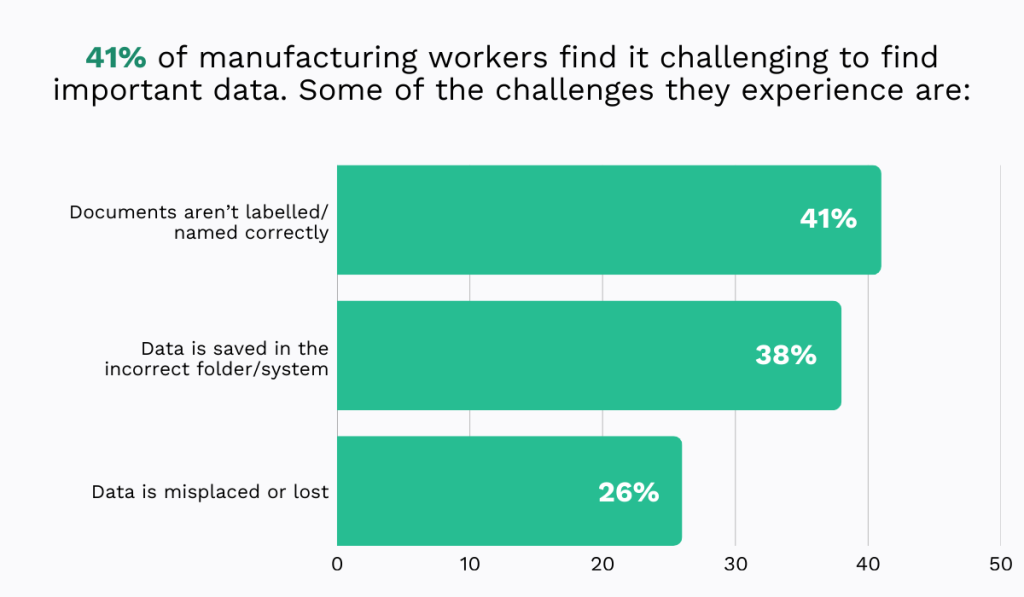
According to the 2021 EDH Technology survey, 41% of manufacturing workers struggle to find the information they need.
This is because these important documents are often mislabeled, stored in the wrong folders, or lost entirely, the respondents report.
That’s exactly what happens when there’s no unified system to organize data and serve as a reliable single source of truth.
As a result, technicians waste valuable time searching for information instead of doing their work and keeping equipment running smoothly.
The most effective solution is implementing a CMMS or similar maintenance management system.
These platforms serve as a central hub for all maintenance activities, bringing consistency to data entry and storage.
Take our own CMMS, WorkTrek, for example.
It includes built-in templates for:
- Work requests
- Work orders
- PM schedules
- Invoices
- Requests for quotes
- Purchase orders
The templates are customizable, enabling you to set required and optional fields.
If a required field isn’t completed, the form can’t be submitted, which ensures all workers follow a consistent data entry structure.
Below is our work order template.
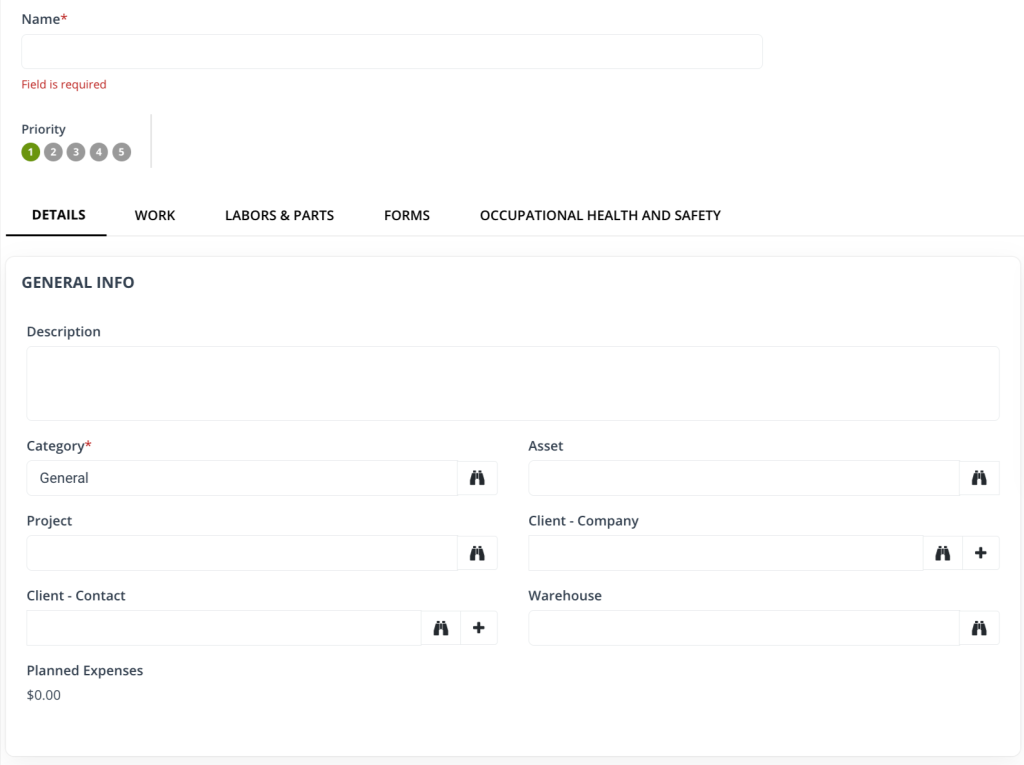
It comes with all the essential fields, including the asset and location, problem description, planned expenses, and spare parts.
Health and safety details like PPE requirements and potential hazards can be added as well.
This way, WorkTrek ensures no detail is ever overlooked.
Workers get all the information they need to perform their tasks efficiently, while supervisors gain complete, accurate records for informed, data-driven analysis and planning.
Train Staff on Record-Keeping Procedures
Once the system has been established, it’s important to provide training so all team members understand how, when, and what to document.
Aaron Zimmerman, a Partner at the construction defect law firm Berding & Weil, points out a common record-keeping problem that occurs when multiple people are involved:

Good training helps prevent this. It cuts down on errors, reduces inconsistencies, and increases accountability.
To ensure the training sticks and to give workers a way to refresh their knowledge when needed, it’s best to create SOPs they can consult at any time.
These documents should outline all the correct steps and record-keeping requirements in a clear, easy-to-follow format.
Here’s what to include.
Start by briefly describing the purpose and scope of the SOP.
This provides more context and helps the team understand why efficient record-keeping matters in the first place.
You may also clarify any technical terms used throughout maintenance records, such as preventive maintenance or condition monitoring.
Then, establish procedures for each step of the record-keeping process:
| Creation of Records | Specify what details must be documented |
| Record Formats | If not using a CMMS, include templates for different types of documents |
| Storage of Records | Explain where and how records are stored (e.g., CMMS, physical file cabinets) |
| Retention Periods | Define how long records must be kept, based on legal, regulatory, or company requirements |
| Access Control | Identify who is allowed to access, modify, or delete records |
To make it even more practical, include examples of what good and bad record-keeping look like. A few real-world scenarios will make your expectations instantly clear.
Additionally, make sure this information is easy to access.
If employees have to sift through piles of paper, they’ll eventually stop trying.
Abid Sulayman, Business Process Improvement and Automation Specialist at Autotek.io, a provider of digital solutions for the automotive industry, offers helpful advice:

Just as digitizing maintenance data improves accessibility, digitizing SOPs does the same.
When a technician can pull up a procedure in a couple of clicks, they’re much more likely to follow it.
Over time, that kind of convenience shapes habits, and those habits build a culture of consistent, reliable, and efficient record-keeping.
Regularly Update Maintenance Records
All maintenance details should be documented immediately, or at least as close to task completion as possible, to keep information accurate and up to date.
The longer a technician waits to record details, the more likely they are to forget or misremember critical information, leading to incomplete or incorrect entries.
An occasional delay is completely fine, but when they become routine, the cumulative impact is unreliable records and, ultimately, poor decisions.
Christopher Risher, Chief Transformation Officer, Senior Director of Consulting and Digital Innovation at RedHelm, an IT management services provider, explains:

To ensure your data stays current and supports smart decision-making, have supervisors periodically review records.
These reviews can be daily, weekly, or monthly, depending on your record volume and operational needs.
You may also want to consider creating a checklist to ensure nothing is overlooked.
For example:
- Verify all completed work orders are closed and signed
- Confirm PMs are completed on schedule
- Check that tasks are correctly prioritized
- Ensure all mandatory fields are filled out
- Review issue descriptions for clarity
When done consistently, this doesn’t take long and is one of the most effective ways to reveal emerging bad habits before they become standard practice.
Just ensure you pair these reviews with timely feedback.
This includes positive reinforcement for behaviors you want to encourage and constructive feedback for behaviors that need improvement.
Yes, both matter equally if you want real improvement.
According to Gallup, 80% of employees say that meaningful feedback makes them fully engaged.

In other words, employees want to know what they’re doing well and where they can improve.
Provide that guidance, and they will be more likely to meet expectations, keeping your records fresh and accurate.
Ensure Mobile Access
Another way to ensure records are complete, up-to-date, and accurate is to enable technicians to view and update them from phones or tablets in the field.
Mobile access saves time dramatically and makes critical information more accessible, which encourages technicians to comply with your record-keeping requirements.
Therefore, it’s no wonder that 53% of maintenance software users rate mobile accessibility as critical, according to Gartner.
Instead of driving in and out of the office to collect and update paperwork, workers can simply pull out their phone in the field, update records, or request additional information as needed.
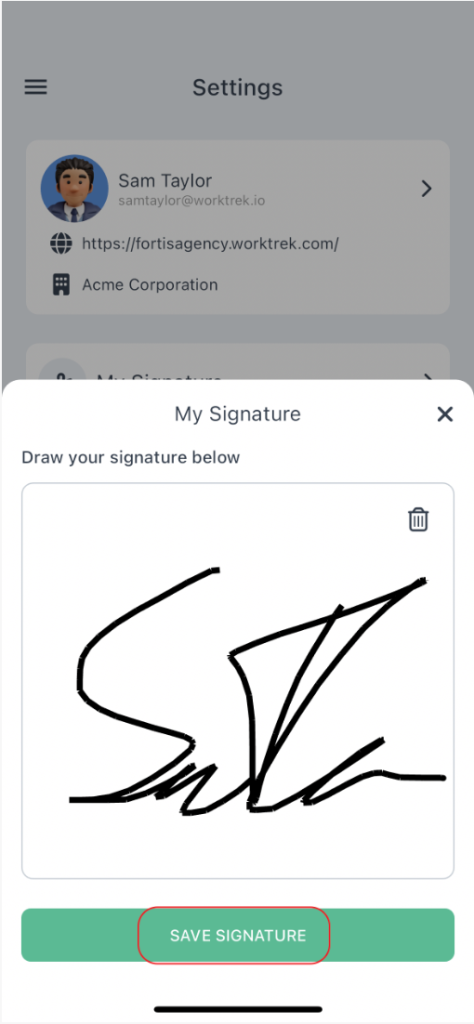
Many solutions now even allow signatures to be collected via mobile devices, meaning the entire work order lifecycle can be completed on the spot.
This reduces wasted time and minimizes errors.
Technicians and supervisors alike appreciate this level of efficiency and convenience, and a Glean survey reveals why.
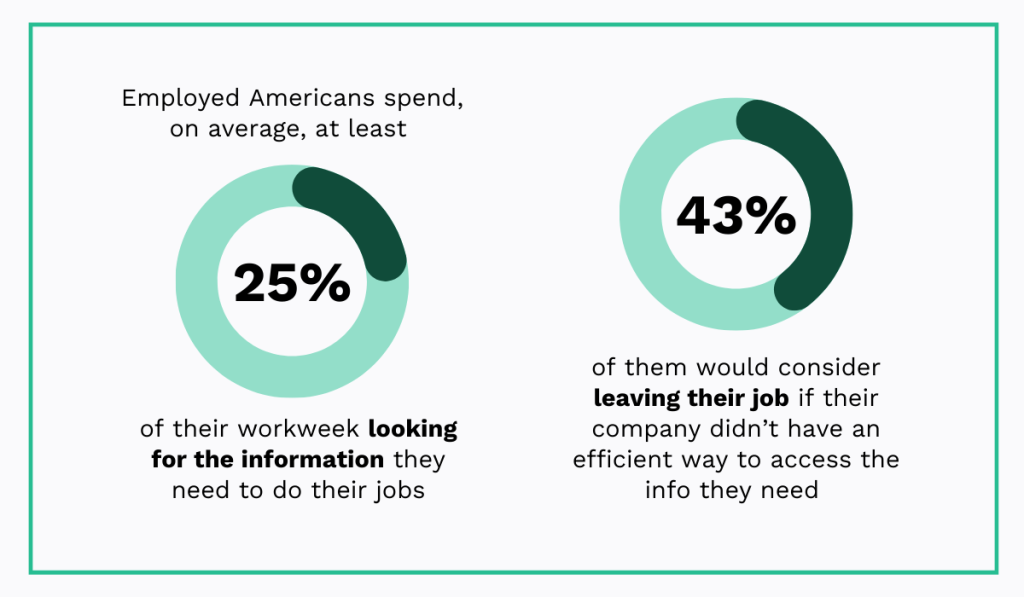
As it turns out, 43% of employed Americans would consider leaving their job if their company didn’t provide an efficient way to access the information and people they need.
This is hardly surprising, given that they typically spend two hours a day, or 25% of their workweek, searching for documents, information, or colleagues needed to complete tasks.
A mobile app can significantly reduce this time, helping technicians track vital information, connect with their coworkers, and make timely updates.
Just be sure your app offers an offline mode.
For workers in the field or remote areas, this feature is a lifesaver, allowing records to be updated regardless of internet connectivity.
Create Equipment Identification System
Each asset should be assigned a unique ID and clearly labeled so technicians can identify items quickly and accurately.
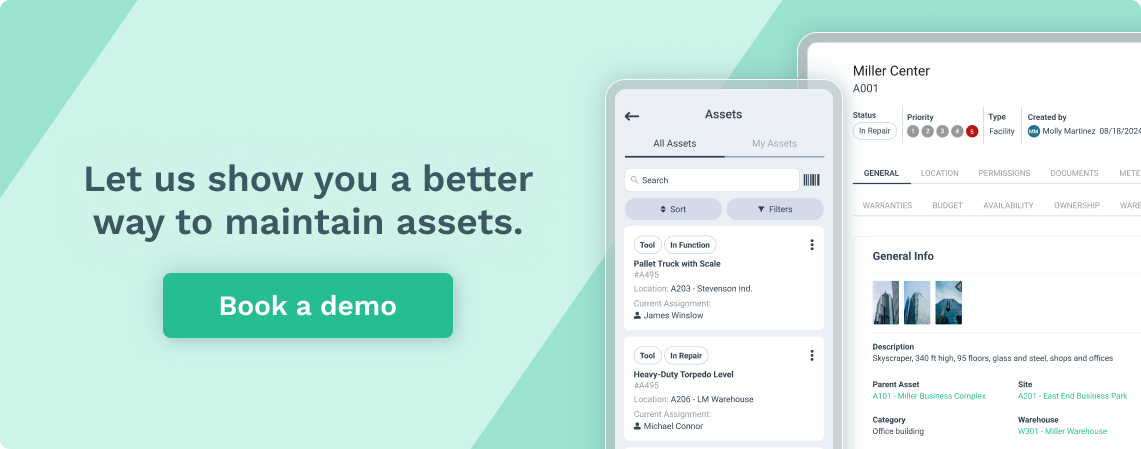
This system works best when integrated with a CMMS, as each asset label then becomes a gateway to a detailed asset profile, like the one you see below.
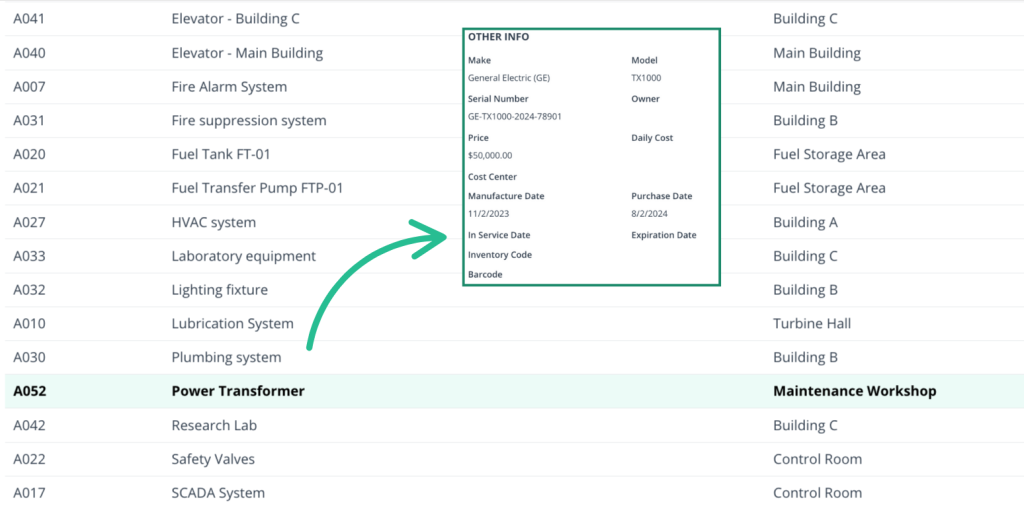
Technicians can simply scan the code with their smartphone to instantly access information such as warranty details, LOTO procedures, maintenance history, and more.
Authorized personnel can also add new information directly to the profile.
This is particularly valuable when managing multiple similar assets.
It eliminates confusion between machines, making it easier to search for records and link data to the correct equipment, reducing the risk of costly errors.
When it comes to choosing identification labels, there are numerous options out there.
According to the 2025 Cheqroom survey, asset managers use a range of technologies, from simple barcodes and QR codes to advanced GPS and IoT devices.
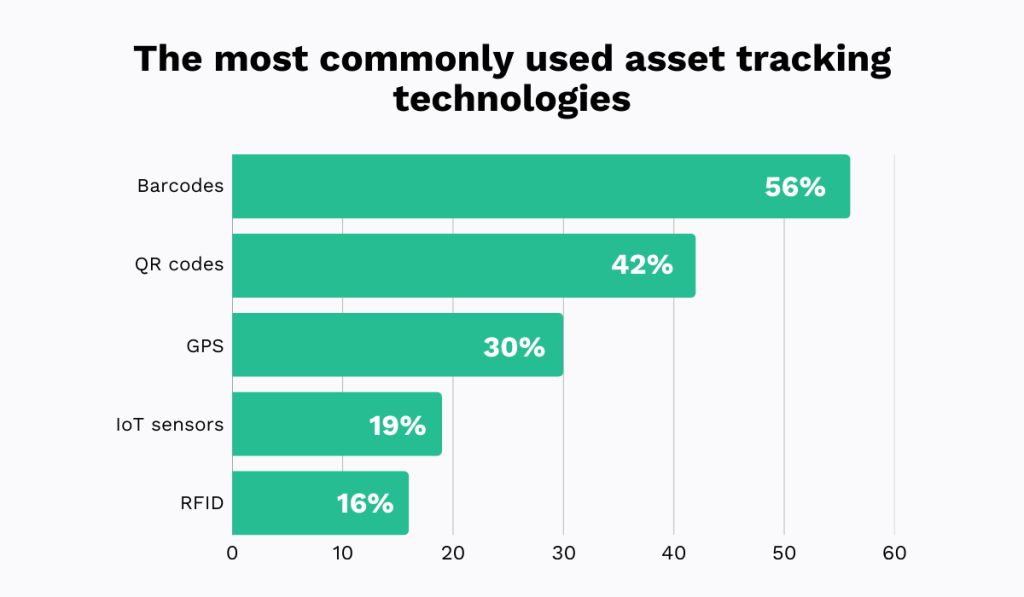
Each comes with its own advantages and limitations.
QR codes, for example, are cost-effective and user-friendly, requiring minimal training since most people are already familiar with them.
However, they do not offer advanced features like, for instance, condition monitoring. They simply connect users to the asset profile.
IoT sensors, by contrast, provide these advanced monitoring capabilities but are more expensive and may require additional training.
Ruan Kruger, Executive Head at Rugged SA, a provider of rugged technology solutions, notes:
“When it comes to choosing which system is right for your business needs, you’ll want to consider what you’re tracking, how secure you need the information you’re tracking to be, how and where your inventory tracking will take place, and your budget for these processes.”
Therefore, before implementing an identification and tracking system, evaluate all the options against these factors.
Your chosen solution should be simple enough for the team to use and fit within the budget, while still meeting all your operational needs.
Track Spare Parts
It’s also important to maintain an accurate inventory of all your tools, spare parts, and other materials used in maintenance tasks.
This includes details on what you have, quantities, storage locations, current users, and any other relevant information.
Here’s an example of what that might look like:
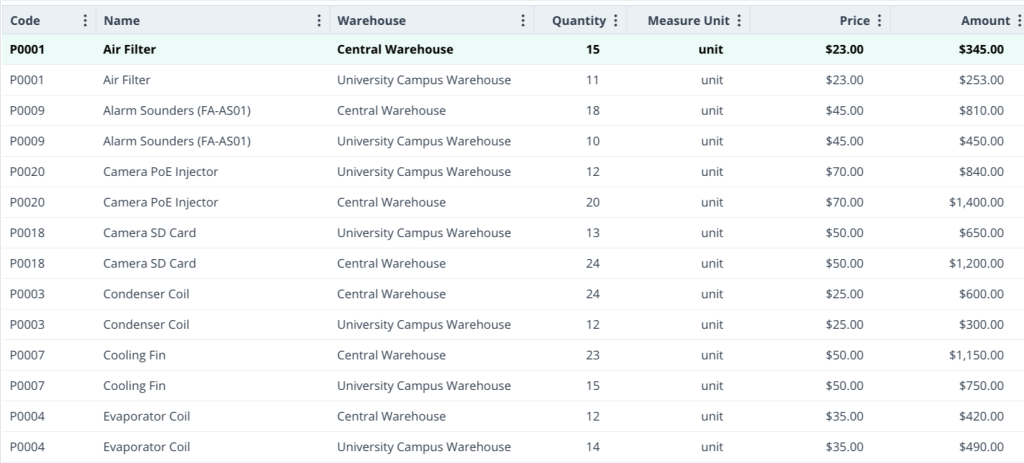
The more complete and precise your records, the easier it is to plan future inventory.
Accurate planning is a must, as it helps prevent stockouts that cause unnecessary downtime and overstocking that wastes money and space.
Taha Zinifi, Co-Founder and Chief Product Officer of the asset recovery firm, Amplio, highlights the shocking impact of inventory waste:

Careful, data-driven planning can reduce this percentage, but only if your records are reliable.
Therefore, to ensure complete accuracy, perform occasional physical stock counts rather than relying solely on system data.
While these counts can be quite time-consuming, you can minimize disruption by scheduling them based on asset criticality.
This approach, known as ABC analysis, categorizes inventory into three groups: A, B, and C.
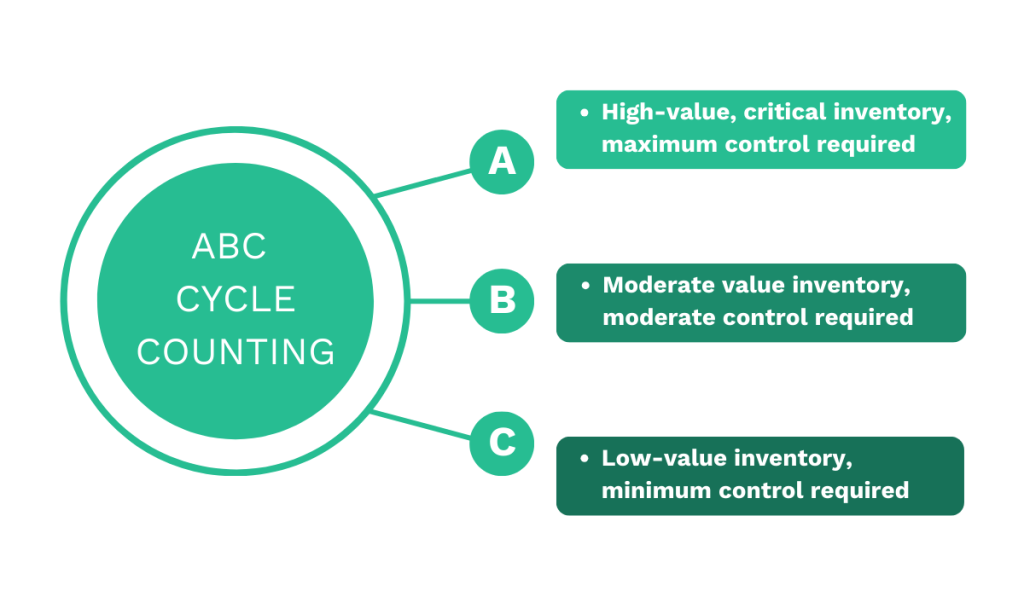
“A” items are the most critical and counted the most frequently, “B” items are moderately important, and “C” items are the least critical and counted the least often.
This will enable you to maintain inventory accuracy in a more efficient way, ultimately supporting more strategic planning and procurement decisions.
Conclusion
It’s understandable that record-keeping often takes a back seat in upkeep operations, not because workers don’t want to do it, but because there are simply too many competing priorities.
In environments where every minute of downtime leads to significant losses and taking a break feels like a luxury, stopping to fill out paperwork or count spare parts just seems impractical.
What many don’t realize, though, is that good record-keeping is exactly what helps prevent those high-pressure situations.
Accurate data provides better visibility into your assets, workforce, budgets, and tasks, enabling more strategic planning and smoother operations.
Ultimately, the goal isn’t to spend more time on record-keeping.
It’s to make the time you do spend on it count.
That’s where centralized systems, properly trained staff, and technology that streamlines the process make all the difference.