
Get a Free WorkTrek Demo
Let's show you how WorkTrek can help you optimize your maintenance operation.
Try for freeKey Takeaways:
- Maintenance platforms increase visibility, reduce unplanned downtime, and improve communication.
- Workers resist change because they feel excluded and lack sufficient information.
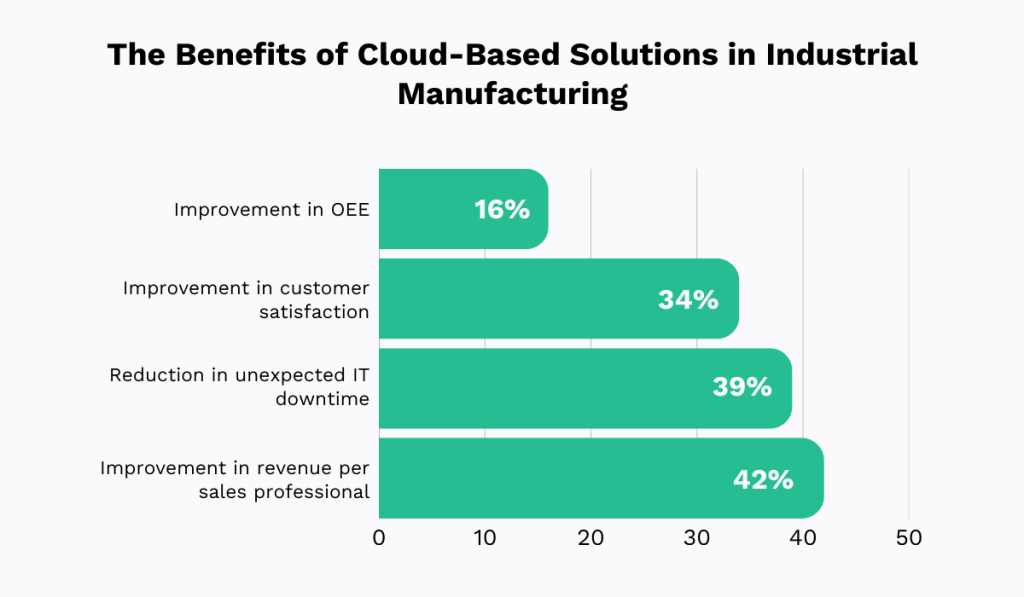
- Manufacturers that use cloud-based tools experience a 34% increase in customer satisfaction.
Research shows that more than half of U.S. companies choose the wrong software solution at least once, resulting in wasted money and reduced productivity.
How can you avoid making the same mistake?
In this article, we’ll walk you through six steps to select equipment maintenance software that perfectly fits your plant, your team, and your unique workflows.
Let’s get started and ensure your software choice is a smart one.
1. Define Your Plant’s Needs
Before evaluating any specific software solutions, you need a clear understanding of how equipment maintenance currently works in your plant, and where it falls short.
Think of it as diagnosing the problem before prescribing the treatment.
Skip this step, and you risk choosing the wrong tool that will either waste money through unnecessary features or fail to solve your problems.
This mistake is more common than you might think.
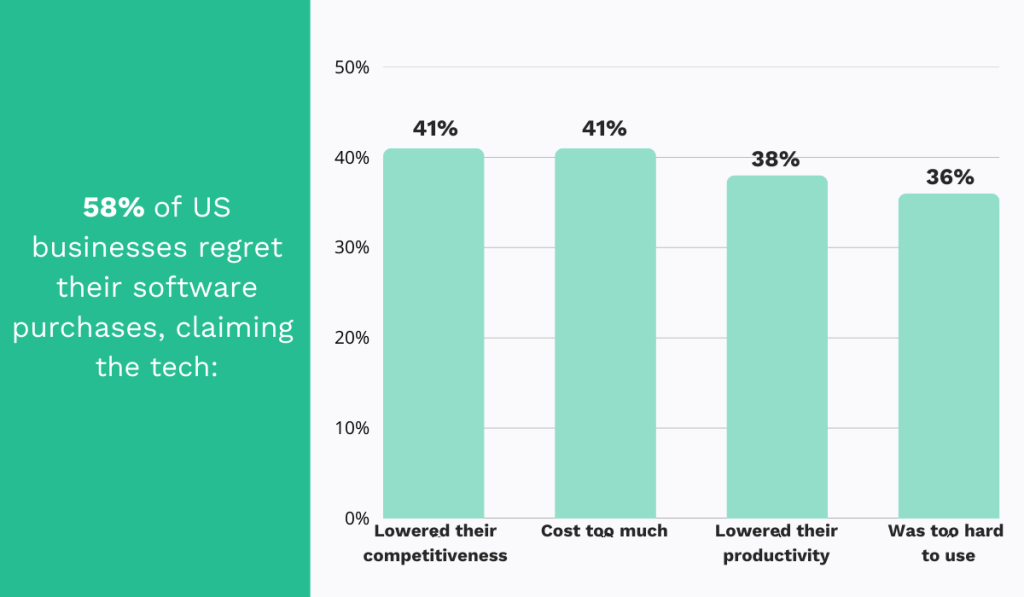
According to Capterra’s 2024 survey, more than half of U.S. companies regretted at least one software purchase in the previous year.
This one bad decision set them back significantly, leading to budget overruns, lower productivity, and even reduced competitiveness.
Fortunately, you can avoid these issues with some upfront planning.
Here’s what to do.
First, assess the current state of your operations. Ask yourself:
| Asset types & complexity | What kind of assets do you need to maintain: heavy machinery, facilities, tools? What are their upkeep needs? |
| Team size & structure | How many technicians, managers, and operators do you have? |
| Regulatory requirements | Which standards do you need to comply with: OSHA, ISO, FDA? |
| Scalability | Will your operations grow in the next 3–5 years? |
Next, identify the challenges you’re facing.
Are unplanned outages affecting production time? Are maintenance costs higher than expected?
From there, it’s much easier to map out your goals, whether it’s reducing downtime, improving scheduling, automating reports, or all of the above, and rank them by priority.
Here, it’s also important to gather input from all relevant roles, including maintenance managers, technicians, production supervisors, and IT personnel.
Kevin Honan, Director of Product Development at Nimbl, an aviation manuals and safety management system, agrees:
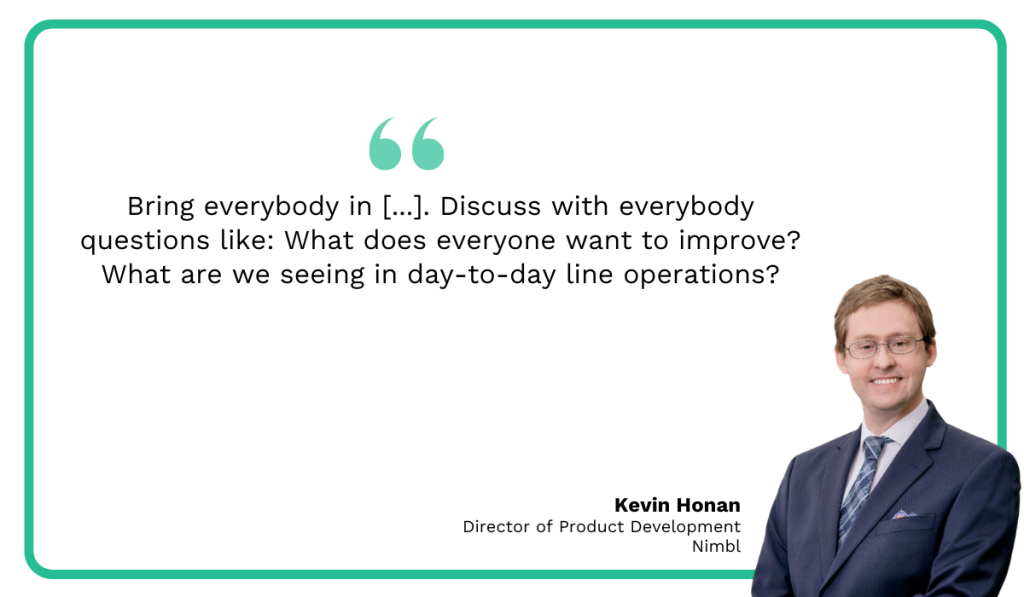
By capturing everyone’s perspectives, you’ll gain a comprehensive understanding of areas for improvement and long-term needs that should inform your software evaluation.
Ultimately, by the end of this step, you’ll have three things:
- A map of current pain points (what’s broken now)
- A list of improvement goals (what success looks like)
- A prioritized set of needs to guide your software evaluation
Armed with that, you’ll already have a much clearer picture of the software that truly fits your plant.
2. Identify Must-Have Features
You now know what problems you need to solve and what goals you want to achieve.
The next step is to translate those into specific software capabilities that your system must deliver.
This matters because vendors often market flashy features that may look impressive but won’t necessarily solve your problems.
That’s why clarity is key.
When you know exactly what you need, you can avoid paying for unnecessary features that add cost without providing value.
To make this easier, here’s a quick guide linking common plant pain points to the software features that actually solve them:
| Pain Point | Feature Needed |
|---|---|
| Work requests get lost in paper/email. | Work Order Management: create, assign, prioritize, and track work orders digitally, with real-time updates. |
| Technicians waste time chasing instructions or approvals. | |
| No visibility into job progress. | |
| Hard to measure maintenance performance. | Reporting & Analytics: dashboards and automated reports to track performance and drive data-based decisions. |
| Decisions are made based on gut instinct rather than data. | |
| Preventive tasks are missed. | PM Scheduling: automate recurring tasks and send reminders. |
| Assets wear out faster. | |
| Frequent unplanned downtime slows production. | |
| Technicians can’t complete repairs because parts are out of stock. | Inventory Management: track stock levels, trigger reorder alerts, and manage supplier info. |
| Overstocking ties up capital. | |
| No visibility into spare parts availability. | |
| Maintenance quality varies between technicians. | Digital Checklists: standardize procedures, tie them to work orders, and ensure compliance documentation is complete. |
| Compliance audits are a nightmare due to missing documentation. |
We also have a dedicated article that explores the most powerful equipment maintenance software features and their significance in more detail.
It’s worth reading if you want to learn more before making your own feature list.
By the end of this step, you should have a clear list of requirements, including must-haves and nice-to-haves, that all stakeholders agree on.
With that list in hand, you can compare software solutions directly against your needs and quickly eliminate options that don’t fit.
3. Consider Deployment Options
Next, you’ll need to decide how to deploy your new software, taking into account data security needs, IT infrastructure, internet reliability, and long-term scalability.
Deployment in this context refers to where and how the system will run in your plant environment.
Broadly, there are three main types:
| Cloud-Based | Hosted by the vendor on their servers, accessed via the internet |
| On-Premises | Installed locally on your plant’s servers and computers |
| Hybrid | A mix of both, such as local data storage with cloud backups or analytics |
This is an important decision because choosing the wrong type can create integration problems, drive up costs, or introduce reliability risks.
So, don’t overlook this step.
You might assume that, because cloud-based solutions have surged in popularity, they are the superior option.
After all, they do unlock significant benefits.
For instance, The Hackett Group found that cloud adoption helps manufacturers improve overall equipment effectiveness (OEE), cut IT downtime, boost customer satisfaction, and more.
However, don’t dismiss on-premises tools just yet.
They are also regaining traction in certain environments.
Apurva Wadodkar, Senior Director, Head of Data and AI at TI Automotive, a major global automotive supplier, agrees.
She explains that, with cloud-based solutions, you risk internet connectivity issues and consequent production line stoppages:
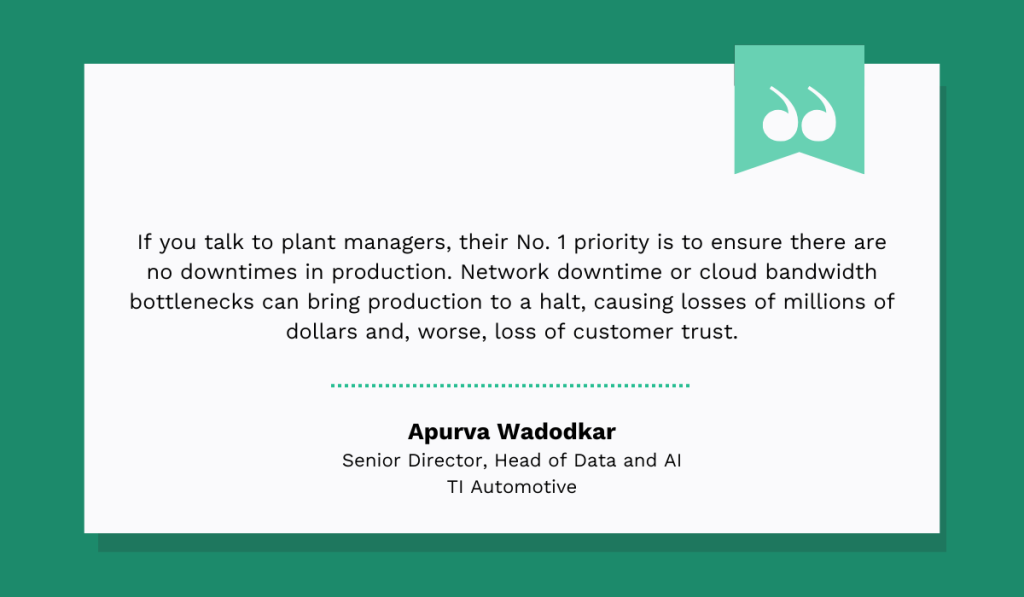
Illustration: WorkTrek / Quote: Forbes
In short, both options have strong advantages and very real tradeoffs.
So, to help you weigh them, we’ve broken them down side by side:
| Cloud-based solutions | On-premises solutions | ||
| Pros | Cons | Pros | Cons |
| Lower upfront costs | Requires reliable internet | Full control over infrastructure | High upfront costs |
| Scalability | Data security & compliance concerns | Software can be tailored to plant-specific processes | Limited scalability |
| Remote access & collaboration | Ongoing costs | No dependency on the internet | Remote access is more complex |
Still, the smartest move is to involve your IT and cybersecurity teams in this decision.
They’ll be able to evaluate the risks, opportunities, and constraints of each option, guiding you toward what’s truly best for your plant.
4. Check Vendor Support
Now that you’ve figured out the technical side of your software needs, it’s time to think about the support you’ll get before, during, and after implementation.
The right vendor should offer highly responsive customer service, online training resources, an active user community, and the flexibility to adapt to your future needs.
Because at the end of the day, even the best software will fail without strong support.
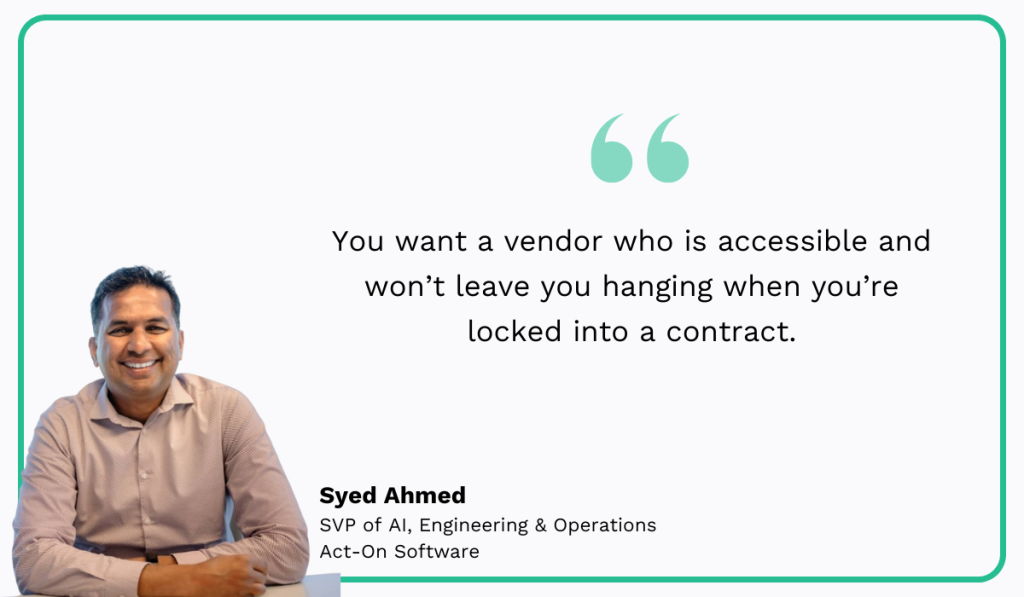
You need confidence that your vendor will be there for you when issues arise.
Syed Ahmed, SVP of AI, Engineering & Operations at Act-On Software, Inc., a SaaS product for marketing automation, puts it best:
At WorkTrek, we couldn’t agree more.
That’s why we put so much effort into making sure our customers always have the help they need when implementing and using our equipment maintenance software.
Customer support is included in all our plans.
You can reach us via email anytime, and we’ll respond quickly.
Additionally, we maintain a comprehensive Help Center on our website, offering advice, FAQs, and step-by-step guides that you can use for both troubleshooting and training new staff.
We also provide a glossary of maintenance and software terms to help standardize language across your team.
Clear, consistent terminology improves communication, reduces errors, and increases overall efficiency.
Our customers notice the difference.
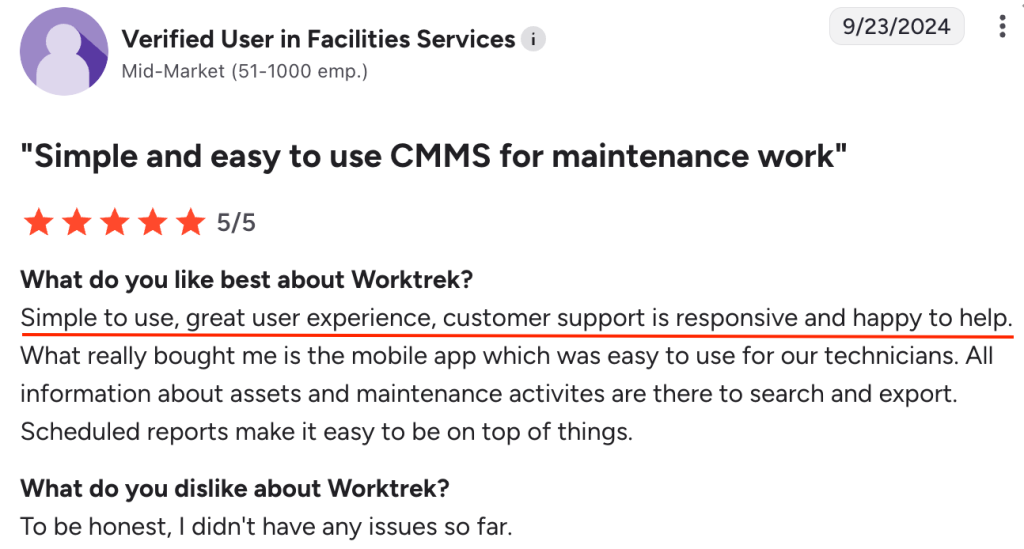
They frequently praise our responsiveness and the way we make onboarding and day-to-day use straightforward.
This brings us to one more important point: don’t rely only on what vendors say about their support.
Check online reviews to see what real customers are saying.
Vendors may promise the moon, but real users will tell you what support actually looks like in practice.
5. Evaluate ROI
We can’t talk about investing in software without talking about ROI.
If you don’t understand how much you stand to gain versus what you’ll spend, you risk overspending, or at the very least, you’ll struggle to justify the purchase to leadership.
However, if you approach this step carefully, you’ll ensure the system pays for itself over time.
So, start by evaluating all the costs, both direct and indirect.
This includes:
| Software costs | License or subscription fees, modules, upgrades |
| Hardware costs | Servers (if on-premises), mobile devices, sensors, QR codes |
| Implementation costs | Installation, data migration, integration with ERP/SCADA |
| Training costs | Staff onboarding and ongoing training |
| Maintenance & support | Vendor contracts, IT staff time |
Next, look at the benefits.
Think back to the pain points you identified at the start and estimate how much each issue would cost if solved.
This can be somewhat tricky because the software doesn’t unlock only tangible savings (like reduced labor costs), but also intangible gains (like efficiency or compliance).
Still, try to translate each one into time or money saved.
For example, consider better reporting.
Suppose your current situation looks like this:
- The manager spends 8 hours per week compiling reports from spreadsheets and logs
- Average fully loaded labor cost: $50/hour
- Weeks worked per year: 50
That totals:
8 × 50 × 50 = $20,000/year
Now, after automating reporting, manual effort drops to, say, 2 hours per week:
2 × 50 × 50 = $5,000/year
This means the annual savings due to better reporting would be:
$20,000 − $5,000 = $15,000
Use your own internal data for these calculations, but you can also supplement your findings with industry reports for a full picture.
For instance, recent surveys show that maintenance management platforms unlock better visibility into completed work, reduce unplanned downtime, and improve team communication.
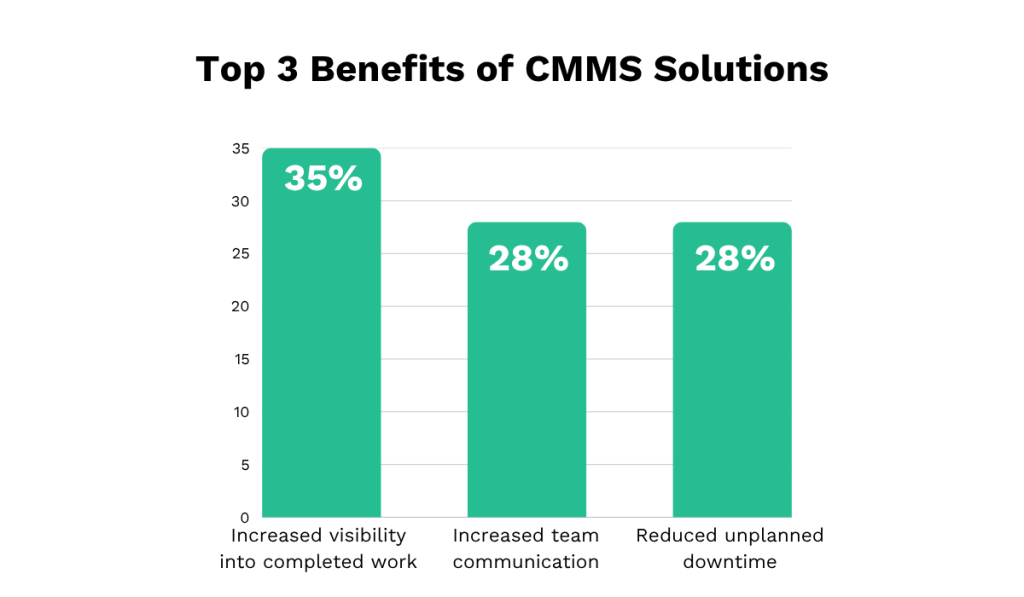
Including this kind of data strengthens your business case even further and makes it easier to demonstrate ROI to leadership.
6. Pilot Before Making a Final Decision
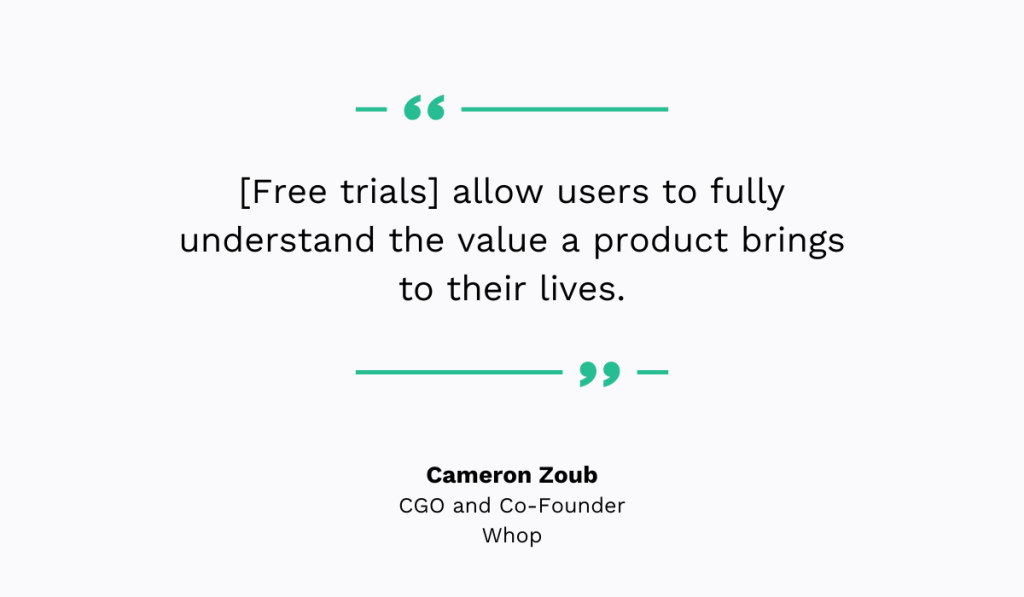
Finally, when possible, take full advantage of free trials and run a small-scale test of the software using real assets, workflows, and users.
This helps you see whether the software truly fits your plant’s operations, is user-friendly, and delivers the results you expect.
Cameron Zoub, CGO and Co-Founder of Whop, a social commerce platform, agrees:
Skipping this step can be more harmful than you think, especially for employee satisfaction and software adoption.
If you purchase a solution without considering your team’s feelings, they may struggle to use it, become frustrated, and ultimately refuse to adopt it, rendering the system useless.
Research shows that workplace change often meets resistance.
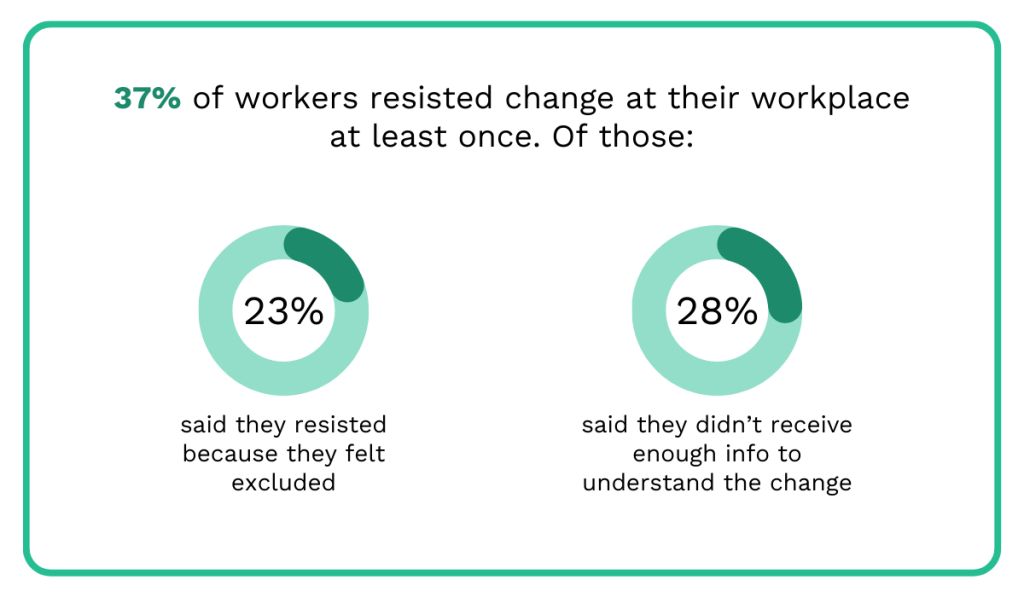
For example, the 2023 Oak Engage survey found that 37% of workers resisted change at least once.
Of those, 23% said they resisted because they felt excluded, and 28% said they didn’t receive enough information to understand the change.
This is what happens when you skip free trials.
You exclude your team from the decision-making process and fail to show them the benefits, possibilities, and practical use of the tool.
It’s only natural that they’d be hesitant to use it.
Therefore, always see if vendors offer a trial, and explore it thoroughly with your team.
Walk through all its features together, test it with real workflows, document the feedback, and make sure everyone understands how it will make their work easier.
Conclusion
Once you’ve explored the free trials for all your top contenders, sit down with the team and jot down your observations: what you liked, what you didn’t, and whether the tool meets the needs you outlined.
Pretty soon, the best choice will start to stand out.
But the work doesn’t stop here.
It’s best also to set baseline KPIs, such as downtime, MTTR, and compliance rate, so that you can measure real-world ROI over time.
This way, you’re not just relying on the feeling that the software works, but backing it up with real data.