
Get a Free WorkTrek Demo
Let's show you how WorkTrek can help you optimize your maintenance operation.
Try for freeKey Takeaways:
- Workers spend only 30–50% of their time actually performing their tasks.
- Unexpected machine breakdowns are the leading cause of productivity loss in plants.
- Knowing when to retire an asset can significantly improve backlog management.
Backlogs are an inevitable part of maintenance, regardless of the industry, sector, team size, or asset types.
They will never completely go away, and that’s fine.
What truly matters is how you handle them.
In other words, real problems arise only when backlogs are poorly managed, causing unexpected equipment failures, production delays, and unnecessary costs.
Fortunately, your CMMS can help you get everything under control.
These solutions track, organize, and systematically reduce your backlog, turning chaos into efficiency and reliability.
In this article, we’ll show you how to manage your maintenance backlog effectively and how your CMMS can support you at every step of the process.
1. Analyze Your Backlog
First, use your CMMS to assess the current situation.
The system’s dashboards display all your work orders and requests, and whether they are open, awaiting approval, completed, or pending.
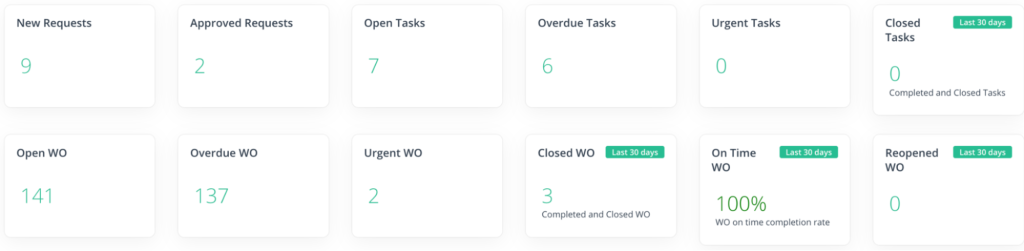
You can also filter these by various criteria, such as status, priority level, asset, location, and more.
Ultimately, this gives you a real-time, organized snapshot of your total backlog, rather than data scattered across spreadsheets, paper logs, or emails.
Use this data to analyze the scope, size, and type of work sitting in the backlog.
Once you know how many work orders are overdue, which assets they affect, and when they’ve accumulated, you’ll be better equipped to identify the main causes of these problems.
Maybe there’s an issue with the availability of spare parts. Or, maybe you’ve been stuck in reactive mode for too long.
There are all kinds of inefficiencies plaguing modern operations.
In fact, according to McKinsey’s 2021 research, workers in most heavy industry companies spend only 30–50% of their time actually performing their tasks.
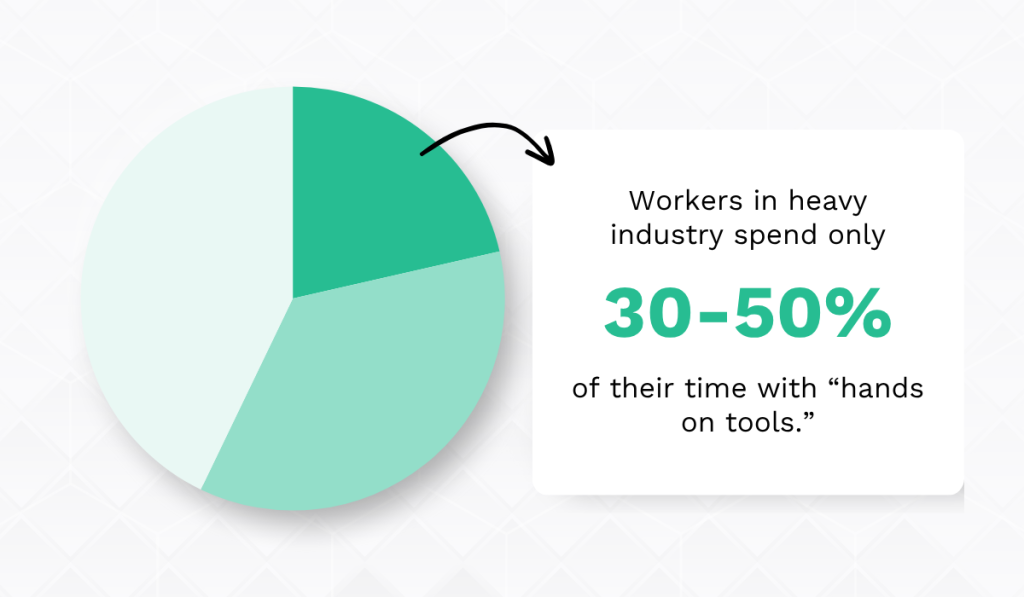
In other words, productivity is an issue for practically everyone.
However, this isn’t due to a lack of effort.
Instead, the research claims it’s due to operational complexity.
There are countless factors to coordinate nowadays: workers, materials, tools, PPE, equipment access, and so much more.
Making one wrong move can easily cause workflows to spiral out of control. Maintenance operations are no exception.
Operational inefficiencies and poor resource use are bound to lead to backlog issues.
Luckily, your CMMS minimizes that complexity, providing complete visibility into completed and pending work.
As a result, you don’t have to guess what’s causing problems and what to do about it. You see it immediately.
2. Determine Order of Task Completion
Once you’ve analyzed your backlog and understand what’s in it, the next step is deciding what to tackle first.
Your CMMS should allow you to assign priorities to each work order, helping technicians determine which tasks should come first based on factors such as safety and operational impact.
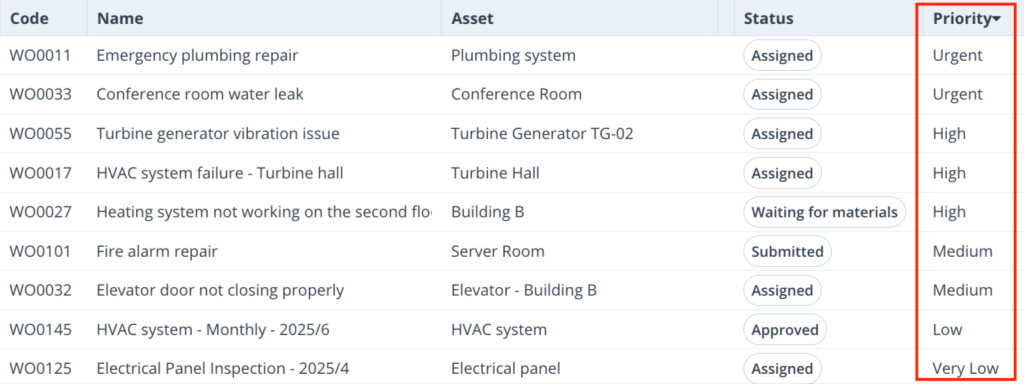
This step is vital.
After all, not all maintenance tasks are created equal.
Some are key for safety or production continuity, while others can wait.
Failing to distinguish between these can lead to wasted time and resources on low-impact work while high-risk issues are left unresolved, ultimately worsening your backlog.
Jason Afara, Director of Solutions Engineering at Fiix Software, agrees:

A CMMS makes implementing this prioritization system much easier.
It gives your team immediate visibility into each task’s priority, eliminating guesswork and subjective judgment.
You just need to establish clear, consistent criteria for task prioritization first.
Therefore, assign your maintenance managers to assess and rank tasks according to factors such as:
| Safety | Does the task directly affect the safety of employees, visitors, or equipment? |
| Operational impact | Will delaying the task disrupt critical operations or cause equipment failure? |
| Compliance | Is the task required to meet regulatory or legal standards? |
| Cost | What are the financial implications of delaying the task? Could postponement lead to higher costs later? |
After tasks have been categorized and ranked, use your CMMS to schedule and prioritize accordingly.
This will almost immediately create a more efficient and better-managed backlog.
3. Automate Preventive Maintenance Scheduling
Don’t forget your recurring work.
A strong CMMS helps you create preventive maintenance (PM) schedules based on various triggers, automatically generating work orders when these thresholds are met.
This ensures critical checkups, inspections, or minor fixes aren’t forgotten or delayed, and don’t escalate into major failures, which are a common source of backlog.
Think of it this way: neglecting preventive maintenance creates a vicious reactive cycle: missed PM → equipment failure → emergency repair → even more backlog.
The 2022 ATS research confirms this, showing that unexpected machine breakdowns are the leading cause of productivity loss in plants.
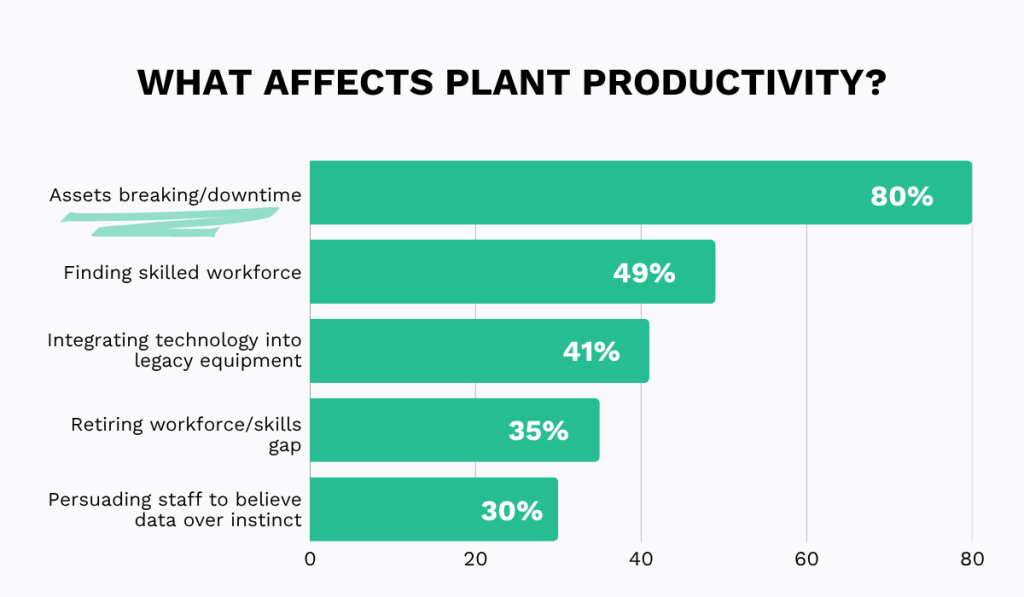
But by making your team more proactive about maintenance, you can reduce unplanned downtime and smooth out workloads by scheduling maintenance predictably.
This gives you far greater control over your backlog.
Anna Waters, Director of Asset Management at EDP Renewables, a company that develops and operates wind farms, solar parks, and energy storage systems, puts it perfectly:
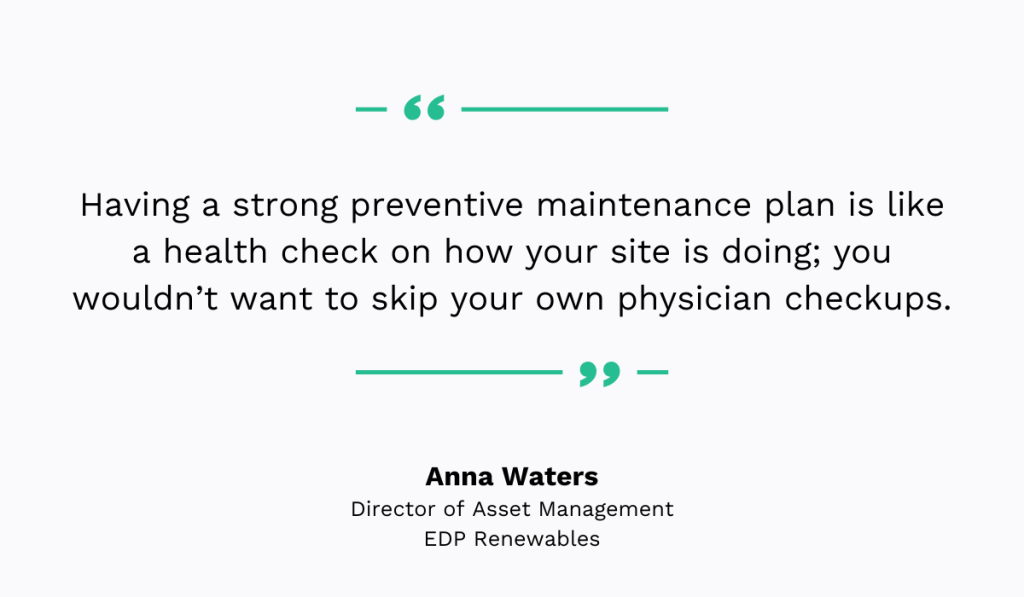
Therefore, let your CMMS handle PM for you and ensure important tasks get done on time.
For example, with a CMMS like WorkTrek, you can schedule preventive maintenance based on time triggers or meter readings, such as usage hours, mileage, temperature, or pressure.
That means no more guessing when an asset needs servicing; WorkTrek automatically alerts your team when criteria are met, making it virtually impossible to miss PM.
Additionally, if an inspection fails, WorkTrek can automatically generate follow-up work orders, so nothing slips through the cracks ever again.
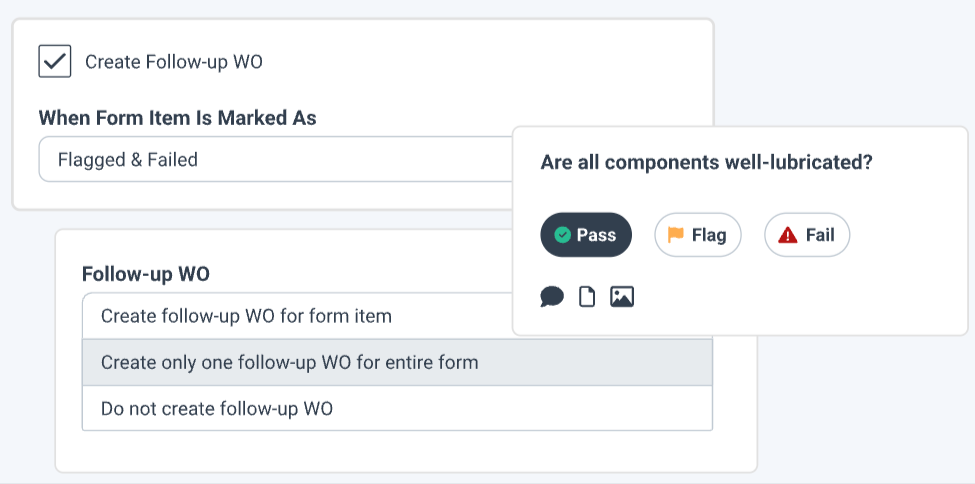
At the end of the day, you’ll never get your backlog under control if you’re constantly reacting to sudden equipment failures.
Get your preventive maintenance program right first, and you’ll have the breathing room to coordinate all your other activities effectively.
4. Optimize Resource Allocation
Even if your maintenance prioritization and scheduling are spot-on, it won’t matter much without the necessary spare parts and manpower to get the job done.
Therefore, you should use your CMMS to track, analyze, and optimize technician and inventory availability.
It’s simple, since the system handles most of the heavy lifting for you.
For instance, it can show which technician is assigned to which task, where they’re working, and when the job should be completed.
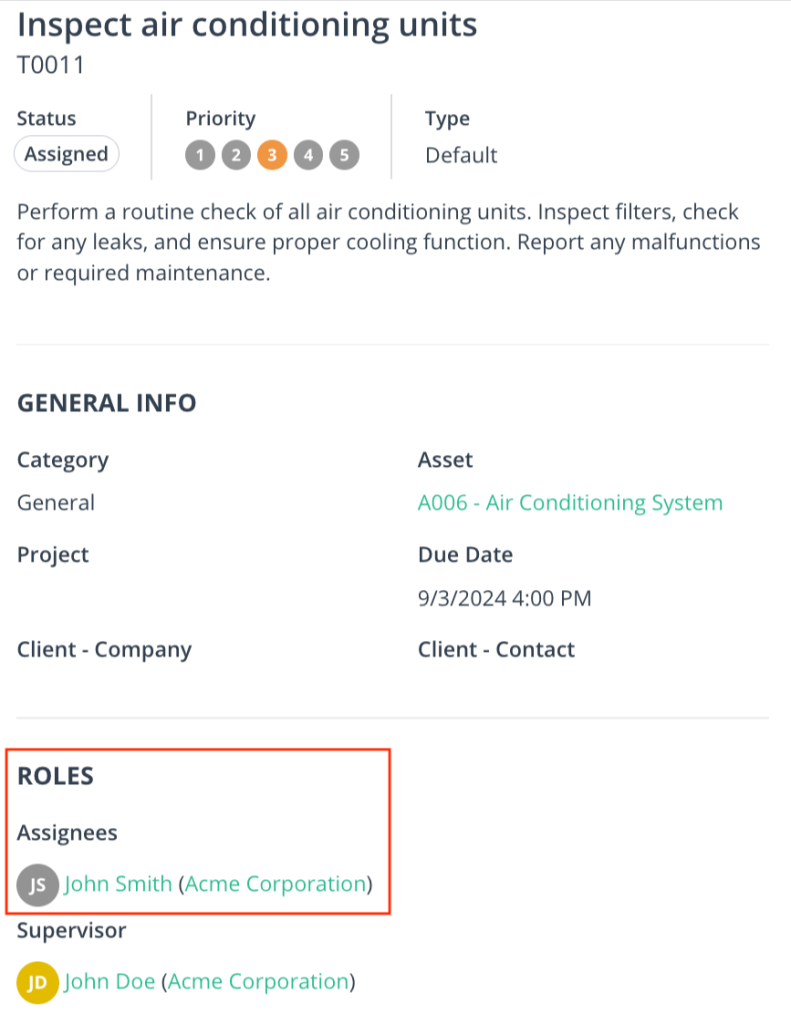
This helps you assign your workers more efficiently.
Similarly, CMMS automatically updates inventory levels, lets you set reorder points, and sends alerts when stock runs low.
All you need to do is reorder when prompted.
Location data is typically available as well, which can be a major time-saver.
Debbie Fox, Co-Founder of Fortell Automotive UK Ltd, a company delivering real-time AI voice technology to fleets, explains:

So, instead of wasting time searching for parts, technicians can quickly look up their exact location on a phone or computer and retrieve them in seconds.
In short, your CMMS gives you a clear view of what you have, how much, where it’s located, and when it’ll be available.
Thanks to this, you can allocate resources strategically and ensure every task has exactly what it needs. No more, no less.
5. Monitor Equipment Health
A CMMS doesn’t just track your workforce and the parts used for maintenance.
It also monitors the equipment itself, giving you access to vital asset data, including location, maintenance history, performance metrics, warranties, downtime records, and more.
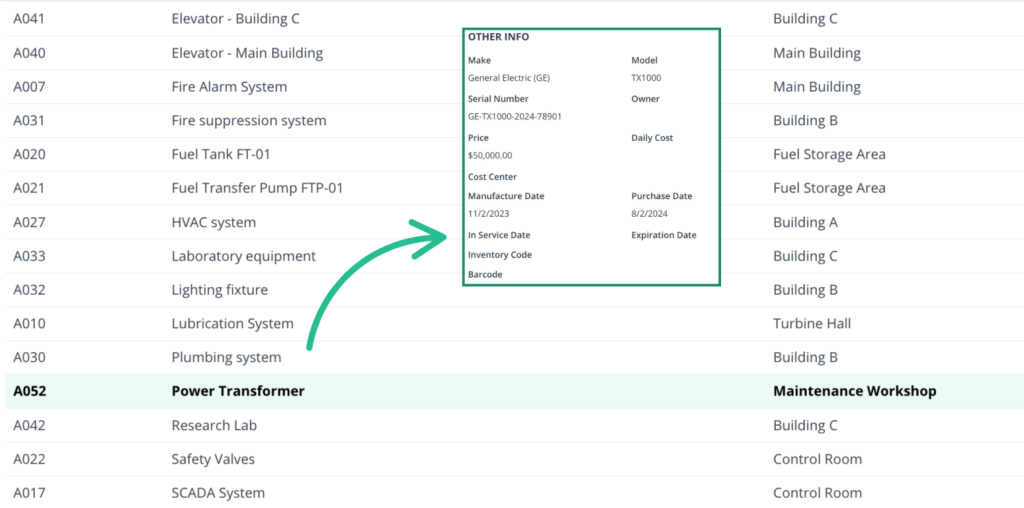
Some systems even integrate with IoT devices to track equipment health in real time, monitoring factors such as temperature, vibration, and other key indicators.
According to the 2025 Cheqroom survey, this is precisely the kind of information most companies wish they had.
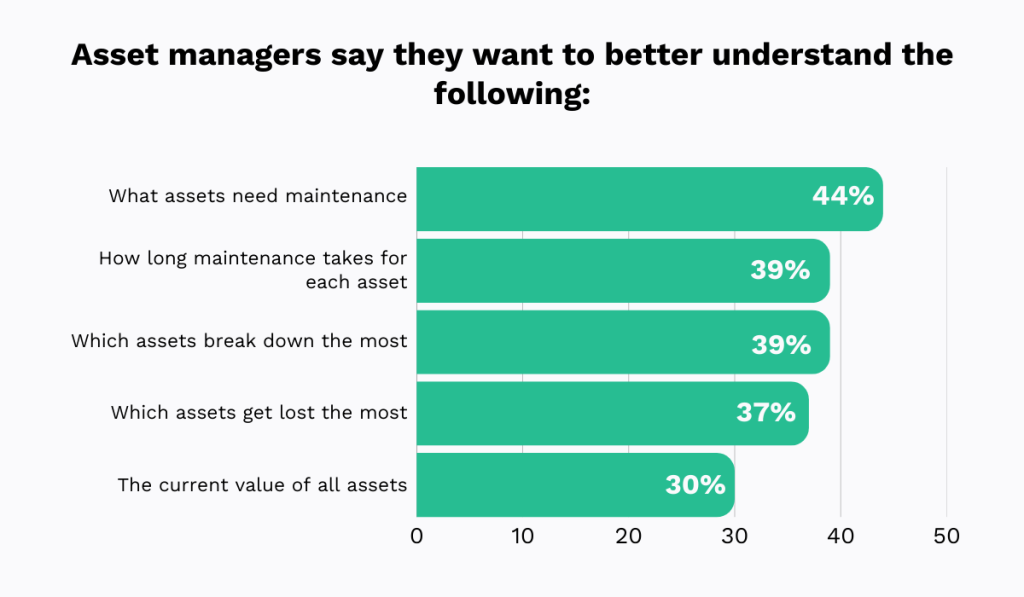
Which assets are used most, which break down most often, and when they require upkeep: with CMMS-powered asset tracking, you can answer all these questions with confidence.
Ultimately, this enables you to focus your resources where they matter most and avoid unexpected failures that clog your maintenance backlog.
Ken Beinhower, Director of Operations at the construction company, E.K. Services, uses his maintenance management system in exactly this way:

But he doesn’t just use this data to schedule maintenance.
He also uses it to decide when it’s time to retire an asset.
After all, every machine has a finite useful life, and a CMMS helps you pinpoint exactly when it’s time to let go by analyzing repair costs and history.
This prevents wasting resources on “black hole” assets and reduces recurring backlog caused by aging, failure-prone equipment.
6. Ensure Technicians Have All Relevant Information
You need to ensure your technicians have all the information they need to do their jobs safely and correctly.
Here’s how to achieve that using your CMMS.
Start with your work requests and orders.
Typically, they come with customizable templates that let you set required fields such as problem description, location, required materials and parts, signatures, time estimates, and more.
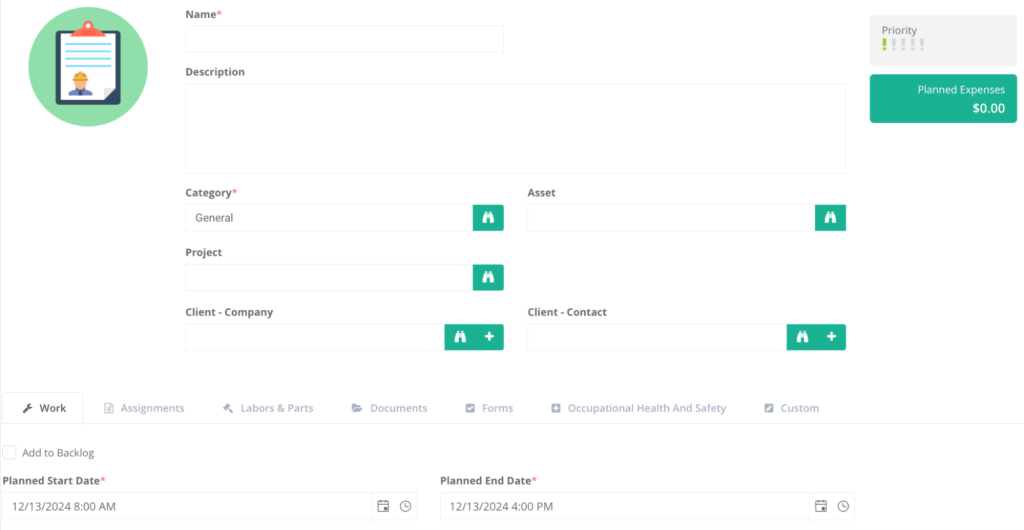
You may even be able to upload photographs of the issue.
Once these templates are in place, all task information is captured consistently, eliminating the need for technicians to call around in an attempt to understand what happened and what needs to be done.
Safety comes next.
Many CMMS solutions allow you to attach reminders about potential hazards, PPE requirements, and LOTO procedures directly to work orders.
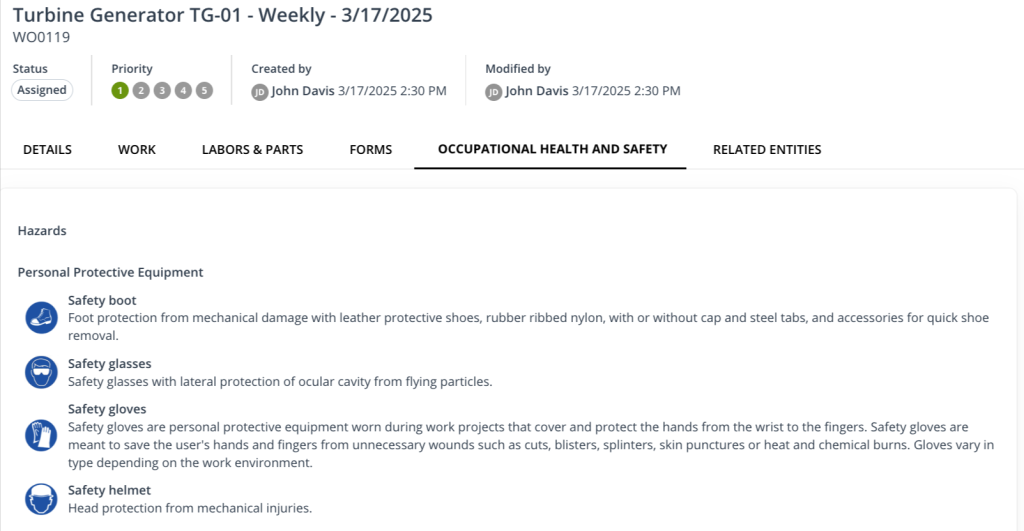
These details are easy to overlook, but forgetting them even once can lead to serious delays, injury, or worse.
A CMMS ensures these reminders are always visible, reducing the risk of safety incidents and workflow disruptions.
Over time, centralizing and digitizing this information drives significant productivity gains.
Take it from Cleanaway Waste Management Limited, an Australian waste management company.
They saw a measurable efficiency boost after implementing digital work orders.
Now, they have all the information they need at their fingertips, instead of having to sift through endless paper-based work orders.
Preet Brar, their Executive General Manager, explains:
“The most immediate benefit is our medium-term target of five percent increased mechanic productivity, which leads to more tool time and reduces the amount of work we need to divert to external mechanics at three times the cost.”
Simply put, more work gets done, more money is saved, and backlogs are easier to manage, all by simply making relevant information more easily accessible.
7. Regularly Track Progress
Once you’ve analyzed, prioritized, and optimized your maintenance workflows in your CMMS, you might think the hard work is over.
But it’s not.
To truly take your backlog under control for good, you need to keep tracking your progress.
Use your CMMS’s reporting features to monitor how the backlog evolves and ensure your improvements are sticking.
Consider tracking metrics such as:
- Total open work orders
- Overdue vs. completed tasks
- Average completion time
- Planned vs. actual costs
- PM compliance rate
These metrics reveal how well your maintenance processes are performing, showing what’s working and what isn’t, ultimately helping you optimize further.
For example, a wrongly set reorder point for spare parts may be causing delays due to stockouts.
Or perhaps labor shortages are preventing your team from hitting PM targets, signaling it’s time to hire additional technicians.
By analyzing the data your CMMS provides, you can quickly identify suboptimal processes and investigate root causes, keeping your operations on track.
The 2023 Databox survey supports this, showing that most companies improve performance through monitoring and reporting.
The specific benefits they unlock include increased efficiency, easier trend identification, and even better financial outcomes.
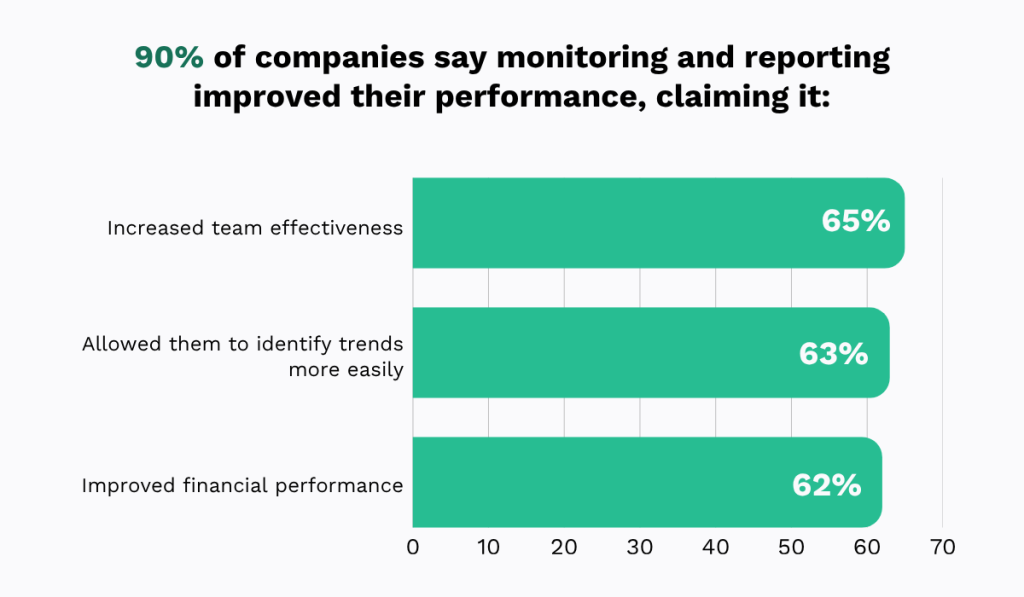
So, don’t skip this final step, as this could make all your previous efforts ineffective.
Pay attention to the data, and let it guide your decisions toward more efficient, cost-effective, and reliable maintenance operations.
Conclusion
Remember, the backlog isn’t the real enemy, and the goal isn’t to eliminate it.
Instead, focus on being proactive with your maintenance efforts and thinking more strategically.
Do this, and soon you’ll realize: when you rely on data and ensure your team has everything they need to do their jobs effectively, everything runs much more smoothly.
In other words, the objective isn’t necessarily to do more work, but to do better work.
And with your CMMS, you can achieve exactly that.