
Get a Free WorkTrek Demo
Let's show you how WorkTrek can help you optimize your maintenance operation.
Try for freeKey Takeaways:
- 86% of employees say job training is important to them.
- Workers spend 2 hours a day looking for information they need to do their job.
- Maintenance managers are digitizing their operations to increase efficiency.
If you’ve been struggling with poor PM schedule compliance, unexpected cost increases, or unplanned downtime, it may be time to take a closer look at how you manage your maintenance logs.
These records are easy to overlook, yet they quietly shape every maintenance decision you make.
Small errors, typos, and inconsistencies may not raise alarms at first, but over time, they blur the truth, leading to misguided strategies and costly mistakes.
That’s why, in this article, we’ll share five best practices to help you nip any inefficiencies in the bud and ensure accurate data that supports smarter, proactive decisions.
Digitize Your Maintenance Log
Moving maintenance records from paper or spreadsheets into a digital maintenance management system is the foundation of effective logging.
With this single change, you can eliminate many errors, inconsistencies, and repetitive tasks, ultimately increasing the reliability of your maintenance log.
That’s precisely why so many organizations are currently digitizing their maintenance operations.
According to Gartner, users of manual and non-specialized tools are frustrated by functional limitations, inefficiency, and poor user experience, and are seeking a better alternative.
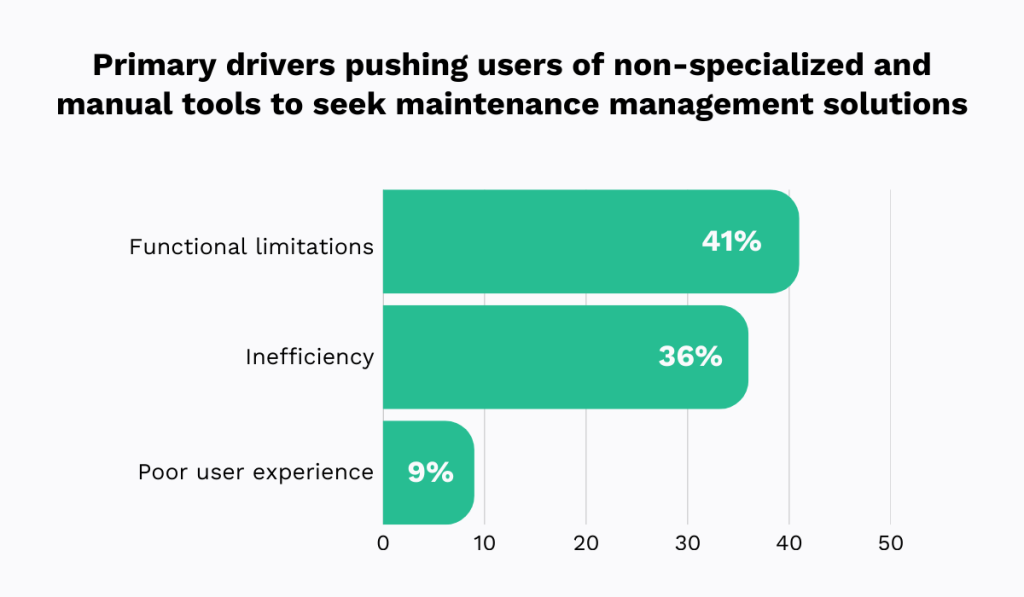
Many report spending hours sorting through data across multiple platforms or chasing technicians for updates.
In the end, they spend more time managing data than managing maintenance.
CMMS tools are the most widely used solution to this issue.
Daniel Golub, Sales and Marketing Leader specializing in SaaS businesses, specifically in CMMS, explains why:

Unlike manual record-keeping methods, CMMS platforms centralize all vital data, serving as a single source of truth for asset history, maintenance activities, and performance trends.
Everything your team needs is easy to access and can be updated on the go.
Take our own CMMS, WorkTrek, as an example.
WorkTrek enables users to record and track:
- Work requests
- Work orders
- Preventive maintenance
- Inventory
- Asset details, and more.
WorkTrek offers built-in templates with customizable required fields, which enable you to define which information must be entered for each of these documents.
Documents cannot be submitted until all required fields are completed, ensuring your maintenance log remains complete and consistent at all times:
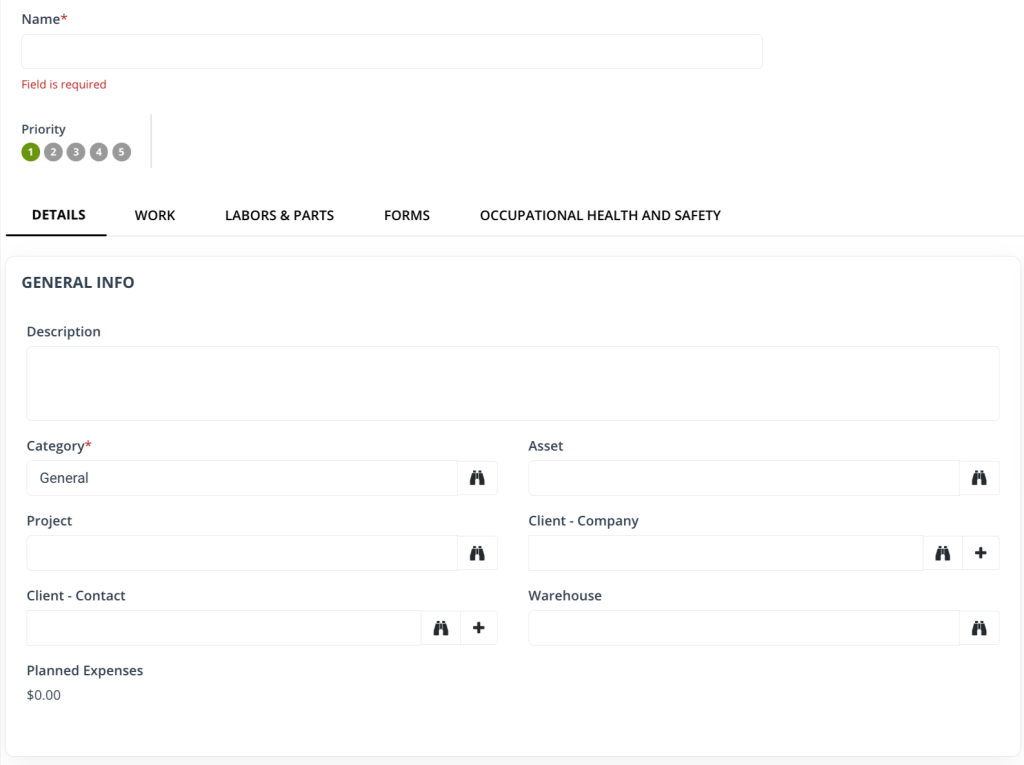
No need to worry about missing data ever again.
Retrieving this information later is just as easy as recording it.
Everything lives in one intuitive, easy-to-navigate system, rather than being scattered across stacks of paper or countless spreadsheets.
With just a few clicks, you can check a work order’s status, a spare part’s availability, an asset’s location, and so much more.
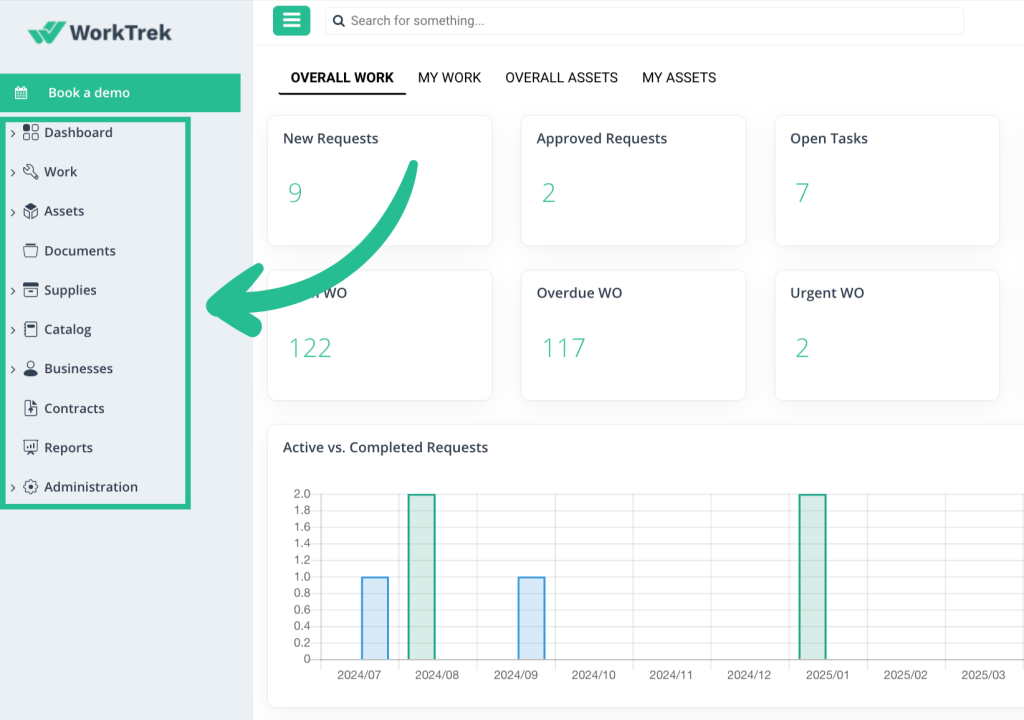
With WorkTrek, your maintenance log is always accurate, always up to date, and always ready to support smarter decisions.
Train Technicians on Proper Logging
It’s also important to ensure technicians understand what to record, how to record it, and why detailed, accurate logging matters in the first place.
Without this kind of training, even the best CMMS won’t make a difference, says Baron Brown, Senior Project Engineer at FST Technical Services, a provider of TICC services:
“I can have a CMMS in my building all day long, but it goes back to personnel. You have to have the proper people there to maintain, to keep things updated, to track it, to check it on a daily basis.”
In maintenance, the importance of safety training or proper equipment handling is well understood, but information management training often takes a back seat.
That’s a mistake.
Record-keeping is foundational to safe, efficient, and reliable maintenance operations, which is why teams must learn about it, too.
Research from SurveyMonkey shows that employees want training, recognizing that it boosts their performance and confidence.
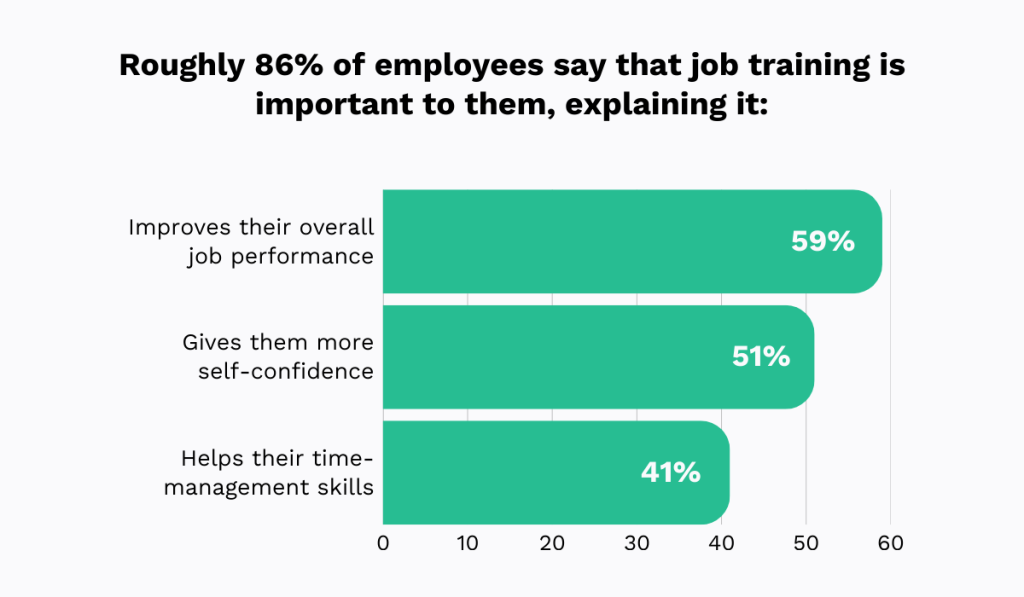
That’s why, when they do receive it, they are more engaged at work and meet or even exceed expectations.
Therefore, if you’re struggling with poor logging despite having a solid system in place, the missing piece may be training, not technology.
When teaching your team maintenance logging best practices, ensure that guidance is always accessible and not delivered as a one-time event.
This is where clear, easy-to-access standard operating procedures (SOPs) come in.
An effective SOP should document all correct steps and record-keeping requirements in a simple, easy-to-follow format, covering areas such as the following:
| Purpose | Explains why the logging SOP exists and clarifies expectations, eliminating ambiguity |
| Definitions and Terminology | Defines standard terms (e.g., downtime, corrective maintenance, root cause) and document naming conventions to ensure consistent data entry and reporting |
| When Logging Is Required | Lists all events and activities that must be logged, ensuring no maintenance work goes undocumented |
| Quality Requirements | Specifies the required level of detail and prohibited entries (e.g., “OK,” “fixed,” or “N/A” without explanation) to improve clarity and consistency |
| Timeliness Requirements | Defines logging deadlines (real-time, end of task, same shift) to prevent the loss of critical information |
| Record Retention | States how long logs must be retained to ensure long-term traceability and compliance |
To take your SOP one step further, consider including real examples.
The Federal Aviation Administration does this exceptionally well, showing how to properly record data through multiple examples.
The document even shows the process of voiding and correcting a log entry:
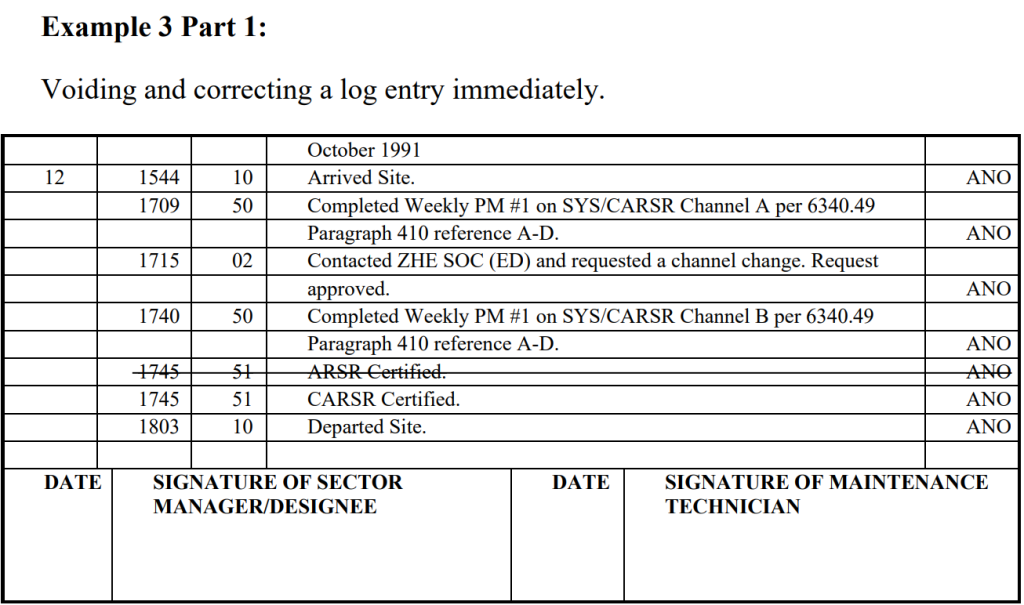
Including examples like these in your own SOPs helps your team understand exactly what’s required, accelerates learning, and, ultimately, improves compliance with logging standards.
Set Clear Responsibilities
It’s particularly important to clearly define who on your team is responsible for creating, updating, reviewing, and approving maintenance log entries.
Doing so eliminates confusion, increases accountability, and reduces data gaps and inaccuracies.
Tamra Chandler, Founder and CEO of PeopleWyze, a human resources and organizational development consultancy, sums it up well:
“Most of us work in teams and are closely connected to our team’s work. When people clearly understand their team’s objectives and their role in achieving them, they become more motivated to contribute and engage.”
Setting clear responsibilities ensures that every aspect of the maintenance logging process is owned and accountable across the entire team, from technicians to supervisors and accountants.
As a result, your maintenance data is more likely to remain accurate, complete, and up to date.
According to a Glean survey, workers often encounter situations where they create a work item only to discover that it already exists.
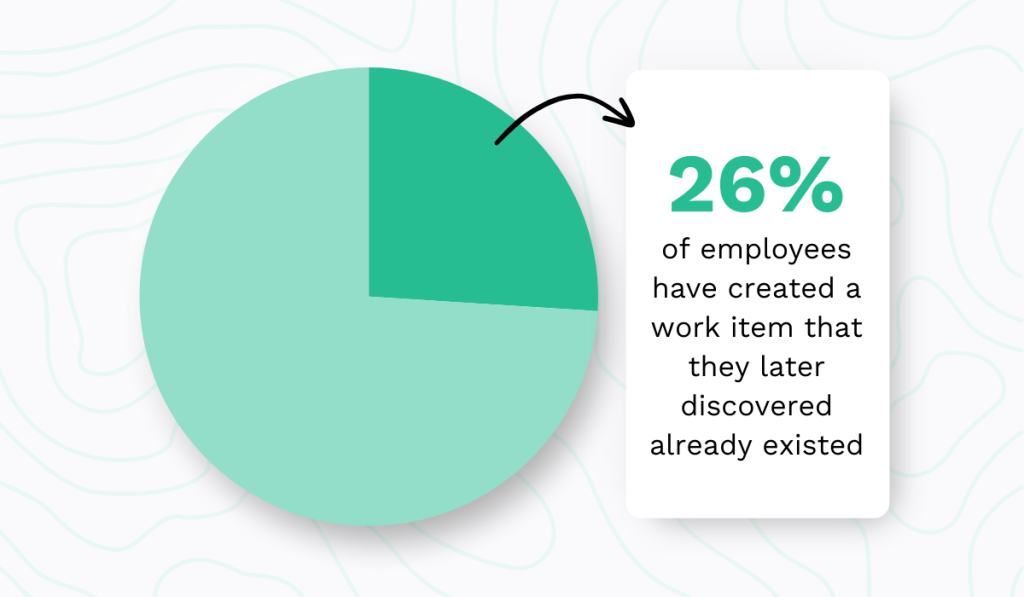
Clearly defined roles and responsibilities help eliminate issues like these.
When it’s obvious who should do what, duplicate entries or missed tasks become a thing of the past.
While this information should be documented in your SOPs, digital maintenance management systems offer an even more effective way to reinforce ownership.
These systems typically allow you to create user profiles that include names, job titles, certifications, and contact information, along with role-based access rights:
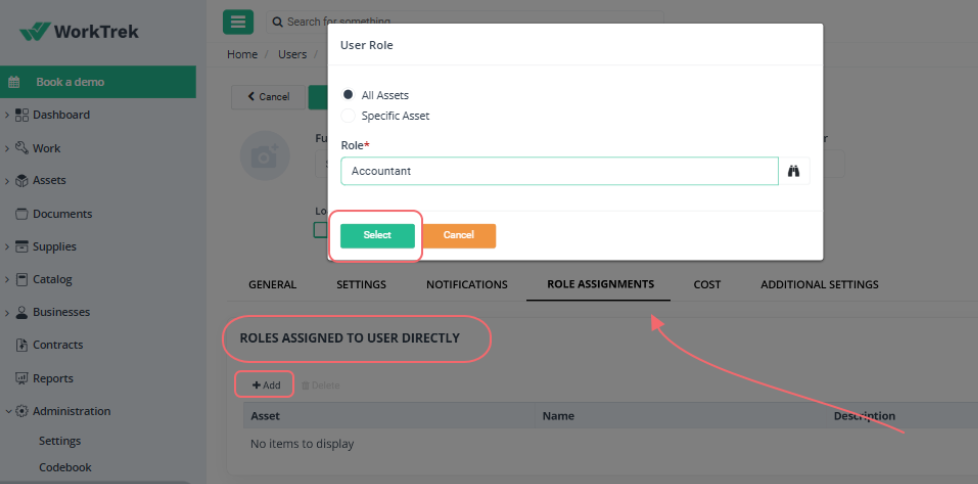
For example, technicians may be able to enter work details but not modify logs once they’re submitted, while supervisors can review, edit, and approve entries.
This automates ownership.
Each team member stays focused on their assigned responsibilities without worrying about tasks outside their role, saving time and improving overall efficiency.
Therefore, if you use a CMMS or another similar tool, be sure to take advantage of this useful feature.
Keep the Log Up-to-Date
Technicians need to record maintenance activities as they happen or immediately afterward, rather than days or weeks later.
The longer they wait, the greater the risk of forgetting or misremembering critical details, which can compromise the overall reliability of the maintenance log.
However, this is often easier said than done, particularly when companies struggle with inefficient record-keeping processes.
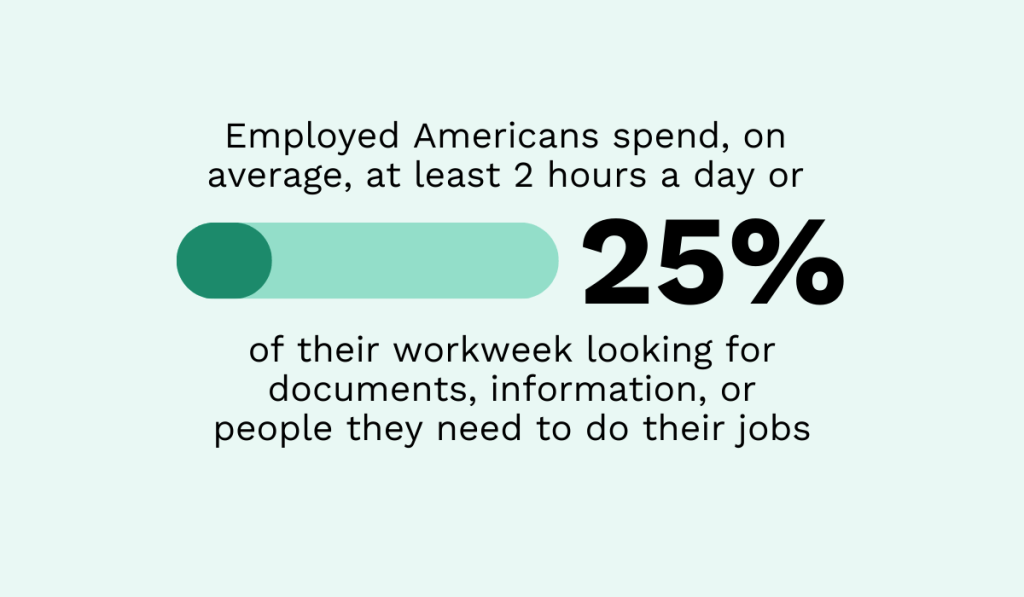
According to the aforementioned Glean survey, American workers spend an average of two hours a day, or 25% of their workweek, searching for documents, information, or colleagues needed to complete tasks.
When finding the right document is so time-consuming, it’s no surprise that many put it off or abandon it entirely.
Fortunately, the solution to this issue is quite straightforward: make it easy to access and update the equipment maintenance log.
Technicians spend most of their day in the field, so they need a system that travels with them.
A mobile app connected to a centralized CMMS or other maintenance platform lets them view and edit data and request additional information on the go.
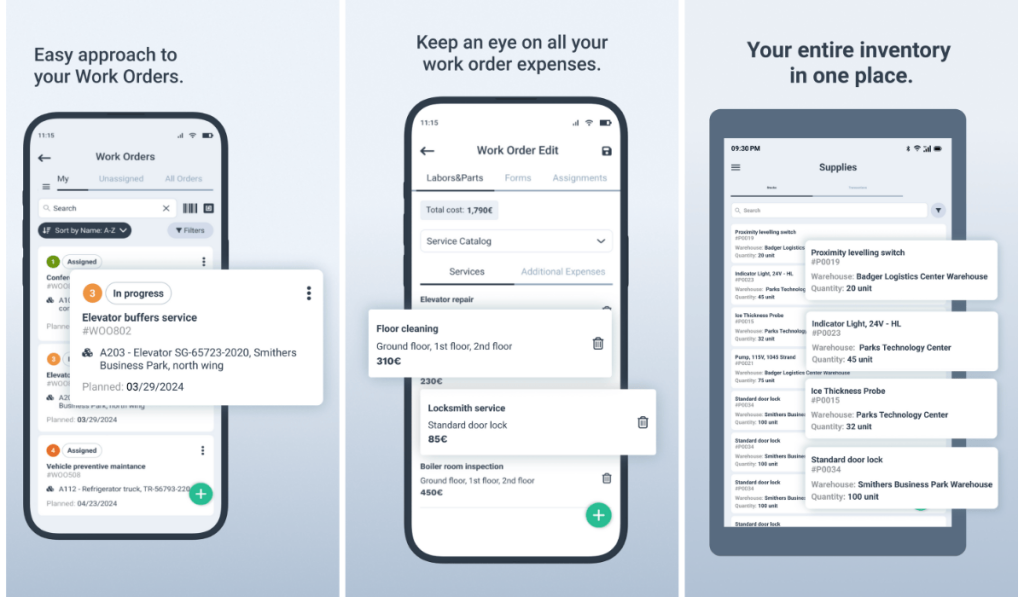
Many such systems now enable users to also attach photos, documents, comments, or signatures for even more context, all from their smartphones or tablets.
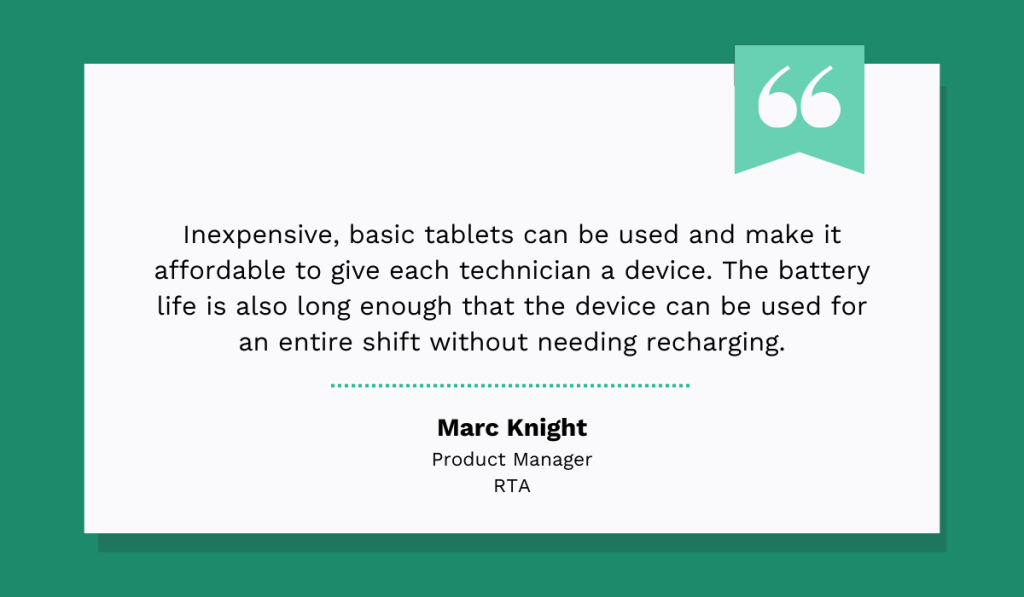
Marc Knight, Product Manager at RTA, a fleet management software provider, notes that mobile technology is perfect for maintenance:
In the end, with mobile solutions, logging maintenance stops being a chore and starts being effortless.
Technicians spend less time on paperwork and more time on actual work, while managers get accurate, up-to-date records.
It’s a system where everyone wins.
Perform Periodic Log Audits
Even with the best training, tools, and workflows, mistakes happen.
That’s why it’s vital to regularly review maintenance logs to ensure their accuracy, completeness, and consistency.
This is the most effective way to identify gaps, errors, or non-compliance before they become the norm and start harming your decision-making.
Christopher Risher, CTO and Senior Director of Consulting and Digital Innovation at RedHelm, an IT management services provider, explains why such due diligence is important:

Your operations depend on the reliability of your data. If you don’t monitor its quality closely, errors will slip through the cracks.
To prevent this, consider establishing a data audit schedule.
You can audit your data weekly, monthly, or quarterly, based on your operational needs, log volume, and available time.
In fact, if time is limited, you don’t even need to review every single piece of information.
Instead, select a random sample for inspection.
Whatever approach you choose, always use a checklist to stay consistent and ensure nothing important gets overlooked.
For example:
- Verify all completed work orders are closed and signed
- Confirm preventive maintenance tasks are completed on schedule
- Check that tasks are correctly prioritized
- Ensure all mandatory fields are filled out
- Review issue descriptions for clarity
Equally important is sharing your findings and feedback with the team, ensuring you always highlight both positive behaviors and areas that need improvement.
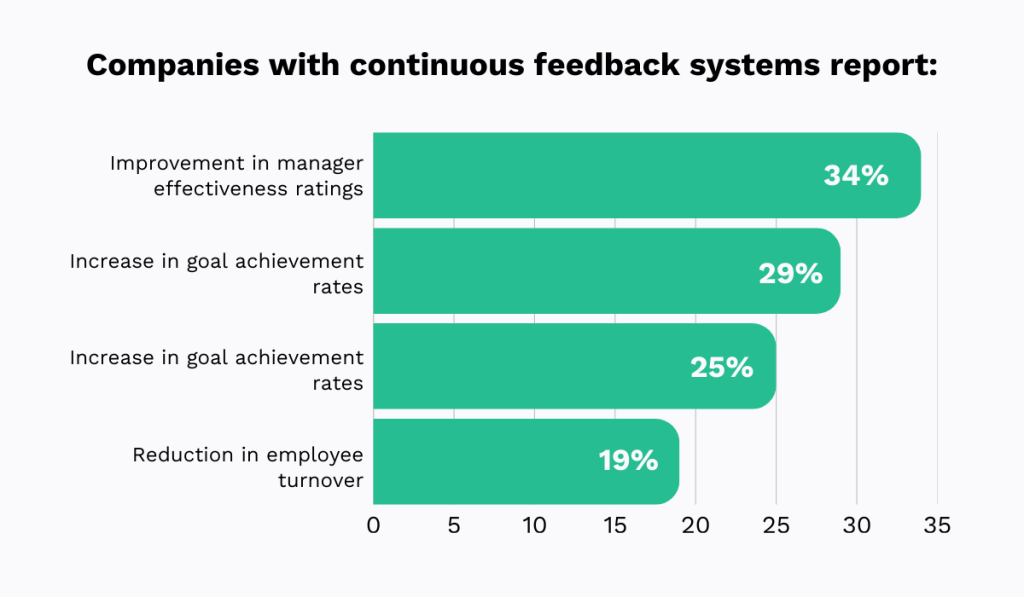
Research by eLeaP shows that organizations with continuous feedback systems see significant benefits, from reduced employee turnover to higher goal achievement rates.
In other words, don’t wait for those monthly meetings or annual performance reviews.
Address issues and recognize good work as soon as you identify them.
When your team sees what’s working and what isn’t in real time, they understand expectations better and take ownership of their work.
Conclusion
As you can see, maintaining an effective maintenance log requires far more effort than many people assume.
That’s why they often fail to invest in the right tools, develop effective workflows, or properly train their employees, thereby missing out on significant opportunities.
You, however, now have the tools to avoid that mistake.
So, work on building a culture of diligent record-keeping and always prioritize data quality.
In no time, you’ll unlock new levels of operational efficiency that your competition can only dream about.