Get a Free WorkTrek Demo
Let's show you how WorkTrek can help you optimize your maintenance operation.
Try for freePicking repair tracking software is harder than it seems.
Most tools on the market offer the same list of features on paper, but the differences show up in the details.
That can include how scheduling is triggered, how much of the repair cycle the system actually covers, and what it costs to get the features that matter most.
This article is for maintenance managers and facility teams who want a clear, side-by-side look at the options available.
WorkTrek
To start off our list, we have WorkTrek, our own CMMS solution with repair tracking capabilities.
WorkTrek is designed to cover repair tracking from start to finish, from the moment a request comes in, all the way through task execution, cost logging, and analytics.
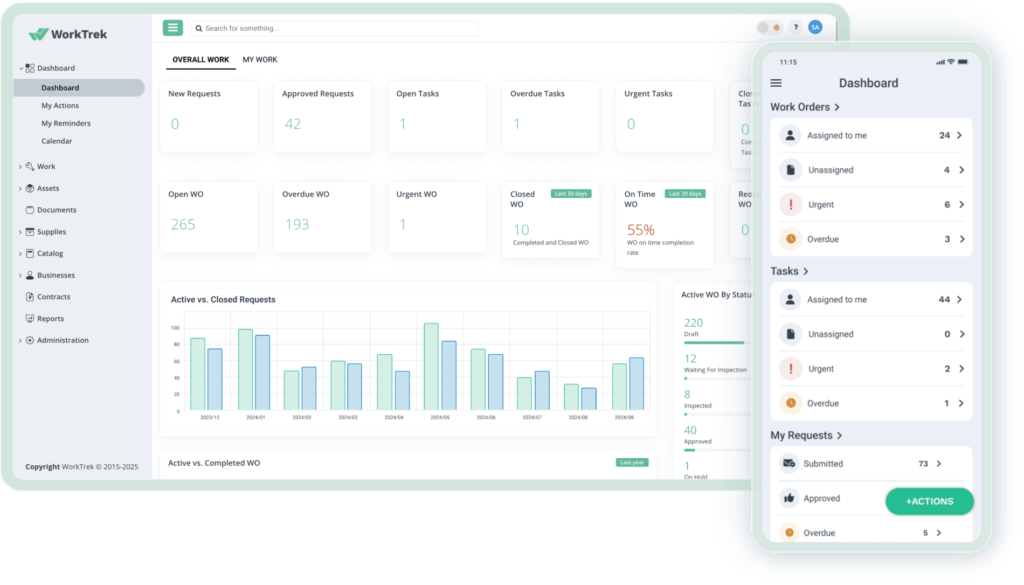
In practice, this means your team handles the entire repair cycle in a single system, without needing to switch between tools or manually reconcile data at the end.
Key features:
- Work order management
- Asset management
- Parts & inventory tracking
- Preventive maintenance
- Checklists & inspections
- Invoicing
- Reports & dashboards
Even if your team handles repair work across multiple locations, WorkTrek’s asset list keeps everything organized.
Each asset has its own profile with details such as location, category, current status, and full maintenance history, so technicians have the context they need before starting a job.
The hierarchy can span from a location or facility all the way down to a specific piece of equipment, as shown below.
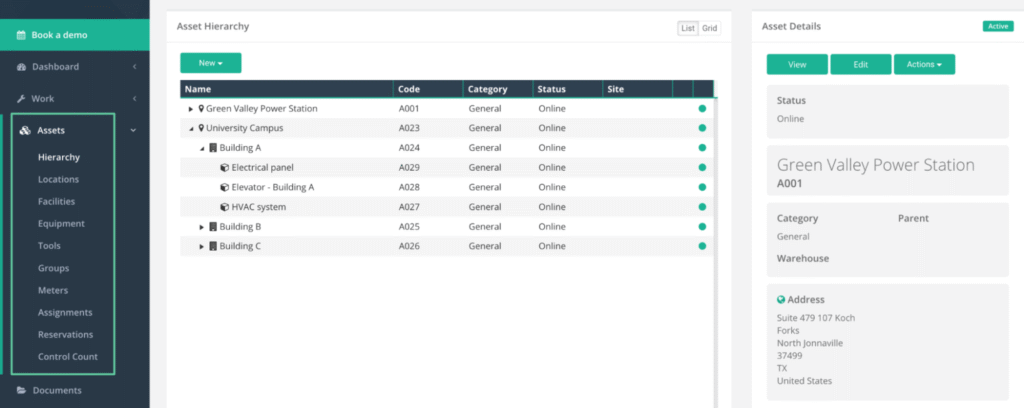
The asset list also helps with planning, since all the information needed to prioritize and schedule work is in one place.
For any asset, repair requests can be submitted through the desktop or mobile app, with instant notifications sent to the assigned workers.
Once a work order is completed, technicians log the relevant details on it directly: photos, time spent, parts used, and any notes.
Right after that, you can generate invoices from that work order data in a few clicks, even across multiple contractor organizations at once.
The table below shows how completed and pending work orders map to invoicing status per contractor.
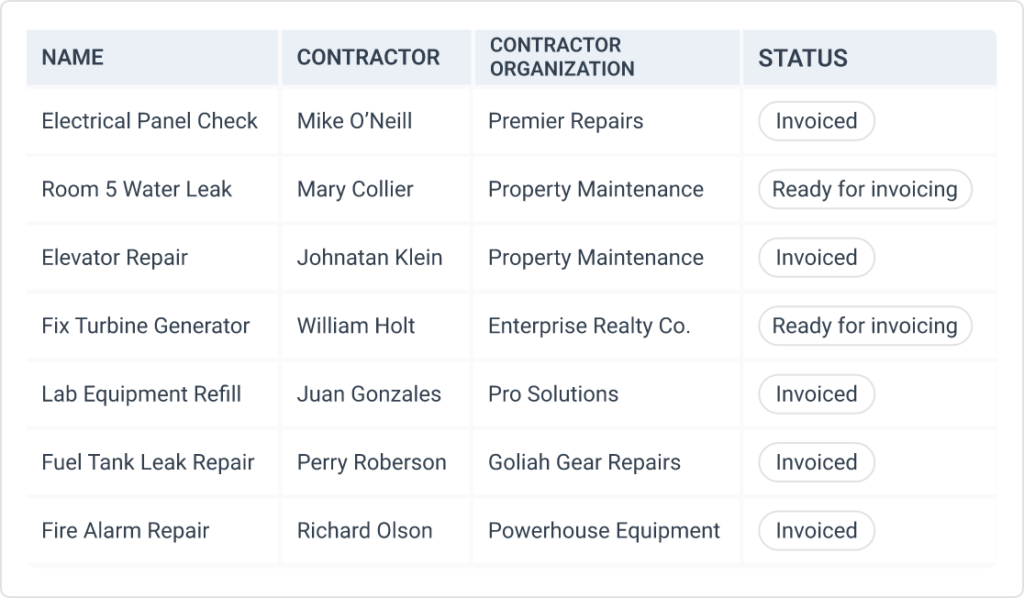
This makes WorkTrek a particularly practical option for facility managers and service teams working with external contractors, where accurate billing without extra admin work matters.
That being said, WorkTrek works well for maintenance and facility teams of all sizes, and it tends to work best for teams that need straightforward end-to-end repair tracking.
As for pricing, there are three paid tiers starting at $29 per user per month.
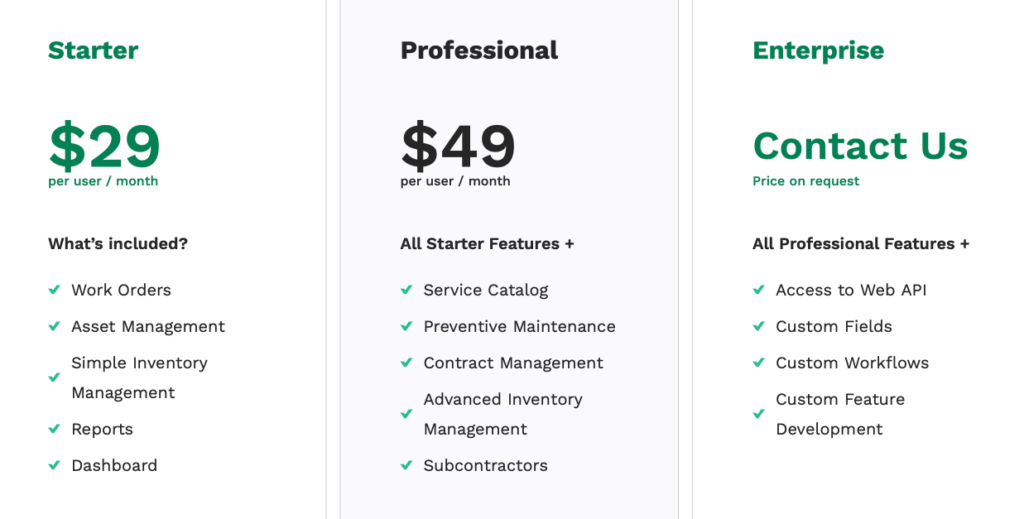
The features available scale with the tier, with the Enterprise plan adding custom fields, custom workflows, and API access, which are generally better suited to larger organizations with more specific operational requirements.
You can also try the platform for free before committing to a plan.
If you’re looking for a system that handles the full repair cycle without requiring additional tools, WorkTrek is a strong starting point.
Zoidii
Zoidii positions itself as an easy-to-use CMMS built for teams transitioning from pen-and-paper or spreadsheets.
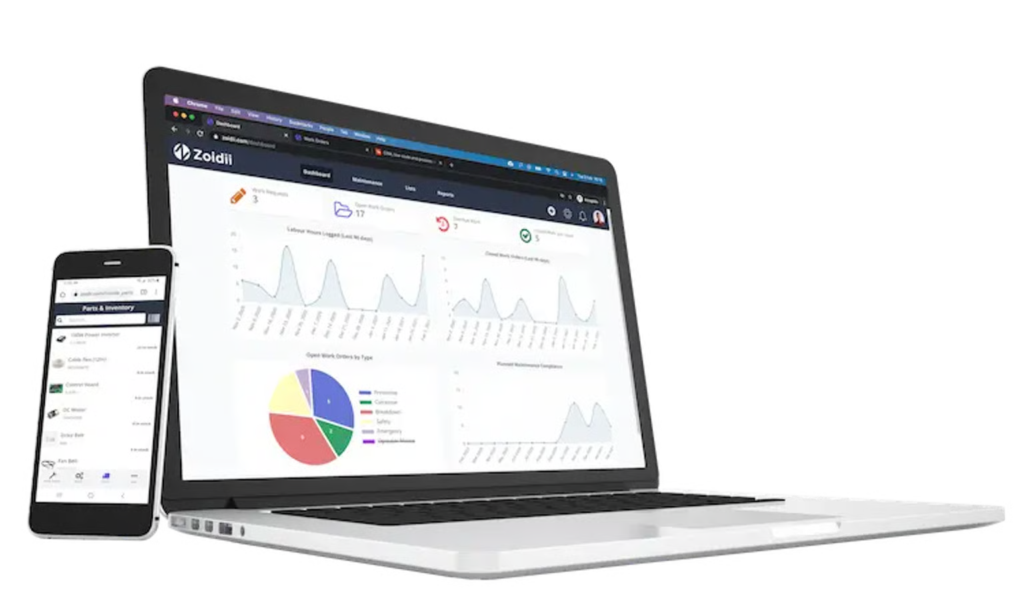
As such, it offers a relatively simple set of features for repair tracking, with an interface designed to be picked up quickly by teams with little prior CMMS experience.
Key features:
- Work order management
- Preventive maintenance
- Parts and inventory management
- Purchasing
- Checklists
- Nested PMs
Beyond the core work order and preventive maintenance (PM) features, Zoidii lets teams track and manage purchase orders directly within the system.
When a repair requires parts that are out of stock, technicians or managers can raise a purchase order, track its status, and connect it back to the repair record, as shown below.
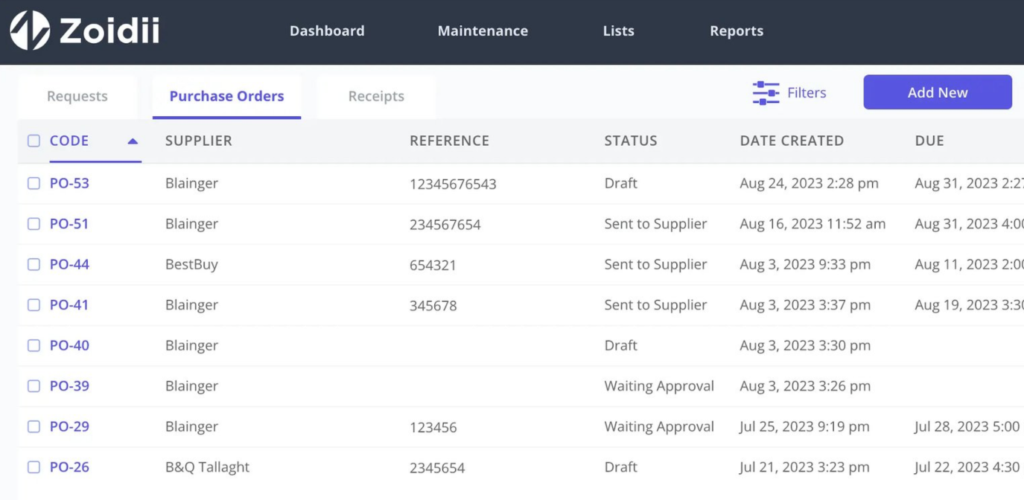
For repair tracking teams, this is useful as it keeps parts procurement tied to the actual work, rather than managing it in a separate spreadsheet or email thread.
It reduces the risk of repairs stalling because nobody knows whether parts have been ordered or not.
Also, while Zoidii does offer features like nested PM, scheduling is still limited to time-based triggers.
Compared to platforms like WorkTrek, which support PM scheduling based on meter readings such as operating hours or pressure, and can automatically generate work orders, Zoidii’s PM capabilities are less responsive to actual asset conditions.
Additionally, nested PMs are only available at Zoidii’s highest paid tier, priced at $75 per user per month.
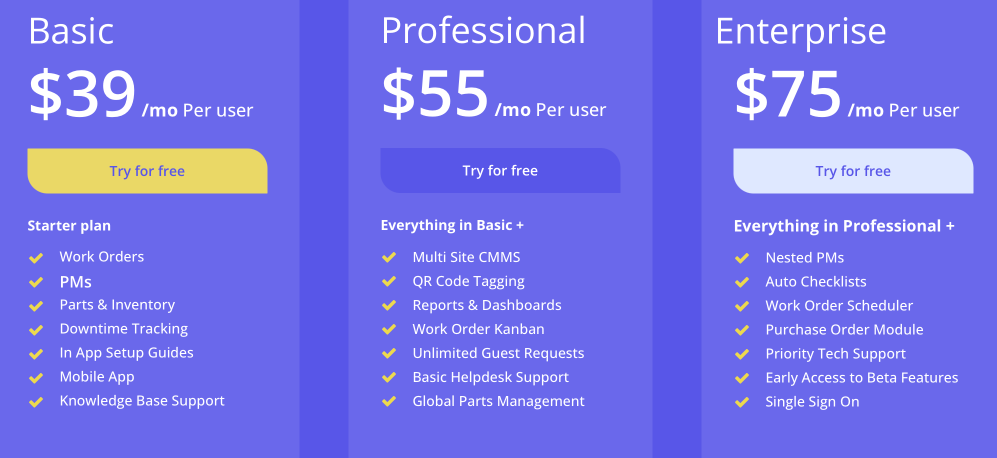
On the Basic plan at $39 per user per month, you only get standard time-triggered preventive maintenance.
Overall, if you are just stepping away from paper notes or spreadsheets and want to explore a simple solution, Zoidii is worth trying alongside the other systems on this list.
MPulse Software
Next on our list is MPulse Software, an older CMMS that has been on the market for 30 years.
It offers a range of standard repair tracking features along with more advanced capabilities similar to some of the more capable modern solutions on our list.
That said, its interface is noticeably less intuitive compared to most other options in this article, which can slow down adoption for less technical teams.
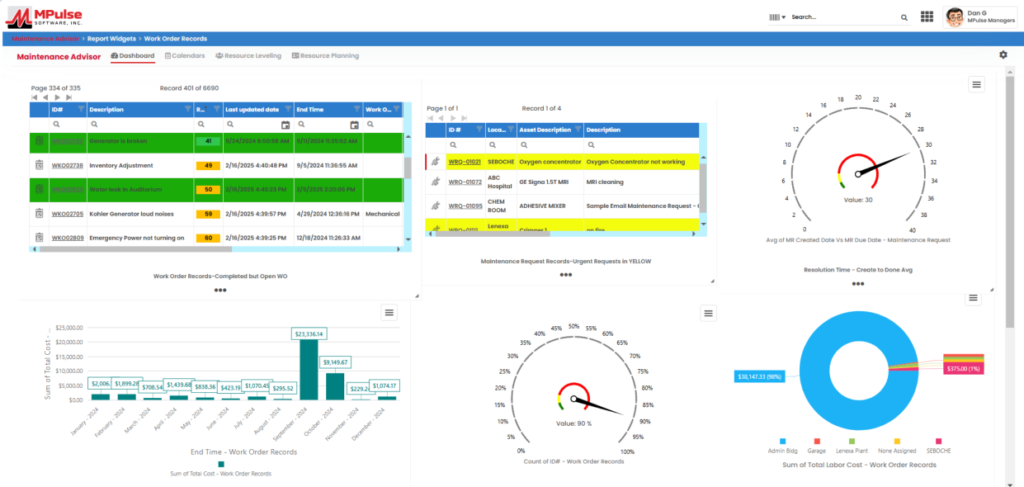
Here are some of its key features:
- Work order management
- Asset management
- Inventory tracking
- Barcode scanning
- Purchase requisitions
- Employee qualification tracking
- Reports & dashboards
Compared to the other solutions here, MPulse has more structured qualification tracking for your workers.
Within each employee record, you can define qualifications, set skill levels, log training dates, and track certification expiration dates, as shown in the example below.
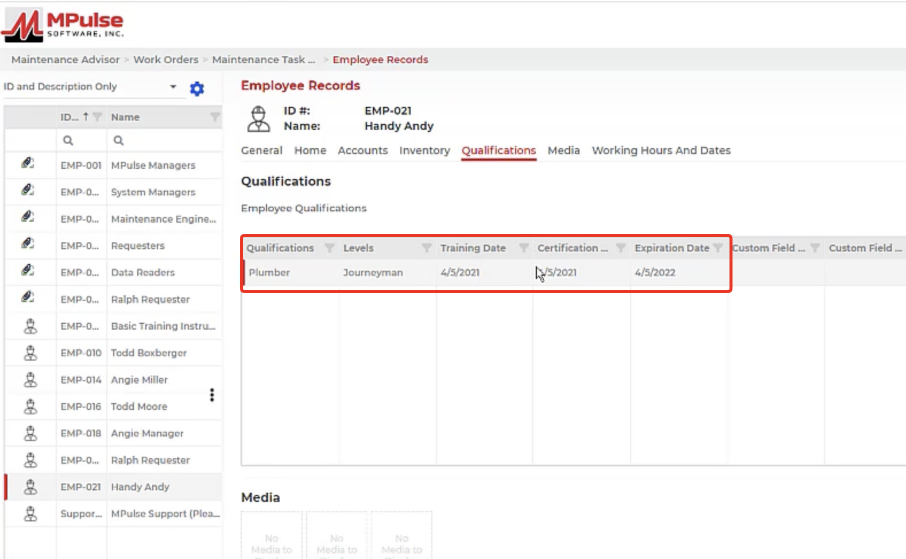
Work orders can then be assigned only to workers who hold the right qualifications for the job, reducing the risk of unqualified personnel handling specialized repairs.
Combined with the system’s role-based access controls, this makes MPulse a well-suited option for compliance-conscious repair teams with complex workforce needs, such as those in regulated industries where technician certifications are tied to specific asset types.
Pricing covers three tiers, which sit on the higher end compared to most of the other tools on this list.
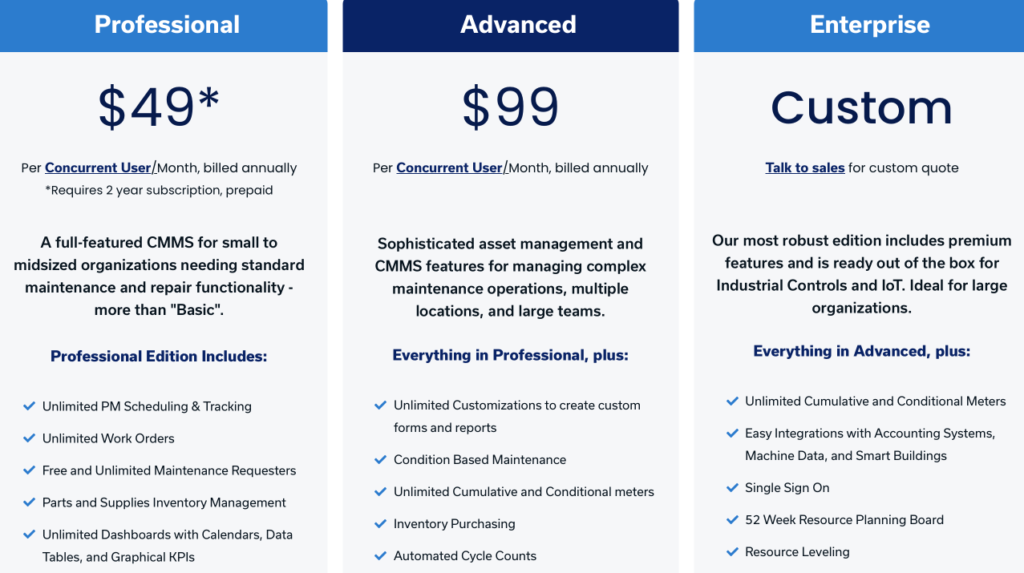
It’s worth mentioning that condition-based maintenance and qualification tracking are only available at the higher tiers, with the Enterprise tier requiring a custom pricing quote.
MPulse is a reasonable choice for mid-to-large organizations that need structured workforce management built into their repair tracking system, though smaller teams may find the cost and the interface harder to justify.
Eptura (Ex-Hippo)
Fourth on our list is Eptura, formerly known as Hippo CMMS, a maintenance management platform that has expanded significantly in scope since its rebranding.
At its core, it is a CMMS for work order management, asset tracking, and preventive maintenance, but its standout capabilities are around location-based and 3D asset management.
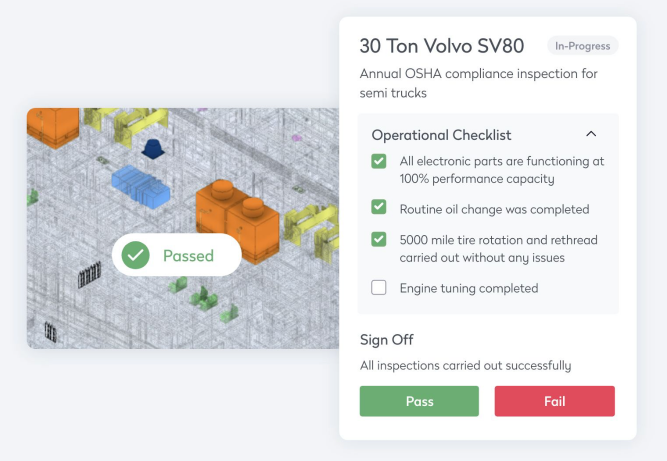
Through its BIM (Building Information Modeling) viewer, teams can place assets within an interactive 3D model of a facility, link repair history and inspection checklists directly to those locations, and manage work in the context of where it physically happens.
Key features:
- Work order management
- Asset management with BIM viewer
- Inventory tracking
- Inspection Checklists
- Vendor management & invoicing
- Repair history tracking
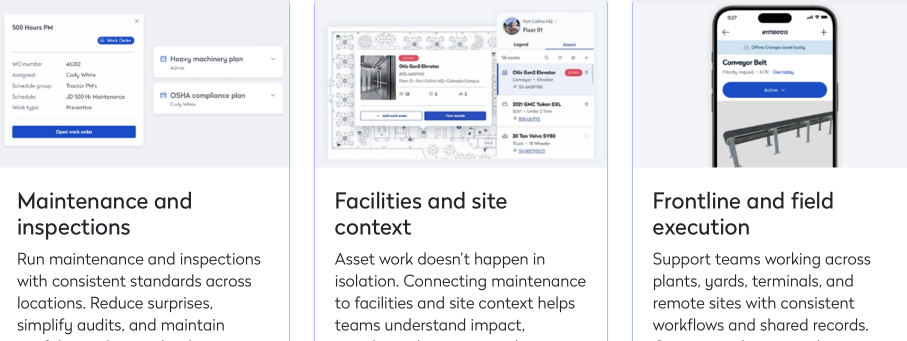
It is also worth noting that Eptura is not a single standalone product but a platform that brings together multiple specialized solutions, covering asset management, workplace management, and field execution.
As such, it can serve as an integrated system for teams that need to connect maintenance and repair activities, facilities context, and frontline work across sites.
This breadth can be either a strength or a challenge, especially for smaller or mid-sized teams.
Also, while its feature depth is comparable to something like MPulse Software, Eptura is more tailored toward organizations managing complex, multi-building environments where spatial context for assets matters during repair planning.
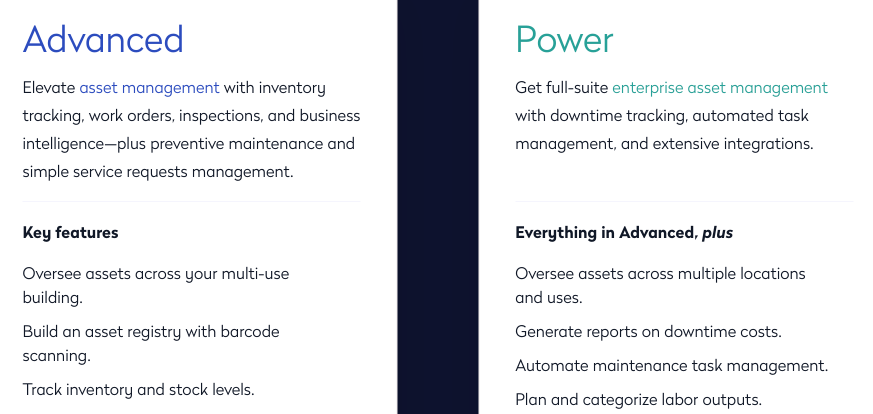
In terms of pricing, if we look at just the Eptura Assets solution, there are two tiers: Advanced and Power, with multi-location tracking, downtime cost reporting, and task automation available only at the higher Power tier.
Overall, Eptura is best suited for large operations in facility management, commercial real estate, and industrial environments.
If you are running a smaller operation, the alternatives on this list will likely be a better fit.
Oxmaint
Oxmaint is a CMMS with a strong AI focus, which makes it distinct from most other systems on this list.
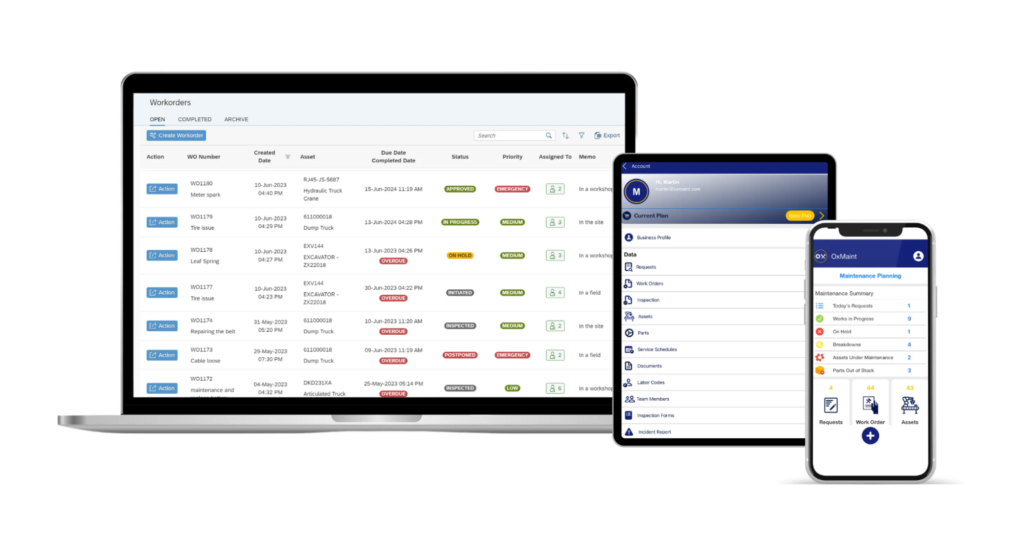
The standard maintenance management features are all there, such as work orders, asset tracking, and preventive maintenance, but several of them are extended with AI-driven capabilities layered on top.
Key features:
- Work order management
- Preventive maintenance
- Synapse AI (AI-powered scheduling and intelligent work order routing)
- AI predictive maintenance
- AI Vision for visual equipment inspections
- AI document workflow
As an example of how Oxmaint’s AI features work, the AI Document Workflow allows teams to upload any maintenance document, such as a service manual, inspection report, or equipment log.
The system then extracts and categorizes the content, analyzes it for patterns, forecasts potential failures, and surfaces recommended actions, as shown in the six-step flow below.
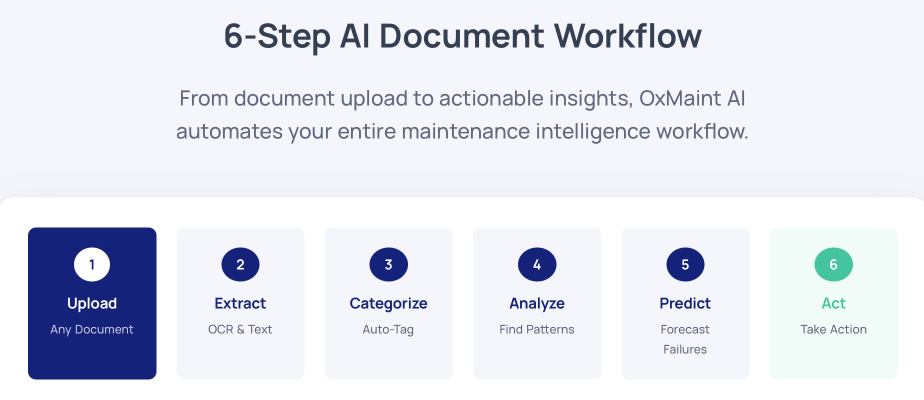
For teams working at scale, this can help identify repair tasks that might otherwise be missed in large volumes of documentation, allowing issues to be addressed before they become breakdowns.
Along similar lines, the AI Vision feature lets technicians point their phone camera at a piece of equipment, and the system visually inspects it for signs of wear or potential failure.
We cannot speak to how effective these AI features perform across all equipment types, but they could serve as a useful additional check, particularly for less experienced technicians.
When it comes to pricing, there is one free tier and three paid options.
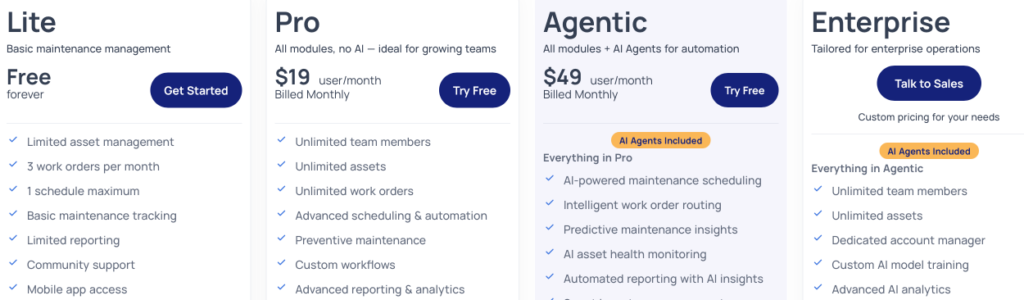
The AI capabilities are only unlocked from the Agentic tier at $49 per user per month.
This means the Pro plan at $19 per user per month gives you a functional CMMS without any of the AI features, so the AI is effectively a separate upgrade decision, not just a bonus included at a mid-tier price.
If AI-assisted repair detection and scheduling are important to your operation, Oxmaint is the only tool on this list where that is a core part of the product.
Click Maint
Finally, we have Click Maint, a CMMS built for simplicity, not unlike Zoidii.
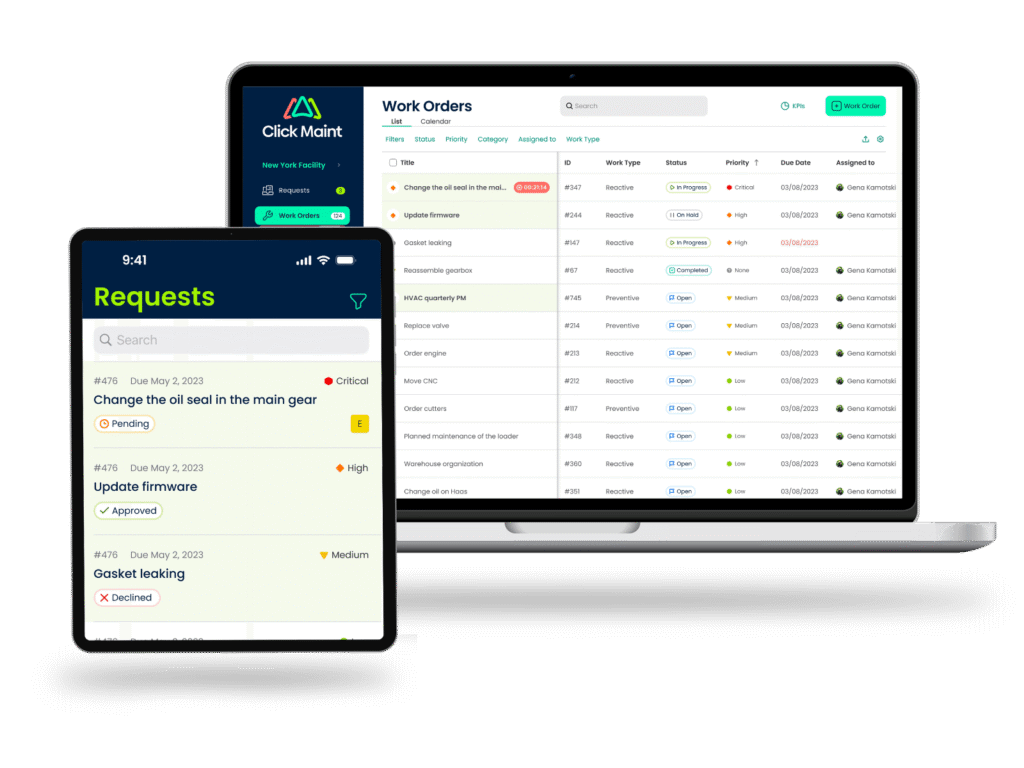
While Zoidii is aimed primarily at manufacturing and facilities teams, Click Maint covers a broader range of industries and offers a similarly clean, low-friction experience that most team members can pick up without much training.
Key features:
- Facility management
- Team collaboration capabilities
- Inventory & parts tracking
- Vendor management
- Inspection checklists
- Reports & KPIs
You can expect all the standard repair tracking functionality from Click Maint, though it’s less specialized for equipment where maintenance needs to respond to actual usage or asset conditions.
For example, the preventive maintenance feature lets you schedule work and track progress alongside parts used, labor hours, and other costs, as shown below.
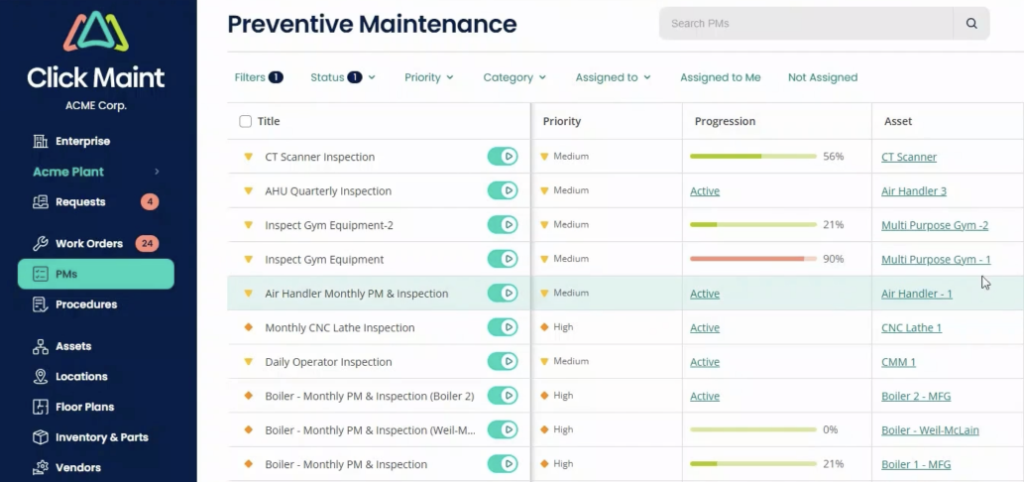
However, scheduling is limited to time-based intervals only. So teams managing equipment with maintenance triggers from meter readings or failed inspections would need to look at options like MPulse Software or WorkTrek.
Some of the key industries Click Maint serves include hospitals and clinics, educational facilities, hotels and resorts, and food and beverage processing.
For those environments, the feature depth is well-suited to the work, since maintenance tends to be facility-based and time-scheduled rather than condition-driven.
Combined with features like task checklists for standard operating procedures and work order history tracking, it gives these teams enough structure to stay organized.
Pricing is straightforward: one plan with all features included, at $42 per user per month.
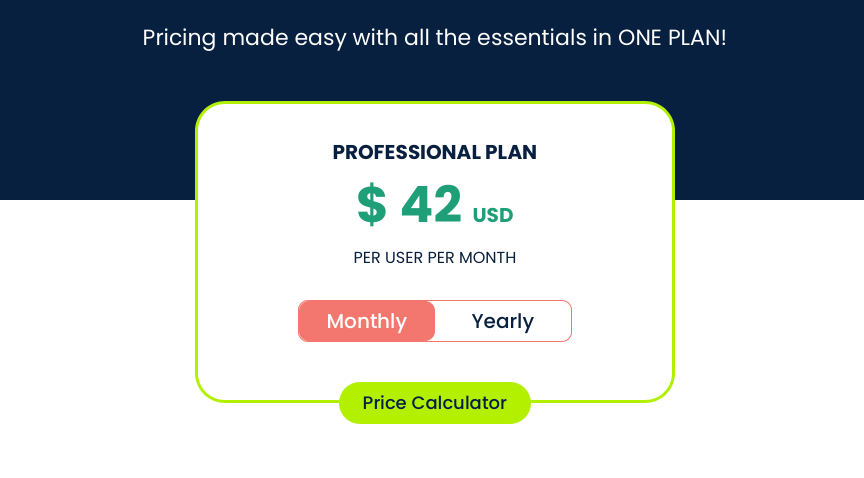
Click Maint also offers a 30-day free trial, which is worth taking advantage of before committing.
If you run a facility where quick adoption and simplicity matter more than advanced maintenance, Click Maint is a practical option to consider.
Conclusion
That covers the six repair tracking software solutions on our list.
Each system covered here takes a different angle, whether that is feature depth, ease of use, AI capabilities, or how well it fits a particular type of operation.
The goal was to give you enough to make an informed shortlist.
From here, the best next step is to explore some trials or demos.
Pick the one or two systems that best match your team’s size, workflow, and budget, and get started.