
Get a Free WorkTrek Demo
Let's show you how WorkTrek can help you optimize your maintenance operation.
Try for freeKey Takeaways:
- Facility managers rank work order tracking as their single biggest time-consuming task.
- CMMS is the most widely adopted type of repair tracking software.
- Repair tracking tools work best when workflows are mapped out before implementation.
Keeping track of repairs gets complicated quickly, especially when teams rely on spreadsheets or lack dedicated systems.
And that’s probably why you’re here.
If you’re a maintenance or facilities manager looking for a clearer picture of how repair-tracking software works and whether it’s worth adopting, this article is for you.
In this overview, we will cover what these systems do, the main types available, their benefits, and what to watch out for during implementation.
What Repair Tracking Software Does
In essence, repair tracking software helps teams manage the full lifecycle of repair work, starting from when an issue is reported until it is resolved.
It’s used across a wide range of settings, from manufacturing plants to property management, or simply wherever equipment and assets need regular attention.
Most solutions share a common set of core features, some of which are shown below.
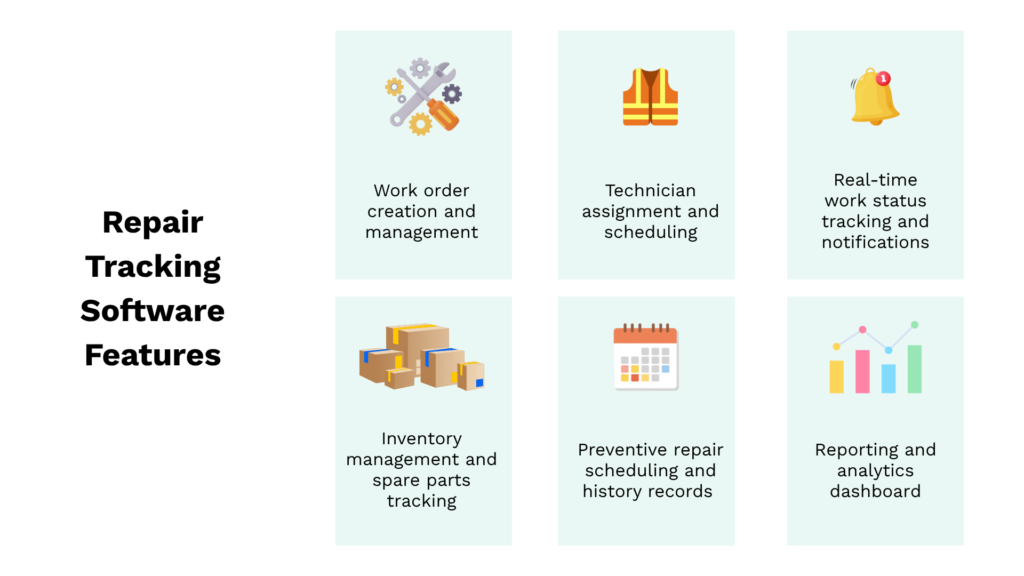
At a minimum, these systems track work orders from the initial request through assignment and execution.
The best tools make this process straightforward at every step, with managers able to create and assign work orders from a desktop, while technicians in the field submit requests and update their progress from a mobile device.
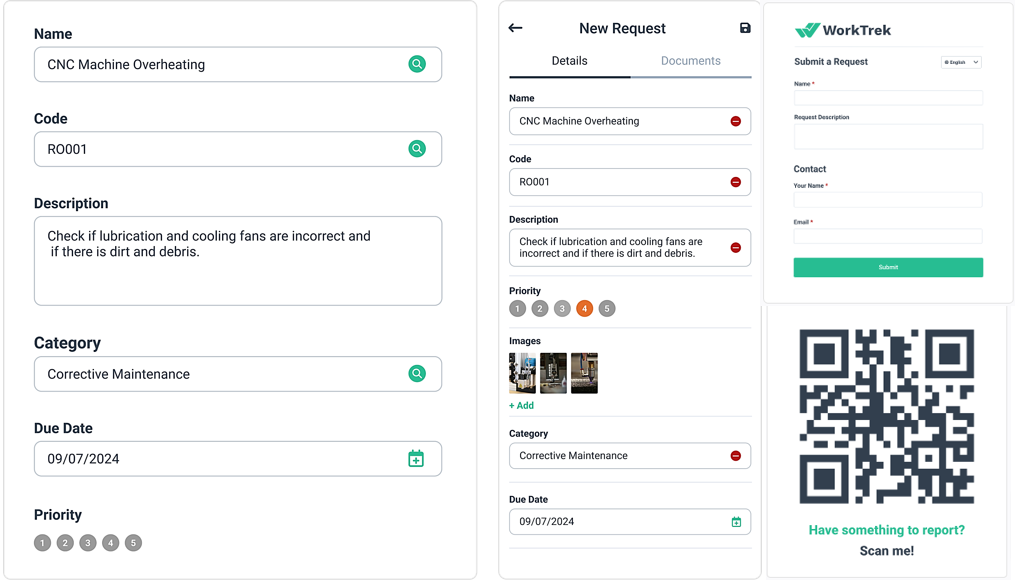
Beyond work order tracking, a good repair tracking system should handle the full process end-to-end.
This includes things like tracking parts used during a repair, or maintaining a service history for each asset over time.
Many systems also support preventive maintenance scheduling alongside reactive work.
The overall goal with these systems is to give teams a centralized place where all repair activity is recorded and easy to act on.
Why You Need Repair Tracking Software
You might wonder why you’d need specialized software when spreadsheets can technically get the job done.
The answer comes down to efficiency and how well you’re using your team’s time.
According to JLL’s 2024 State of Facilities Management Technology report, facility managers ranked work order tracking as the single biggest time-consuming task, with WO assignment and dispatch coming in fourth.
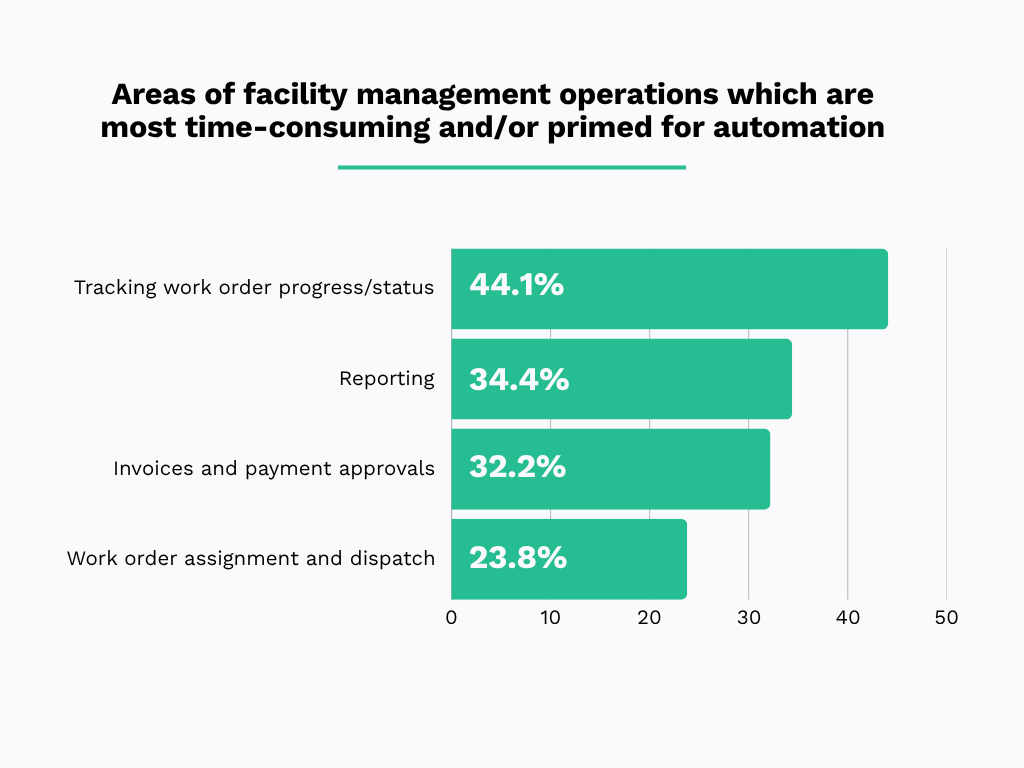
In other words, a large portion of a manager’s time goes towards WO management.
Not to mention that, for technicians, time spent tracking down job details or updating records manually is time not spent on repairs.
That adds up quickly in terms of labor costs and delays.
Repair tracking software helps by automating or significantly optimizing these tasks.
The image below summarizes a case study from McKinsey that shows how this plays out in practice.
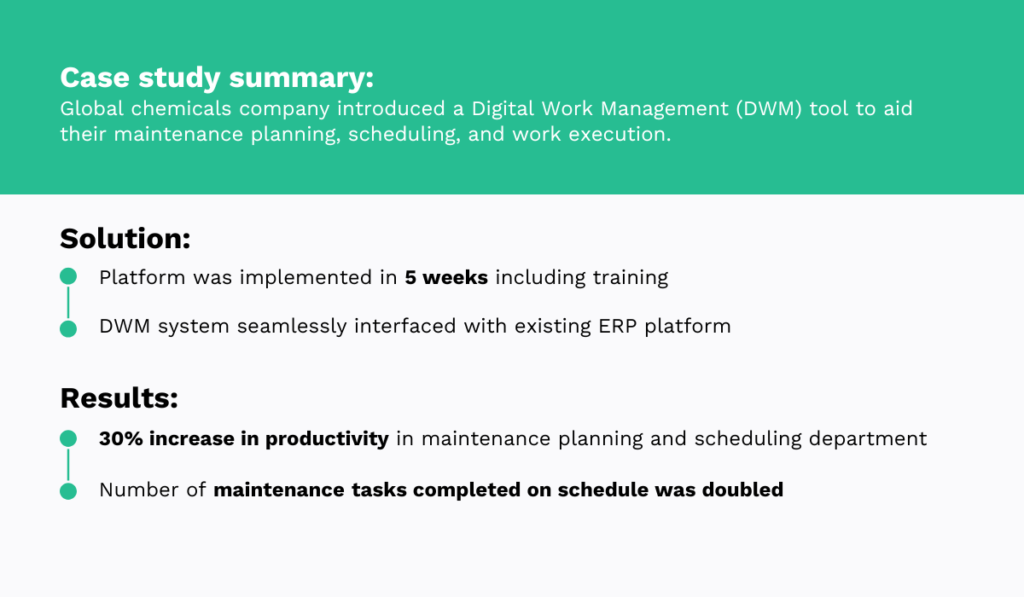
While the chemicals company needed a few weeks to set up the new platform, the productivity gains are well worth it, with completed maintenance tasks roughly doubling after implementation.
These results are something that Richard Jeffers, managing director at Two6 Services and asset management veteran, would not find surprising.
In fact, in a comment for The Manufacturer, he had the following to say:
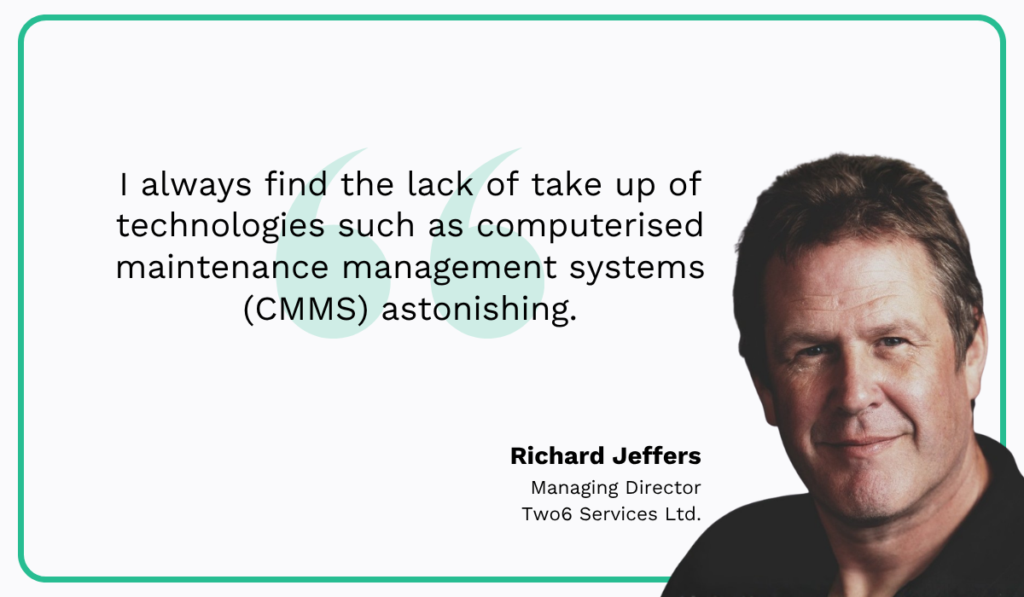
Jeffers points out that, unfortunately, underreliance on repair and maintenance tracking systems is a recurring issue, with many teams still running their operations out of Excel.
However, he makes the case that as maintenance becomes more preventive and data-driven, teams without the right tools will fall further behind.
Getting the right repair tracking system in place is a straightforward way to close that gap.
Examples of Repair Tracking Software
To get a better sense of what repair tracking looks like in practice, it helps to examine specific solution types.
We’ll cover three types of systems, going over what they do and some examples of each.
Enterprise Asset Management (EAM) Software
EAM software is designed to manage assets across their entire lifecycle, from acquisition through disposal.
These systems are typically adopted by large organizations because of the scale and complexity of what they’re managing.
A large hospital or utility company, for example, can have thousands of assets spread across multiple sites, and keeping track of all of them without a dedicated system quickly becomes unmanageable.
The features that come with EAM software reflect that scope, as shown in the table below.
| Feature | Description |
|---|---|
| Asset lifecycle management | Tracks assets from acquisition through disposal |
| Financial tracking | Monitors depreciation, ROI, and total cost of ownership |
| Work order management | Creates, assigns, and tracks maintenance tasks |
| Compliance and audit trails | Maintains records for regulatory requirements |
| Multi-site management | Manages assets across multiple locations |
As you can see, EAM software covers a wide range of functions, with the full asset lifecycle at the center of everything.
IBM Maximo is one of the most widely known platforms of this type, used across a range of industries from energy to manufacturing.
Shown in the image below is its operational dashboard, featuring capabilities for creating and tracking work orders, predictive maintenance, and analytics.
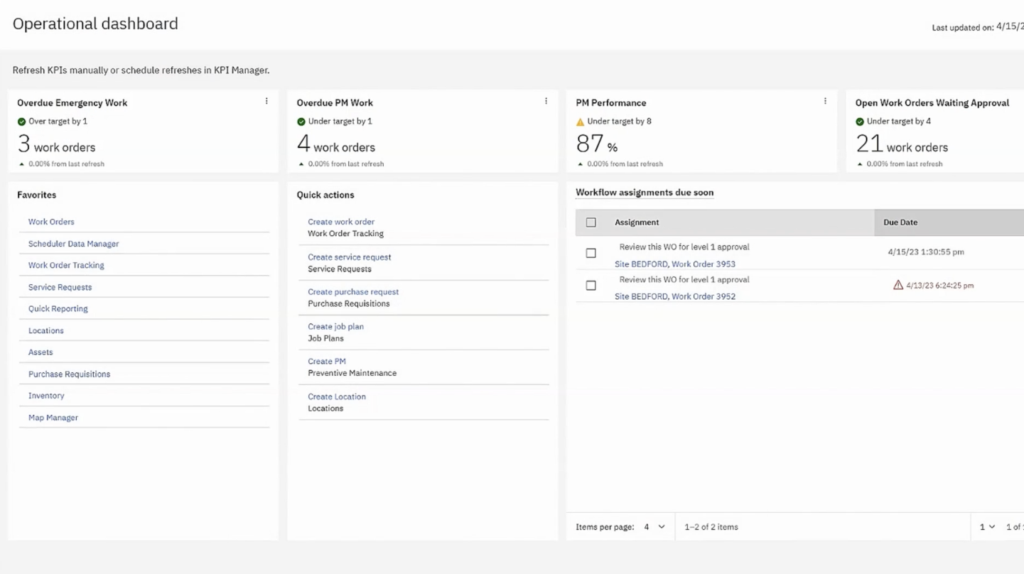
Beyond these core features, a tool like Maximo includes AI and IoT-driven predictive maintenance, compliance tracking, and spatial asset management.
While some of these features are shared with other repair tracking tools, the scale and depth of EAM platforms mean they tend to be less focused on the day-to-day simplicity that field technicians or smaller teams need.
They are systems built for enterprises, which means there is a learning curve involved, and implementation typically requires significant time and resources.
For organizations with large, complex asset portfolios, this might be a worthwhile investment, while for others, it may be more than necessary.
Field Service Management (FSM) Software
FSM software is designed with the main focus being the logistics side of repair work, making sure the right technician gets to the right job as efficiently as possible.
The feature set follows that priority, covering things like dispatch, scheduling, route planning, and real-time communication between the office and field staff.
| Feature | Description |
|---|---|
| Dispatch and scheduling | Assigns jobs based on technician location, skills, and availability |
| Route optimization | Plans efficient travel routes between service calls |
| Mobile work orders | Technicians access and update jobs from the field |
| Streamlined communication | Sends real-time arrival estimates and status updates |
| Parts and inventory | Tracks van stock and field parts usage |
| Service contract management | Manages SLAs, warranties, and recurring service agreements |
These tools are built around the idea that the technician is constantly moving, and the system’s job is to make that movement as smooth as possible.
Salesforce’s Field Service Management solution is a good example of how this looks in practice.
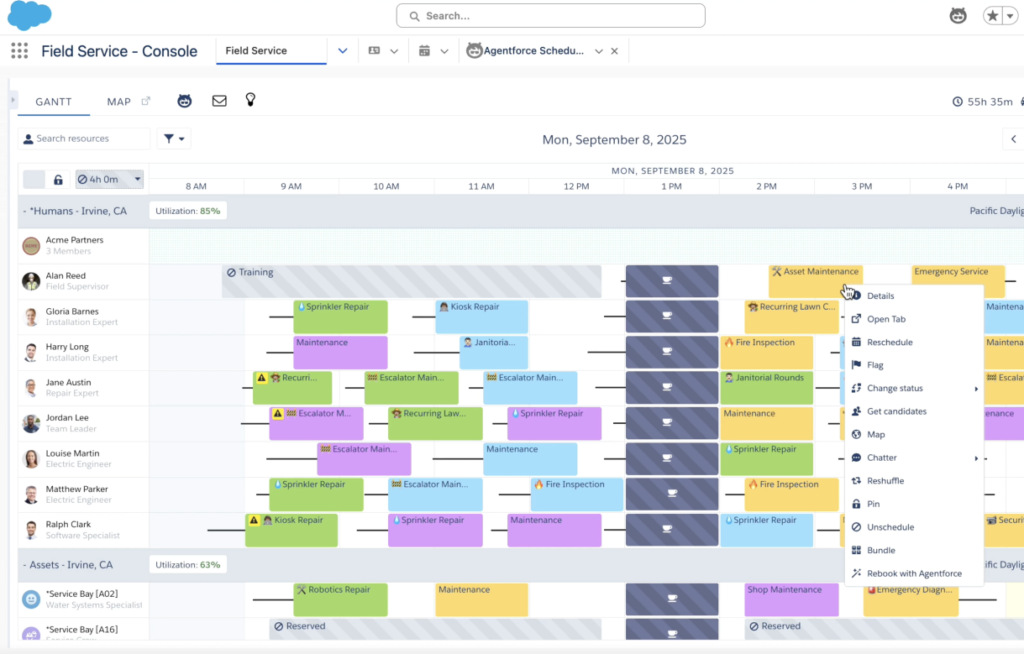
The platform gives dispatchers a real-time view of technician availability and job status, making it straightforward to assign and adjust work as the day unfolds.
It is a strong fit for organizations like telecom providers or home services companies, where dispatching field teams is a core daily operation.
For teams working primarily within a single facility, though, FSM may not be the best choice, as the internal repair tracking and asset history features tend to be lighter.
In that case, a more maintenance-focused system would likely be a better fit.
Computerized Maintenance Management System (CMMS)
CMMS tools are some of the most widely used types of maintenance systems, with data like the following RS report showing wide adoption over alternatives like EAM tools.
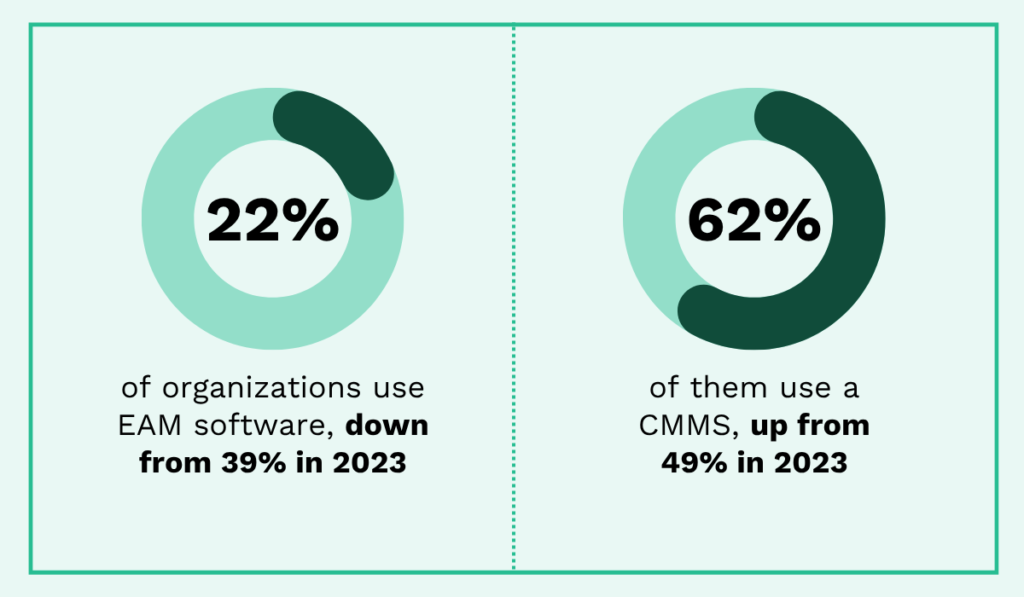
The decrease in EAM software usage in favor of CMMS makes sense.
After all, EAM covers a broader range of financial and enterprise functions, but that added scope can make it more complex than necessary.
So, for most teams, a CMMS is the most practical fit for repair tracking because it is built for day-to-day operations.
The core features of these systems are outlined below.
| Feature | Description |
|---|---|
| Work order management with mobile field access | Creates, assigns, and tracks maintenance tasks from request through completion |
| Preventive maintenance scheduling | Automates recurring maintenance based on time intervals, meter readings, or usage thresholds |
| Asset management | Maintains a centralized registry of equipment with service history, warranties, and location data |
| Inventory and parts tracking | Monitors spare parts stock levels, usage per work order, and triggers reorders when stock is low |
| Reporting and analytics | Tracks KPIs such as mean time between failures, maintenance costs, and technician productivity |
WorkTrek is a good example of a CMMS built with repair and maintenance teams of all sizes in mind.
It covers the core work order tracking functions without adding unnecessary complexity, which means teams can get it up and running without a steep learning curve.
On top of that, WorkTrek includes a mobile app that gives technicians full access to their work orders and tasks while in the field.
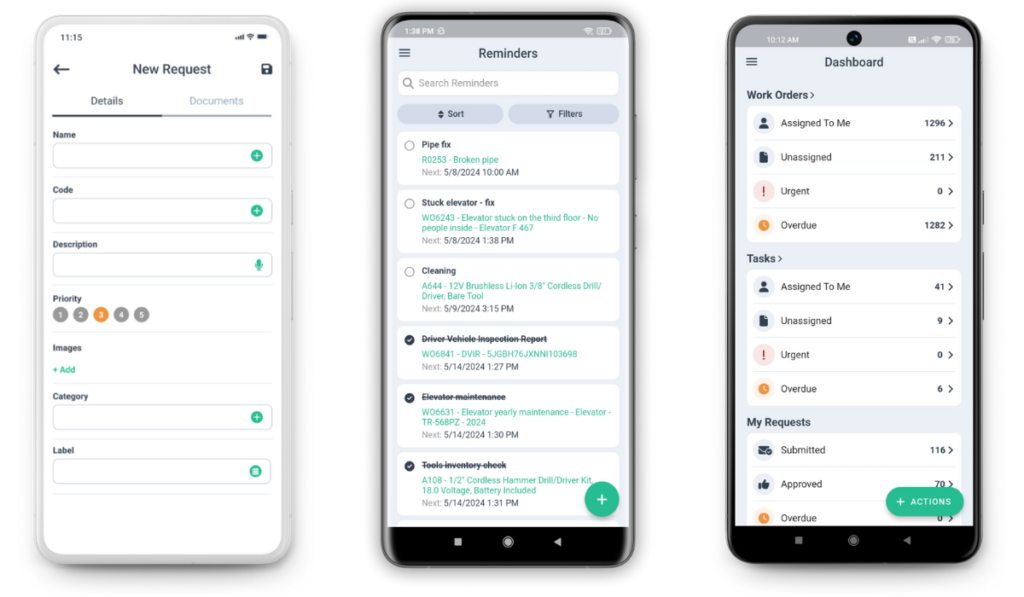
From the field, workers can submit repair requests and update job status directly from their phone, acting as an FSM tracker.
Plus, all activity is centralized in one place, giving managers a clear overview of ongoing repairs and scheduled maintenance at any given time.
That combination of accessibility and focused functionality is exactly what makes CMMS the go-to choice for repair tracking.
Biggest Mistakes Companies Make During Implementation
Finding the right type of repair tracking software is only part of the work.
How you implement it and how prepared your team is largely determine whether it delivers the results you’re looking for.
Here, we’ll cover three common mistakes during implementation.
Implementing Before Defining Processes
Many companies buy repair tracking software before they have a clear picture of how their repair process should actually flow.
Getting a capable system in place is one thing, but expecting it to structure the entire process for you is another.
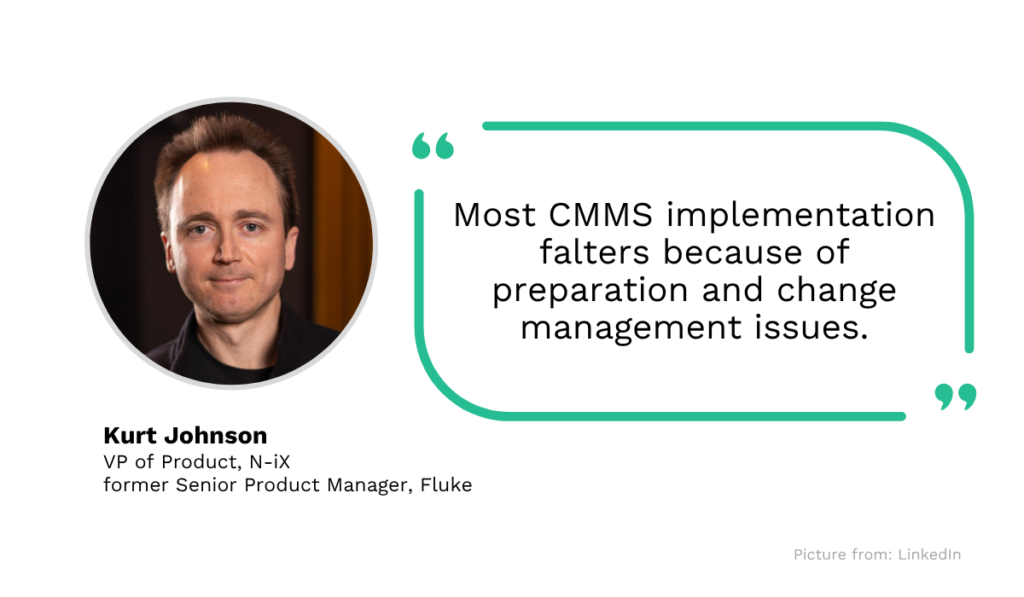
In fact, Kurt Johnson, former product manager for Fluke’s eMaint CMMS, points out that most CMMS implementations fall short because of preparation and change management, regardless of how good the software is.
Without a defined step-by-step workflow, teams end up with inconsistent processes and confusion about how to use the tool.
After all, managers and technicians need to know which features apply to which situations and what data needs to be captured at each stage.
For that reason, mapping out your repair tracking flow first is vital.
Below, you can see an example of one such flow.
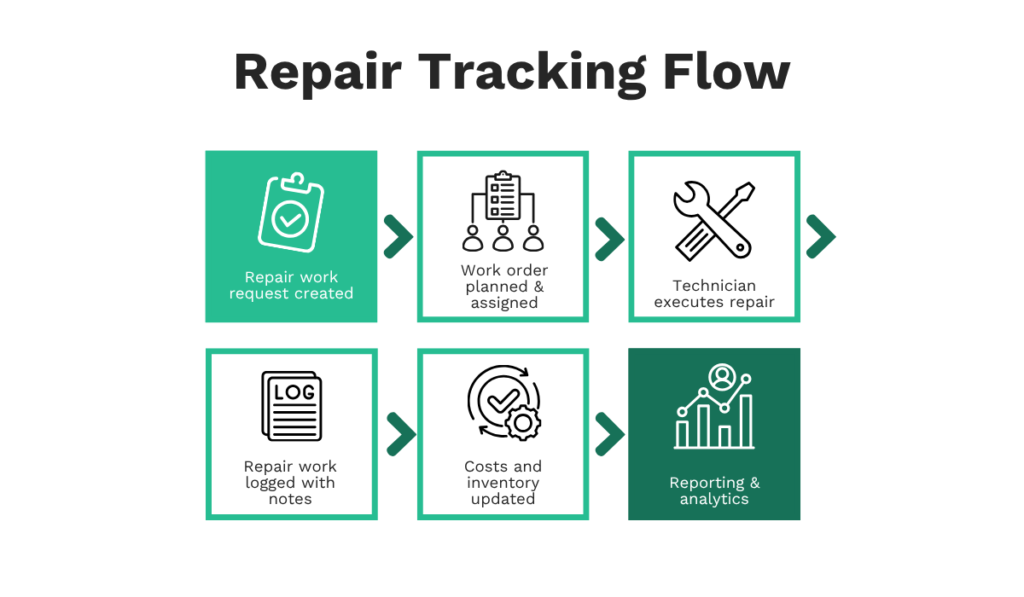
While we simplified the steps, each part of the workflow should be carefully looked at to see where the repair tracking tools come in and the procedures that need to be followed.
When logging repair work, for instance, you might define which data points are required, such as parts used or time taken, and then configure the system to enforce that through mandatory fields or preset templates.
Going through each step of your workflow in this way gives you and your team the needed clarity to use the tool correctly.
Choosing Software That’s Too Complex
Repair tracking systems vary widely in scope, and a common mistake is selecting a platform that goes well beyond what your team actually needs.
When a system has more features than the team can realistically use, parts of it get ignored, and the tool ends up being used at a fraction of its capacity.
According to Zylo, the average rate of unused software is 36% annually, meaning a substantial share of what organizations pay for delivers no value.
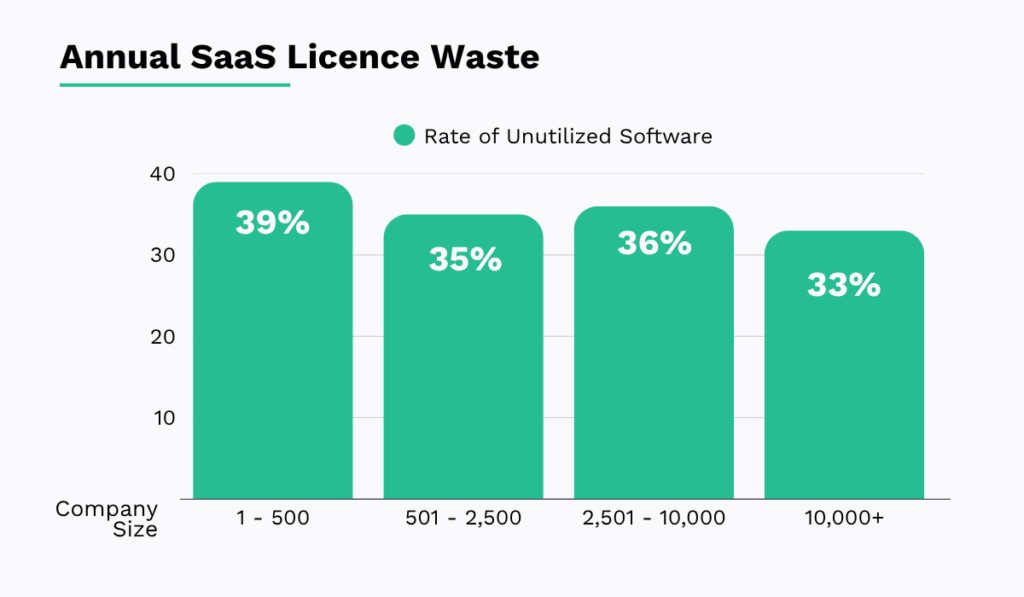
The straightforward takeaway is to focus on software that matches what your team actually does day to day.
Oracle EAM is a useful example here. It’s a highly capable system, but look at what is required just to get it implemented.
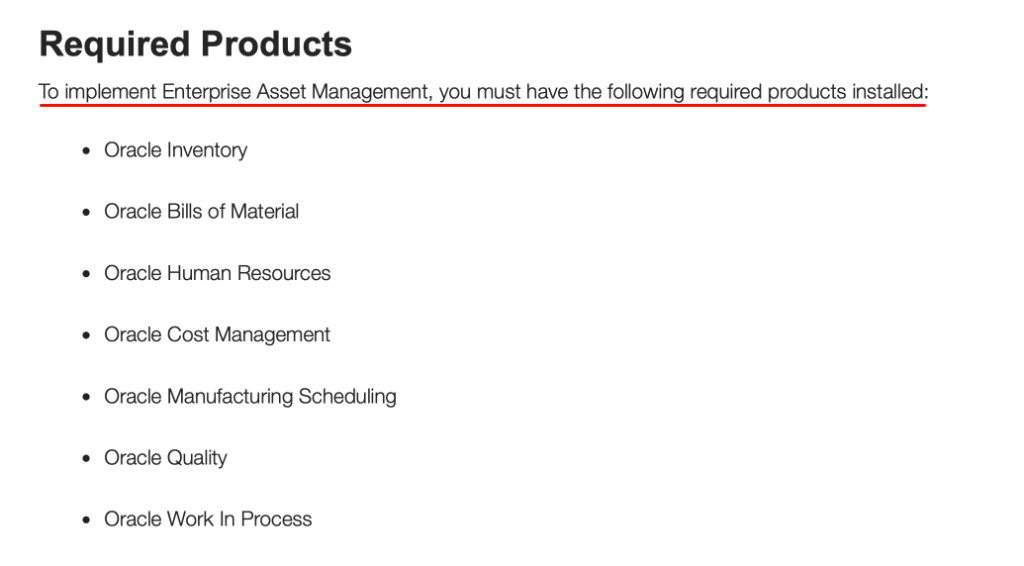
If you’re managing assets across a large enterprise with dedicated IT resources, that setup may well be justified.
But for most, it’s a significant amount of overhead for a system that covers far more than their repair tracking needs.
A better approach is to map out your repair-tracking flow first, and use free trials or demos to test how well a tool supports your workflow before you commit.
That way, the decision is based on actual fit rather than feature count.
Underestimating Change Management
All the planning and preparation can go to waste if your team isn’t on board with the new system.
Even well-chosen software tends to fall short when employees aren’t meaningfully involved in the rollout.
There are three aspects of change management worth paying attention to here.
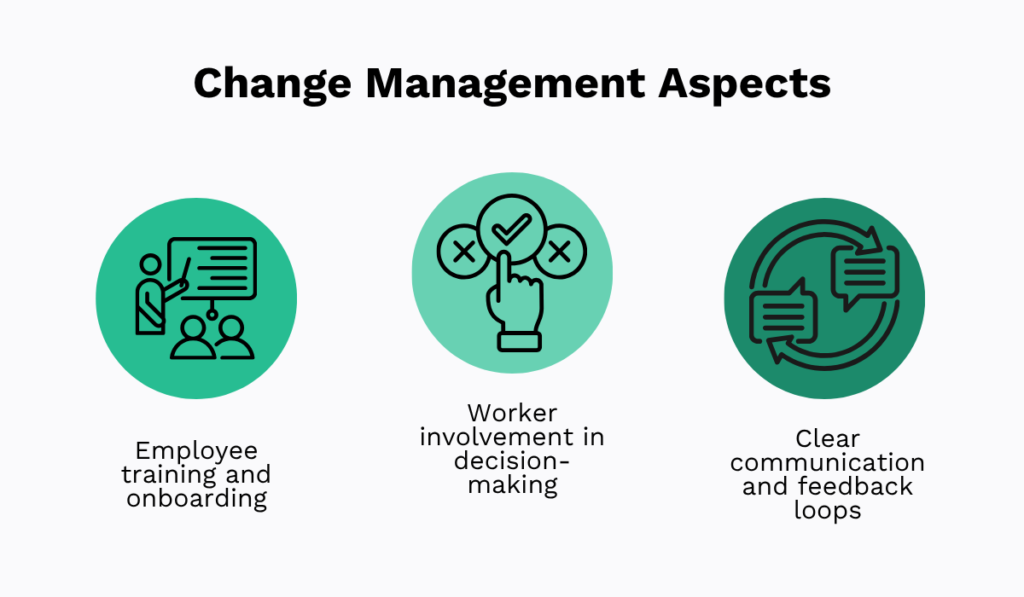
Training and onboarding might seem like an obvious step, but organizations consistently underestimate it.
According to Yooz, 1 in 7 employees actively refuse to adopt new technology at work.
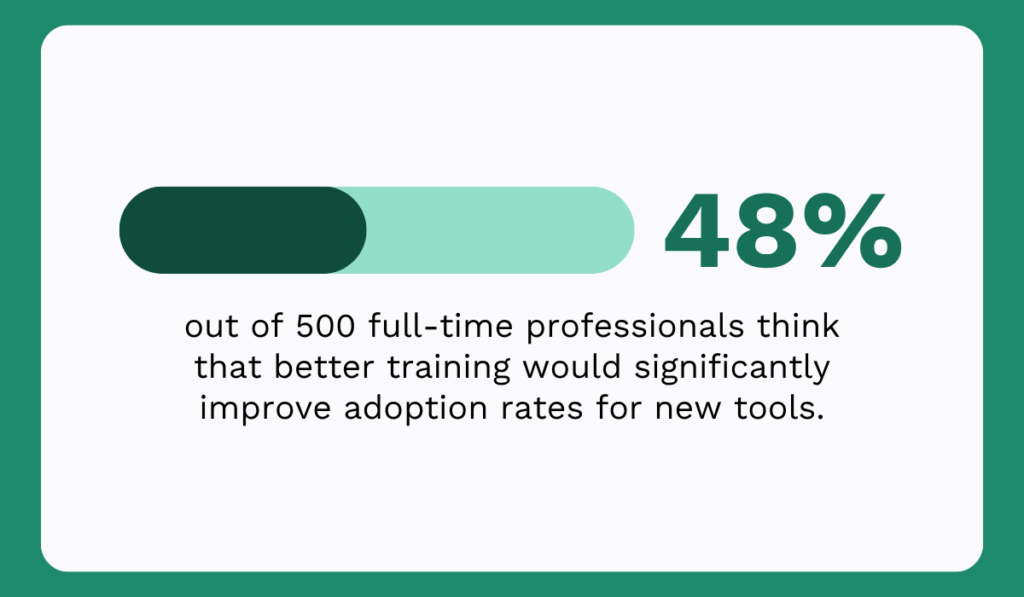
The same report found that almost half of all professionals surveyed believed better training would significantly improve adoption rates.
Beyond training, you also want to involve workers before the system goes live.
They should have input on how workflows are structured and explore which features should and can be a part of their day-to-day routine.
Considering that frontline technicians understand the actual work better than anyone else, their perspective can often surface practical issues that wouldn’t be visible from a management level.
That can be the case even after the system is live, so keeping feedback channels open is essential.
Ultimately, only by listening to your team and acting on what they share can you make a repair tracking system rollout that holds up over time.
Conclusion
That covers everything you need to know about repair tracking software.
You have a solid understanding of how this software functions, what to look for in your own solution, and common challenges encountered during implementation.
Hopefully, we provided enough information to help you make a more informed decision about your operations.
Whether you’re comparing software options or planning a rollout, use what you’ve read here to move forward with confidence.